Interface des outils
Affichez des composants d’interface enrichis et interactifs dans l’interface de chat de Vibe Work et visualisez l’exécution des outils avec un retour de statut structuré. Utilisez les composants d’interface pour la mise en page et la visualisation ; utilisez les états d’interface d’outils pour montrer en temps réel ce que font vos outils.
Composants d’interface enrichis
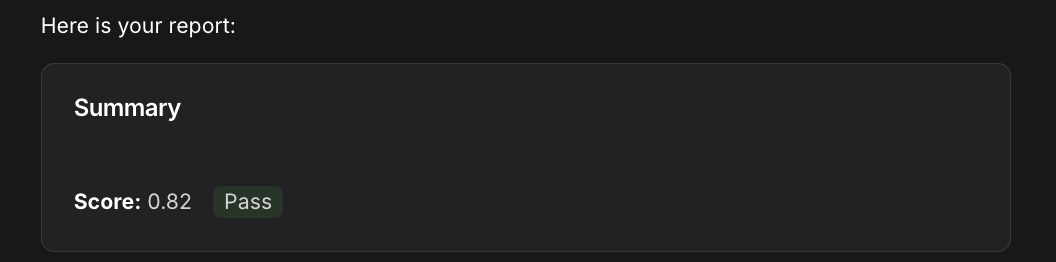
Les workflows peuvent afficher des composants d’interface enrichis et interactifs dans l’interface de chat de Vibe Work à l’aide de la bibliothèque de composants du design system. Les composants sont définis sous forme d’objets Python et envoyés en tant que ressources UIComponentResource.
Utilisation de base
import mistralai.workflows as workflows
import mistralai.workflows.plugins.mistralai as workflows_mistralai
from mistralai.workflows.plugins.mistralai.conversational_ui_components import (
    Badge,
    Card,
    Column,
    Markdown,
    Row,
)

@workflows.workflow.define(
    name="report-workflow",
    workflow_display_name="Report",
    workflow_description="Generate a rich UI report",
)
class ReportWorkflow:
    @workflows.workflow.entrypoint
    async def run(self) -> workflows_mistralai.ChatAssistantWorkflowOutput:
        report = Card(
            title="Summary",
            children=[
                Row(
                    children=[
                        Markdown(content="**Score:** 0.82"),
                        Badge(variant="success", children="Pass"),
                    ],
                ),
            ],
        )

        await workflows_mistralai.send_assistant_message(
            [
                workflows_mistralai.TextOutput(text="Here is your report:"),
                workflows_mistralai.ResourceOutput(
                    resource=workflows_mistralai.UIComponentResource(component=report),
                ),
            ]
        )

        return workflows_mistralai.ChatAssistantWorkflowOutput(
            content=[
                workflows_mistralai.ResourceOutput(
                    resource=workflows_mistralai.UIComponentResource(component=report),
                ),
            ],
        )
Composants disponibles
Tous les composants sont importés depuis mistralai.workflows.plugins.mistralai.conversational_ui_components.
Component | Description | Props principales |
|---|---|---|
| Alert | Messages importants avec niveaux de gravité | title, variant (info/warning/error/success), children |
| Avatar | Image d’avatar de l’utilisateur | src, alt, text, size |
| Badge | Petite étiquette pour les indicateurs de statut | variant (default/primary/success/warning/error), size, children |
| ButtonLink | Lien stylisé en bouton | href, variant, size, external, children |
| Card | Conteneur avec titre et description facultatifs | title, description, padding, children |
| Chart | Graphique en courbes ou en barres | variant (line/bar), data, xAxis, yAxis, title |
| Column | Conteneur de mise en page vertical | alignment, distribution, gap, children |
| Image | Affichage d’image | src, alt, size |
| Markdown | Texte au format Markdown | content |
| PieChart | Graphique en secteurs avec segments étiquetés | data, title |
| Row | Conteneur de mise en page horizontal | alignment, distribution, gap, wrap, children |
| Tooltip | Informations supplémentaires au survol | trigger, children |
Imbriquer des composants
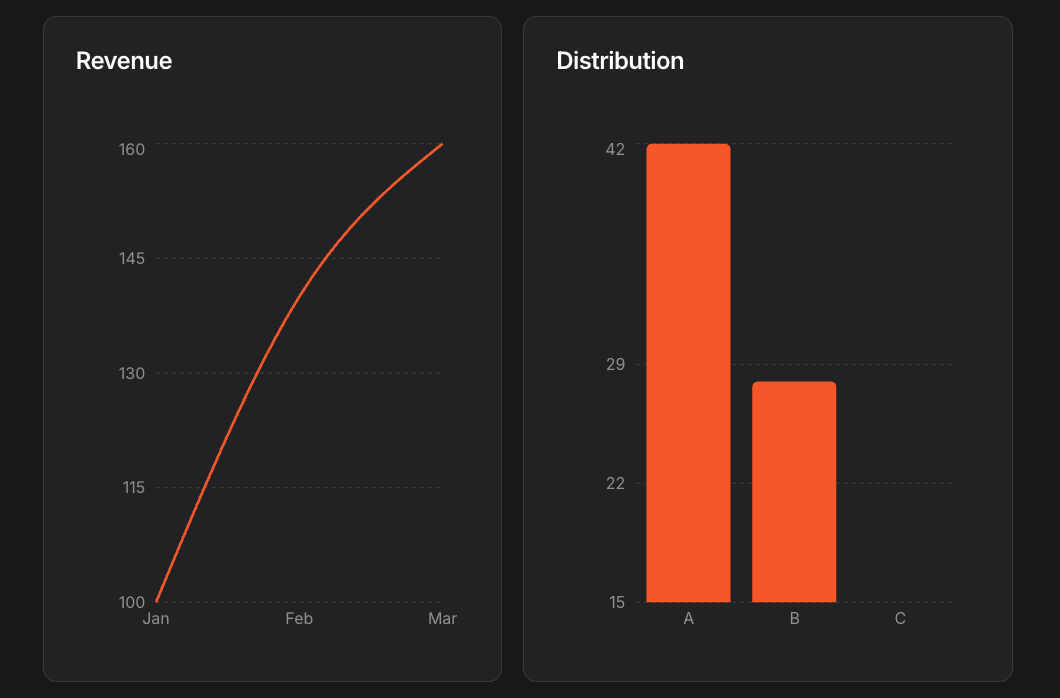
Les composants qui acceptent children peuvent contenir d’autres composants, ce qui vous permet de créer des mises en page complexes :
from mistralai.workflows.plugins.mistralai.conversational_ui_components import (
    Card,
    Chart,
    Column,
    Row,
)

layout = Row(
    children=[
        Card(
            title="Revenue",
            children=[
                Chart(
                    variant="line",
                    xAxis="month",
                    yAxis=["actual", "target"],
                    data=[
                        {"month": "Jan", "actual": 100, "target": 120},
                        {"month": "Feb", "actual": 140, "target": 130},
                        {"month": "Mar", "actual": 160, "target": 140},
                    ],
                ),
            ],
        ),
        Card(
            title="Distribution",
            children=[
                Chart(
                    variant="bar",
                    xAxis="category",
                    yAxis="count",
                    data=[
                        {"category": "A", "count": 42},
                        {"category": "B", "count": 28},
                        {"category": "C", "count": 15},
                    ],
                ),
            ],
        ),
    ],
)
États d’interface des outils
Les états d’interface des outils fournissent des représentations visuelles facultatives de l’exécution des outils dans l’interface de chat de Vibe Work. Associés à ChatAssistantWorkingTask, ils permettent un retour visuel spécialisé selon les types d’opérations d’outils, ce qui permet aux workflows d’afficher le statut et les résultats des appels d’outils de manière structurée et conviviale.
Types d’états d’interface des outils
Il existe trois types d’états d’interface des outils :
État d’interface d’outil de fichier
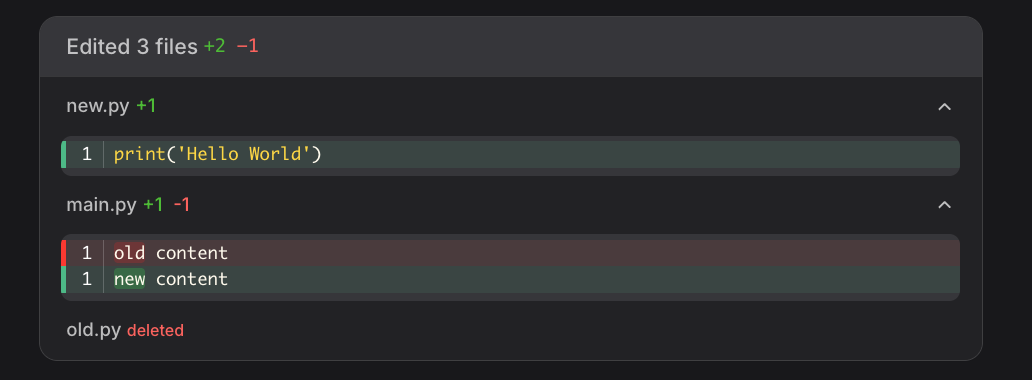
Représente des opérations sur des fichiers, comme la création, le remplacement ou la suppression de fichiers :
from mistralai.workflows.conversational import (
    FileToolUIState,
    CreateFileOperation,
    ReplaceFileOperation,
    DeleteFileOperation,
)

# Create a file
create_state = FileToolUIState(
    toolCallId="tc-1",
    operations=[
        CreateFileOperation(
            uri="file:///workspace/new.py",
            content="print('Hello World')"
        )
    ],
)

# Replace file content
replace_state = FileToolUIState(
    toolCallId="tc-2",
    operations=[
        ReplaceFileOperation(
            uri="file:///workspace/main.py",
            fileContentBefore="old content",
            blocks=[SearchReplaceBlock(search="old", replace="new")],
        )
    ],
)

# Delete a file
delete_state = FileToolUIState(
    toolCallId="tc-3",
    operations=[
        DeleteFileOperation(uri="file:///workspace/old.py")
    ],
)
État d’interface d’outil générique
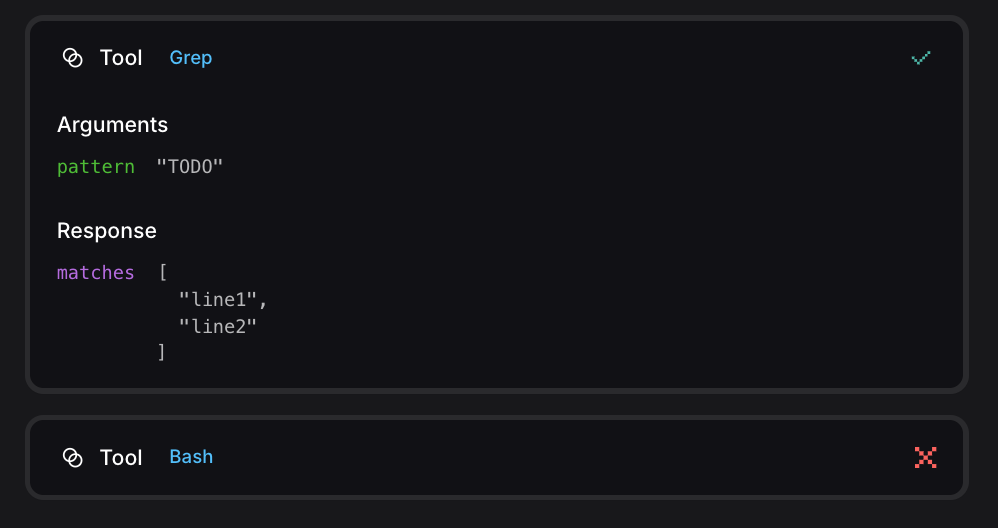
Représente l’exécution d’un outil générique avec différents états de statut :
from mistralai.workflows.conversational import (
    GenericToolUIState,
    ToolResultRunning,
    ToolResultSuccess,
    ToolResultFailed,
)

# Tool is running
running_state = GenericToolUIState(
    toolCallId="tc-1",
    name="bash",
    arguments={"command": "ls -la"},
    result=ToolResultRunning(),
)

# Tool completed successfully
success_state = GenericToolUIState(
    toolCallId="tc-2",
    name="grep",
    arguments={"pattern": "TODO"},
    result=ToolResultSuccess(value={"matches": ["line1", "line2"]}),
)

# Tool failed
failed_state = GenericToolUIState(
    toolCallId="tc-3",
    name="bash",
    arguments={"command": "false"},
    result=ToolResultFailed(error="exit code 1"),
)
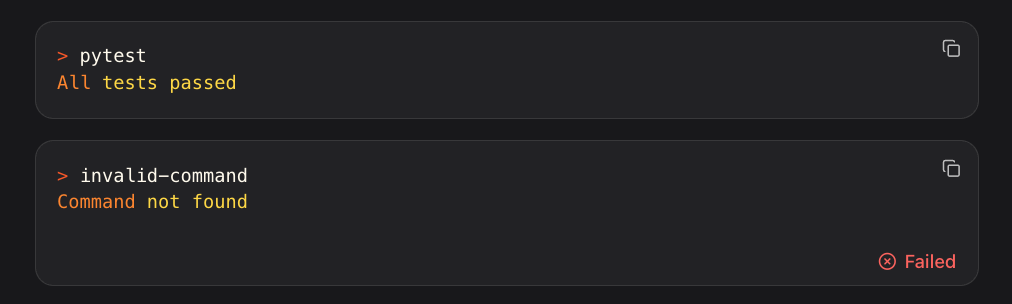
État d’interface d’outil de commande
Représente l’exécution d’une commande avec les états running/success/failed :
from mistralai.workflows.conversational import (
    CommandToolUIState,
    CommandResultRunning,
    CommandResultSuccess,
    CommandResultFailed,
)

# Command is running
running_state = CommandToolUIState(
    toolCallId="tc-1",
    command="npm install",
    result=CommandResultRunning(),
)

# Command completed successfully
success_state = CommandToolUIState(
    toolCallId="tc-2",
    command="pytest",
    result=CommandResultSuccess(output="All tests passed"),
)

# Command failed
failed_state = CommandToolUIState(
    toolCallId="tc-3",
    command="invalid-command",
    result=CommandResultFailed(error="Command not found"),
)
Utiliser les états d’interface des outils dans les tâches en cours
Les états d’interface des outils peuvent être associés à ChatAssistantWorkingTask pour fournir un retour visuel pendant l’exécution des outils :
from mistralai.workflows.conversational import ChatAssistantWorkingTask

# Show a working task with file operations
task = ChatAssistantWorkingTask(
    title="Creating file",
    content="Generating new.py",
    toolUIState=FileToolUIState(
        toolCallId="tc-1",
        operations=[CreateFileOperation(uri="file:///workspace/new.py", content="print('hi')")],
    ),
)

# Show a working task with command execution
command_task = ChatAssistantWorkingTask(
    title="Running tests",
    content="Executing pytest",
    toolUIState=CommandToolUIState(
        toolCallId="tc-2",
        command="pytest",
        result=CommandResultRunning(),
    ),
)