Choose what to build
Studio builds three kinds of systems: agents, workflows, and apps. Choose for each part of your process, not for the whole project: a process can combine several of them, and they can use the same connectors and secrets.
This page helps you pick the right one for each part, and shows how they work together.
Choose by the shape of the process
Answer the questions from the top.
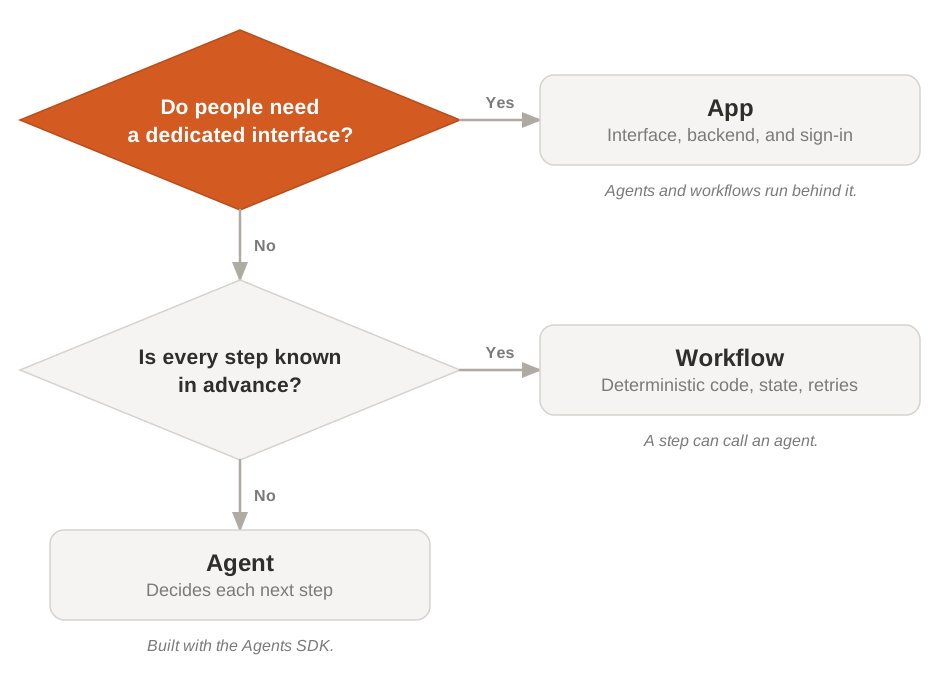
Start from the people. If they need their own place to review results, give feedback, or approve an action, build an app, and run agents and workflows behind it. Otherwise, look at the steps: if you can write them all down in advance as business rules, build a workflow; if the next step depends on what the system finds, build an agent.
People can use your agents and workflows in Vibe before you build an app for them. Build the app when they need an interface made for the task.
What changes between them
The three systems differ in who decides the next step, how they keep their state, and how people reach them:
| Agent | Workflow | App | |
|---|---|---|---|
| Who decides the next step | The model, from its instructions, context, and tools | Your code: every run follows the same rules | The people who use it, and the agents and workflows behind it |
| State and failures | A session keeps the conversation; as a durable worker, the state survives a crash | Studio keeps the execution state and retries the steps that fail | The app keeps its application data, for example in a database it deploys with |
| People in the loop | A permission policy pauses a tool call until someone approves it | The workflow waits for a person's decision or input, then resumes | People sign in and act in the interface |
| How people reach it | A session from the SDK, or Vibe | The API, triggers, or Vibe | Its own URL, or the Vibe catalog |
| Where it runs | On your machine, on your own workers, or managed by Mistral | On your machine, on your own workers, or managed by Mistral | Managed by Mistral, on Mistral Cloud |
| Built with | The Agents SDK, in Python | The Workflows SDK, in Python | The Mistral CLI (mistral init), from ready-made capabilities |
mistral init asks whether you are building a workflow, an app, or a custom set of capabilities, and scaffolds the project.
A workflow can start from a trigger or a webhook, for example a new message in a channel or an event in your tracker. Triggers currently start workflow executions only. Agent and workflow runs both appear in traces.
Observability and evaluations are available to Enterprise-tier organizations only.
Apps, standalone workflows, and plugins
Use a standalone workflow for a process started by an API call, schedule, or other trigger when users do not need a dedicated interface. It owns the process steps and durable execution.
Put the workflow inside an app when people need forms, a dashboard, or a place to review its results. The app provides the interface and application data; the workflow still runs the durable steps. For example, a claims app can start a workflow from a submitted form and show the decision when it finishes. You can deploy the interface and worker as parts of the same project.
Use a plugin to extend a Vibe Code session with skills, MCP servers, and instructions. A plugin is not an independently hosted app or a durable workflow worker. Through an MCP server, it can give Vibe access to a service you have deployed. Plugin support is experimental: see Vibe plugins.
Combine them
A process can use all three. Take a security team that triages newly reported vulnerabilities:
- A workflow runs the process. It receives each finding, applies the company's rules, and decides which findings need a closer look.
- An agent investigates. For those findings, the workflow hands the case to an agent that inspects the code, checks whether the vulnerable path is reachable, and proposes a fix.
- A person decides. The workflow pauses while a security engineer reviews the evidence, in an app or in Vibe, and approves or rejects the fix.
- Evaluations close the loop. Hard cases from production become an evaluation dataset, so the next version of the agent is tested on them before it ships.
The agent and the workflow can use the same connectors to reach the code and the issue tracker, and the same secrets.
When you don't need an agent
A single call to a model, with or without tools, doesn't need an agent or a workflow: use chat completions in Inference.
To build an agent, use the Agents SDK. The Agents API and durable agents in Workflows are about to be deprecated: Agents explains what changes for existing agents.