Latency
Latency sounds like a single number, but in audio it covers several delays that are easy to mix up: the time the model spends on the work, the end-to-end latency, and every stage in between. Telling them apart is how you find what's slow, choose the setting that fixes it, and weigh speed against quality.
Model latency and end-to-end latency
Keep two numbers apart:
- Model latency is the time the model spends on the work, measured on the server. It leaves out the network and everything your application does.
- End-to-end latency is the number to watch for your mode, listed below. It starts when your application acts and stops when the user sees or hears the result, so it includes the model latency and every stage around it.
End-to-end latency is always the longer of the two, and the gap between them is where most latency problems are. A model latency figure helps you compare models. It doesn't predict what your users will wait for: only a measurement from your application does.
The numbers that matter
Measure the delay the user notices, not the duration of an API call. Depending on the mode, that's one of these:
- Time to the complete result, for offline requests: from sending a file or a text to having the full transcript or the full audio. Watch it for batch work, where nobody waits in front of the screen.
- Time to first transcript, for realtime transcription: from the moment someone says a word to the moment its text reaches your application. Watch it for live captions and voice input.
- Time to first audio, for speech generation: from sending the text to hearing the first sound. Watch it whenever someone is waiting to hear the answer.
- Per-turn latency, for voice agents: from the moment the user stops speaking to the moment the agent starts answering. Users perceive it as how responsive the agent is.
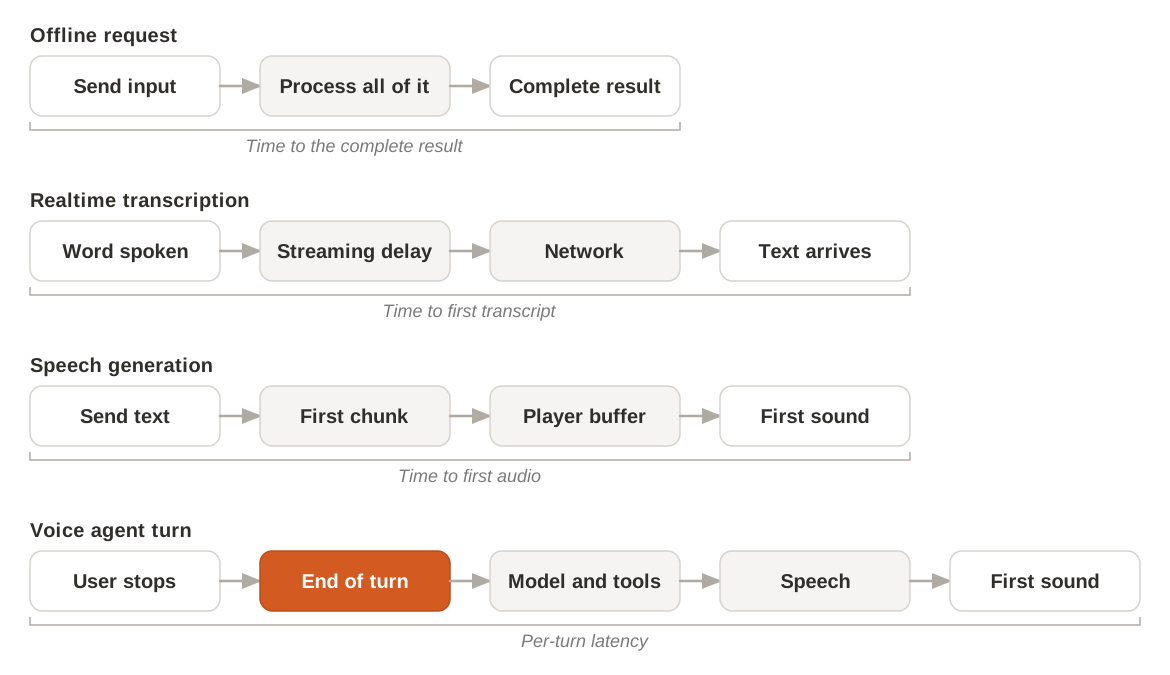
Latency by mode
| Mode | What end-to-end latency covers | Where the delay comes from | Where to tune |
|---|---|---|---|
| Offline transcription | The complete transcript, or its first words when you stream the response | Sending the file, then processing time that grows with the length of the audio | File transcription |
| Realtime transcription | The text of each word, soon after it's spoken | The streaming delay you choose, then the network | Realtime transcription |
| Speech generation | The first sound | Generating the first chunk of audio, then buffering in your player | Stream speech |
| Voice agents | The agent's reply after the user stops speaking | End-of-turn detection, transcription, the model, tools, and speech generation, one after the other | End-of-turn detection and fillers |
Where the delay comes from
Every request crosses the network twice and waits for the model. On top of that, each mode adds its own stages. A delay you measure in your application is always longer than the model's processing time alone, because it includes everything around it.
The network share depends on distance: between your users and your servers, and between your servers and the API. A test from your laptop doesn't tell you what a user on another continent waits for, so measure from where your application runs and from where your users are.
Offline requests
An offline request starts once the whole input is sent, so a long recording takes longer to upload before the work starts. The model then processes the complete input. The time to the complete result grows with the length of the audio to transcribe, or of the text to speak.
When you stream the response of an offline request, the total time doesn't shrink, but the first words of the transcript or the first chunk of audio reach you before the rest is ready. Your application can show or play them while the model works on the rest. For the difference between this and the realtime mode, see Offline and realtime audio.
Realtime transcription
In a realtime session, the model doesn't write each word as soon as it hears it. It waits a little to hear what comes next, because the following sounds help it pick the right word. This wait is the streaming delay, and you set it for each session: a shorter delay gets the text out sooner, a longer delay gives the model more context and more accurate text. Choose it for your use case on Realtime transcription.
Live captions and note-taking benefit most, because readers see words at once and the final text is right.
If your application acts on a turn event, account for the text still on its way.
End-of-turn detection
A pause doesn't always mean the speaker has finished. To avoid cutting people off, end-of-turn detection waits for a minimum silence before it ends a turn, and ends it anyway after an end timeout when the model still isn't sure. That wait comes before anything else in an agent's reply, so it counts in full in the per-turn latency. A shorter silence makes the agent answer sooner, and interrupt more often. Turns and turn-taking explains this trade-off.
Detection also sends an early signal, the eager end, when a turn is probably over. Your application can start preparing a reply at that point and drop it if the speaker goes on. The Voice Agents SDK handles turn detection internally and does not expose turn.eager_end events to the application. The settings are on Turn detection.
Speech generation
For speech, what the listener notices is the time to first audio, not the time to generate the whole clip. When you stream speech, the API sends audio in chunks as it generates them, and your application can start playback with the first chunk. Your player adds its own wait if it buffers audio before it plays: a smaller buffer starts playback sooner, with more risk of gaps if the stream slows down. so measure it over many requests. See Stream speech.
Voice agents
A voice agent chains the stages above in one session: realtime transcription, a model, then speech generation. For one turn, the delay adds up in order.
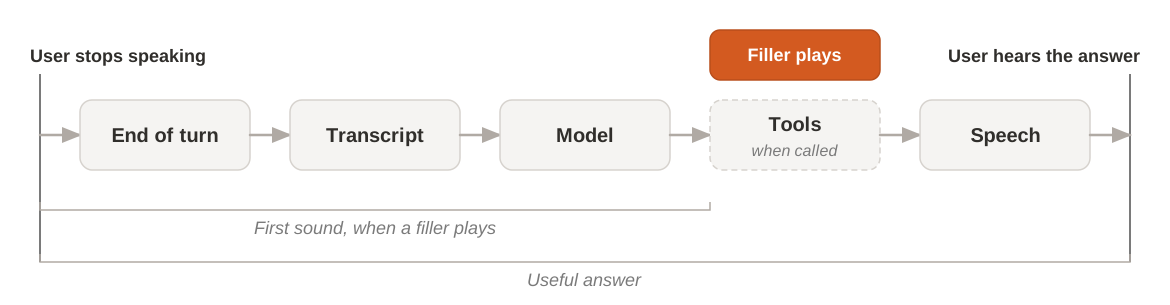
Each stage waits for the one before it to produce something, so the slowest stage sets the pace. Tool calls are often the longest wait, because they depend on a service outside the model, such as a web search or your own code. A filler covers that wait: the agent plays a short clip when a tool call starts and stops it when the result arrives. The filler makes the wait easier to bear but doesn't shorten it. See Fillers and Voice agents.
Speed against quality
Most settings that cut a delay cost something else. Change one at a time, then check what you lost.
| You shorten | The user gets | The cost | Details |
|---|---|---|---|
| The streaming delay | Text sooner | Less accurate text | Realtime transcription |
| The end-of-turn silence | Replies sooner | The agent cuts people off more often | End-of-turn detection |
| The player buffer | Sound sooner | More risk of gaps in playback | Speech generation |
| The silence during a tool call, with a filler | A first sound sooner | Nothing: the useful answer arrives at the same time | Voice agents |
Measure from your application
Measure where your users feel the delay: in your application, on your network, with your models and your settings.
Time each stage
A single end-to-end number tells you something is slow, not what. Record a timestamp at the boundary of each stage, then compare the stages to find the one to work on.
| Stage | Start | Stop |
|---|---|---|
| Connection | Your application opens the session | The session is ready to receive audio or text |
| Transcription | The user says a word | Its text reaches your application |
| End-of-turn detection | The user stops speaking | The turn ends |
| Model | The final transcript is ready | The first part of the model's answer arrives |
| Tools | A tool call starts | Its result is back |
| Speech generation | The text to speak is sent | The first audio chunk arrives |
| Playback | The first audio chunk arrives | The user hears it |
Count connection apart from the rest: it happens once per session, not once per turn. For the stages that start with the user's voice, take the timestamp from the audio itself, not from the moment your code sends a request. In realtime transcription, turn events carry the position in the audio stream where they happened, which you can line up with the moment you sent that audio.
Compare runs, not single calls
One call proves nothing: the same request can take a different time on each run. Repeat the same scenario many times and look at two numbers: the median, for the usual experience, and the 95th percentile, for the slow cases that users remember.
- Change one thing at a time. Switch the model, the streaming delay, or the end-of-turn settings, then run the same scenario again. If you change two things at once, you can't tell which one made the difference.
- Keep the conditions the same. Use the same network, the same region, and the same audio for each run.
- Send audio at the pace of speech. In a realtime session, a file sent faster than real time doesn't behave like a microphone. Stream it at its real pace, as a live speaker would.
- Test with real conversations. Short, clear sentences hide the pauses and hesitations that end-of-turn detection has to handle. Start with recordings you control, so runs compare, then replay recordings of real users, with their accents, microphones, and background noise, then full conversations with interruptions.
- Check what speed costs. After each change, check accuracy and interruptions, not only the time. See Speed against quality.
Measure fillers separately
A filler or a quick acknowledgment makes the agent sound responsive, but it isn't the answer. Record two times for each turn: when the user first hears something, and when they hear the useful answer. If you only track the first, fillers hide a slow tool. If you only track the second, you miss what fillers do for the conversation.