Turn detection
Turn detection tells your application, in a realtime transcription session, when the user starts speaking and when they've finished. Use it whenever your application acts at the end of what someone says: a voice agent that answers, a voice command, or a live caption that closes its line.
For why the end of a turn is hard to detect, and how to choose between answering sooner and cutting people off, see Turns and turn-taking.
Enable turn detection
To enable turn detection, add a turn_detection object to the session.update message that configures your realtime session. An empty object applies the default values:
{
  "type": "session.update",
  "session": {
    "audio_format": { "encoding": "pcm_s16le", "sample_rate": 24000 },
    "turn_detection": {}
  }
}Send it before the first audio chunk: once audio has started, the session rejects any change to its settings with the error Session fields cannot be changed after audio has started.
Turn detection only works in realtime sessions, and not together with diarization:
- A file transcription request with
turn_detectionreturns a 400 error:turn_detection is only supported on the realtime transcription endpoint. - A realtime session that sets both
turn_detectionanddiarizereceives the errorDiarization is not compatible with turn detection.To label speakers, see Diarize speakers.
The following example streams a WAV file at its own pace and prints each turn event with its time in the audio, then the full transcript.
The Voice Agents SDK sends turn_detection through the stt config. For raw WebSocket sessions, send session.update with websockets in Python and ws in TypeScript.
import asyncio
import base64
import json
import os
import wave

import websockets

MODEL = "voxtral-mini-transcribe-realtime-3"
URL = f"wss://api.mistral.ai/v1/audio/transcriptions/realtime?model={MODEL}"
HEADERS = {"Authorization": f"Bearer {os.environ['MISTRAL_API_KEY']}"}
AUDIO_FILE = "customer_call.wav"  # 16-bit mono PCM WAV

async def send_audio(ws, path):
    with wave.open(path, "rb") as wav:
        while chunk := wav.readframes(wav.getframerate() // 10):
            await ws.send(json.dumps({"type": "input_audio.append", "audio": base64.b64encode(chunk).decode()}))
    await ws.send(json.dumps({"type": "input_audio.end"}))

async def main():
    with wave.open(AUDIO_FILE, "rb") as wav:
        sample_rate = wav.getframerate()

    async with websockets.connect(URL, additional_headers=HEADERS) as ws:
        await ws.recv()  # session.created
        await ws.send(json.dumps({
            "type": "session.update",
            "session": {
                "audio_format": {"encoding": "pcm_s16le", "sample_rate": sample_rate},
                "turn_detection": {},
            },
        }))
        sender = asyncio.create_task(send_audio(ws, AUDIO_FILE))

        async for message in ws:
            event = json.loads(message)
            if event["type"] == "session.updated":
                print("turn_detection:", event["session"]["turn_detection"])
            elif event["type"].startswith("turn."):
                print(f"{event['time_s']:6.2f}s  {event['type']}  {event.get('end_reason', '')}")
            elif event["type"] == "transcription.done":
                print("text:", event["text"])
                break
            elif event["type"] == "error":
                print("error:", event["error"]["message"])
                break
        sender.cancel()

asyncio.run(main())The output looks like this:
turn_detection: {'start_threshold': 0.5, 'eager_end_threshold': 0.5, 'end_threshold': 0.33, 'min_silence_ms': 500, 'end_timeout_ms': 3000}
  0.00s  turn.start
  1.36s  turn.eager_end
  1.44s  turn.resume
  2.56s  turn.eager_end
  2.64s  turn.resume
...
 34.56s  turn.eager_end
 35.12s  turn.end  threshold
text: Thanks for calling Northwind Support. This is Daniel. How can I help you today? [...]In this output:
session.updatedechoes the values the session applies. With an emptyturn_detectionobject, these are the defaults.- Each pause between sentences produces a
turn.eager_end, followed by aturn.resumewhen the speaker goes on. - The turn only ends with
turn.endonce the speaker has stopped. Itsend_reasonsays what ended it.
How end-of-turn works
While it transcribes, the model scores the probability that the user is in a semantically active segment of speech, from 0 to 1. The server compares that score with your thresholds and moves the session between three states. Each move sends one turn event.
Each arrow is an event, with the condition that sends it.
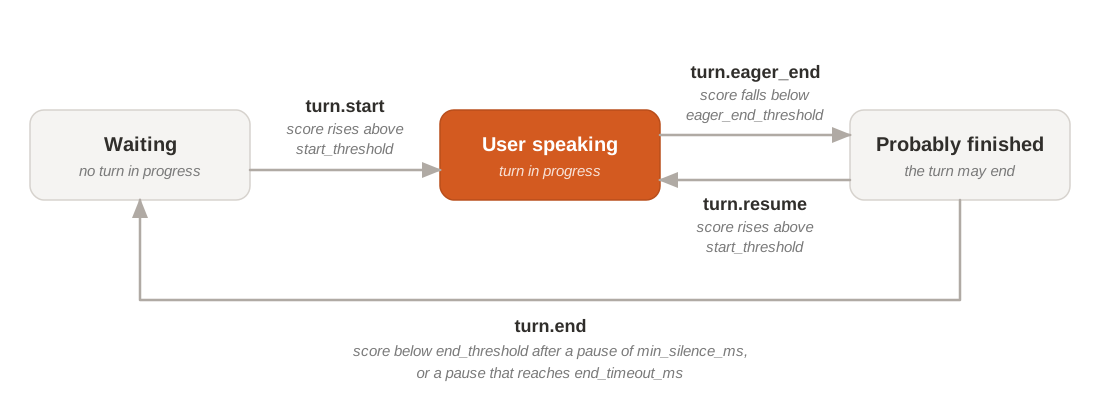
The same order holds in every session:
- A turn always opens with
turn.start. - A
turn.resumecancels the eager end before it, and the turn goes on. - After
turn.end, the nextturn.startopens a new turn.
The minimum silence and the end timeout bound the decision in time. The turn can't end before the pause reaches min_silence_ms, even when the model is confident. Once the pause reaches end_timeout_ms, the turn ends even if the model isn't confident, with end_reason set to timeout.
Events and text timing
Turn events arrive in the same stream as the transcript events. Each one carries time_s, the position in the audio in seconds from the start of the stream, not the time on your clock.
| Event | Fields | Sent when | Your application can |
|---|---|---|---|
turn.start | time_s | The user starts speaking | Mark the start of the turn, for example to show that the user is speaking. |
turn.eager_end | time_s | The user has probably finished | Start work that you can throw away, such as preparing a reply. |
turn.resume | time_s | The user goes on after an eager end | Drop the work started on the eager end. |
turn.end | time_s, end_reason | The turn is over | Act on the turn: answer, run the command, or close the caption line. |
end_reason is threshold when the score ended the turn, or timeout when the end timeout did.
Wait for turn.end before doing anything you can't undo, such as sending a message or calling a tool that changes data. Eager ends are frequent: most pauses between sentences send one.
The last words arrive after the turn event
The transcript runs behind the turn events. When turn.end arrives, the text of the last words of the turn can still be on its way: it comes in the following transcription.text.delta events.
Text events carry no time, so you can't match them to a turn by timestamp. To build the full text of a turn:
- Keep appending text deltas to the current turn after
turn.end. - Close the turn's text once the streaming delay has passed after the event, or when the next
turn.startarrives. - Act on the complete text, for example send it to the model that writes the reply.
On a turn.eager_end, the text you've received so far is enough to start preparing a reply. If you go ahead with it on turn.end, check that the words that arrived in the meantime don't change the request.
For the streaming delay and its effect on accuracy, see Realtime transcription and Latency.
Tune thresholds
Five settings in turn_detection control when turns start and end. Set only the ones you want to change: the others keep their defaults.
Start from one of the common configurations, then change one setting at a time and test with recordings of your real users.
| Setting | Default | What it does | Move it when |
|---|---|---|---|
start_threshold | 0.5 | Threshold for deciding that the user has started or resumed speaking. | Raise it if turns start too easily, such as on background noise. |
eager_end_threshold | 0.5 | Threshold for deciding that the user may have stopped speaking, which sends an eager end. | Lower it if eager ends fire too often. |
end_threshold | 0.33 | Threshold for deciding that the user has stopped speaking, which ends the turn. | Lower it to cut people off less often. The reply then comes later. |
min_silence_ms | 500 | Minimum pause before the turn can end. | Increase it to end turns too early less often. The reply then comes later. |
end_timeout_ms | 3000 | Maximum pause before the turn ends anyway. | Decrease it to cap the longest wait more tightly. |
The thresholds must keep their order, start_threshold at least eager_end_threshold, itself above end_threshold, and end_timeout_ms must be at least min_silence_ms. Otherwise the session returns an error.
Common configurations
Two sets of values cover most applications. Pick the closest one, then tune individual settings from there.
| Configuration | start_threshold | eager_end_threshold | end_threshold | min_silence_ms | end_timeout_ms | Best when |
|---|---|---|---|---|---|---|
| Default | 0.5 | 0.5 | 0.33 | 500 | 3000 | A good starting point for most conversations. You get these values with an empty turn_detection object. |
| Aggressive | 0.5 | 0.4 | 0.33 | 300 | 2500 | Speed matters most, as in fast back-and-forth: the turn ends sooner after the user stops, at the cost of more cut-offs. |
There's no field that selects a configuration by name: send its values in turn_detection. For example, the Aggressive configuration:
{
  "type": "session.update",
  "session": {
    "audio_format": { "encoding": "pcm_s16le", "sample_rate": 24000 },
    "turn_detection": {
      "start_threshold": 0.5,
      "eager_end_threshold": 0.4,
      "end_threshold": 0.33,
      "min_silence_ms": 300,
      "end_timeout_ms": 2500
    }
  }
}