Turns and turn-taking
A turn ends at the moment a speaker hands the conversation over, and any live application that acts on speech has to detect that moment. This page explains how Voxtral makes that decision, how to lean between cutting people off and answering late, and how voice agents handle a user who talks over them.
Why silence isn't enough
People stop talking for many reasons besides being done. They breathe, look for a word, read out an order number digit by digit, or think before the end of a sentence. Your application has to tell these pauses apart from a real end, because the end is when it acts: a voice agent answers, a voice command runs, or a live caption closes its line.
A rule based on silence alone can't do it well. With a short silence, the application cuts off everyone who pauses mid-sentence. With a long one, every reply comes late, even after a clear, complete question. A better decision also takes into account what the speaker said and how they said it.
How Voxtral detects the end of a turn
End-of-turn detection is built into the realtime transcription model, so it only exists in realtime sessions. While it transcribes, the model scores the probability that the user is in a semantically active segment of speech, from 0 to 1. The server turns that estimate into events that mark the moments of a turn.
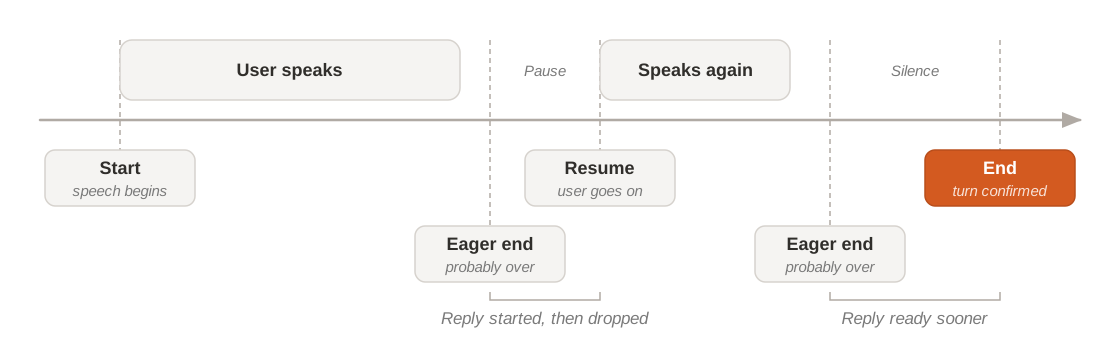
Each moment has a matching event. For the events, their timing against the transcript, and how to enable detection, see Turn detection.
Eager end: prepare before the turn is over
Waiting for the end costs time on every turn. The eager end lets your application use that time: when the turn is probably over, start preparing the reply, such as the model call or the first words of speech. If the user goes on, drop what you prepared. If the end follows, the reply is already underway and the user waits less. For where this time goes in a full reply, see Latency.
Only start work that you can throw away at no cost. Wait for the end before you do anything that can't be undone, such as sending a message, booking a slot, or calling a tool that changes data.
The Voice Agents SDK handles turn detection internally and does not expose turn.eager_end or turn.resume events to the application.
Cutting people off or answering late
Every turn detection setting moves the same dial. End turns sooner, and replies come faster, but more users get cut off mid-sentence. End them later, and fewer users get cut off, but every reply waits longer. No setting removes the trade-off: you choose where your application sits on it.
Which way to lean
The right balance depends on how your users speak and on which mistake costs them more. Find the row closest to your application. If it mixes cases, such as a support agent that also takes order numbers, start from the row where a mistake costs your users the most.
| Your application | Lean toward | Why |
|---|---|---|
| Short commands and quick questions, such as a voice menu | Ending sooner | Requests are short and complete, and a slow reply is what users notice. |
| Fast back-and-forth conversation | Ending sooner | Turns are short, and long gaps make the conversation feel stiff. |
| Collecting details, such as addresses, order numbers, or symptoms | Ending later | People pause while they read or remember. A cut-off makes them start over. |
| Users who think aloud, such as in interviews, tutoring, or advice | Ending later | Pauses are part of the answer. Interrupting feels rude and loses information. |
Start from a preset
Rather than tune each setting from scratch, start from a preset, a set of values chosen to work together:
- Default: what you get when you enable turn detection without any settings. A good starting point for most conversations.
- Aggressive: ends the turn sooner after the user stops, for fast back-and-forth where speed matters more than the occasional cut-off.
A preset isn't a switch in the API: you copy its values into your session settings, then adjust from there. For the values, see the common configurations on Turn detection.
To end turns sooner, the settings go in this direction: a shorter minimum silence, a higher end threshold, and a shorter end timeout. To end them later, move the same settings the other way. Change one at a time, and check the effect on interruptions as well as on speed. The settings, their ranges, and their defaults are on Turn detection.
Interruptions in voice agents
Turn-taking goes both ways. In a conversation with an voice agent, the user also needs a way to take the floor back while the agent is speaking, for example to correct it or to skip a long answer.
By default, the user can interrupt the agent. When the user starts speaking while the agent talks, the agent stops its speech and listens. The turn.allow_interruptions setting controls this behavior (default: on). You can turn interruptions off in the agent configuration. The choice comes down to who must be able to stop whom:
| Interruptions on | Interruptions off | |
|---|---|---|
| The user can | Stop the agent at any time and take the floor | Speak only when the agent has finished |
| Suits | Most conversations, where users expect to cut in as they would with a person | Messages that must be heard in full, such as a legal notice or a confirmation to read back |
| Watch out for | A user who can't stop a long or wrong answer gets frustrated |
To show who has the floor in your interface, such as a microphone indicator or a speaking animation, follow the agent state. See the events on Manage agent sessions.
Turn detection and diarization
Realtime transcription offers both turn detection and speaker diarization, but not in the same session: a session that turns on both gets an error. The two features answer different questions about the audio.
For each session, pick the one your application needs:
- Turn detection for interactive applications that act when one user finishes, such as voice agents and voice commands.
- Diarization for conversations between several people, where you need to know who said what, such as live captions of a meeting. See Speakers and diarization.
If you need both, for example to answer live and to label speakers in the record, you can keep the recording of the session and diarize it offline afterwards. See Diarize speakers.