Concepts
Studio is organized around a recommended loop: build a system, give it context, test it, deploy it, observe it in production, and improve it. Each stage has components that serve it. They're reusable from one project to the next and made to combine: an agent, a workflow, and an app can share the same connector, secret, or evaluation. Some components are still in preview, or available to Enterprise-tier organizations only: each component's page gives its status.
This page explains each stage of the loop, which components serve it, and where to start.
The loop
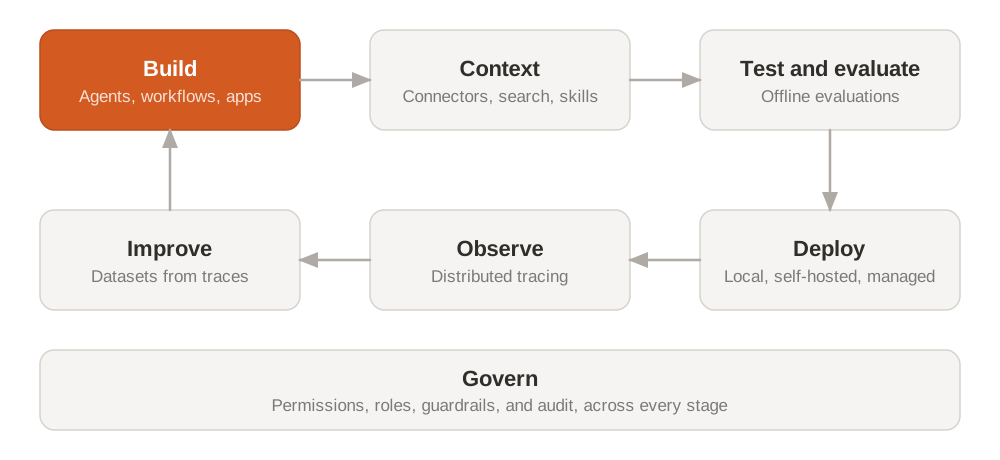
Build
You write the system itself. An agent decides each next step from its instructions, context, and tools. A workflow runs your business rules as deterministic code. An app gives people an interface to review, approve, and act. To decide which one fits each part of your process, see Choose what to build.
| Component | What it gives you | Start here |
|---|---|---|
| Agents SDK | Agents in Python, with a harness for their tools, connectors, skills, and approvals | Agents |
| Workflows | Durable processes in Python: state, retries, schedules, and human steps | Workflows, quickstart |
| Apps | Applications built from ready-made capabilities, with sign-in and hosting | Apps, quickstart |
| Secrets Manager | Credentials stored once and referenced by name, never copied into code | Secrets Manager |
You can build from code, from the console, or with a coding agent through the Mistral CLI and the Mistral MCP server.
Context
You give the system what it needs to know about your company: live access to your tools and data, your documents, and the instructions your teams reuse. You set each source up once, and every agent, workflow, and app can use it.
| Component | What it gives you | Start here |
|---|---|---|
| Connectors | Tools from your systems, over MCP or HTTP APIs | Connectors, quickstart |
| Libraries and Agentic Search | Your documents, ready to search from an agent or a workflow | Libraries, quickstart |
| Search index | A search index that Studio hosts for you | Search index, quickstart |
| Search Toolkit | The building blocks to run your own ingestion and retrieval | Search Toolkit, quickstart |
| Prompts and Skills | Versioned instructions and know-how, shared by name across systems | Prompts and Skills, quickstart |
An organization admin connects shared apps once and decides which connector tools members can use in Studio and Vibe: see Connectors in Admin.
Test and evaluate
Before anything ships, you check that the system does what you expect. You run it on a set of cases, score the results, and compare versions, so a change that fixes one case doesn't break another.
Offline evaluations and their datasets are available to Enterprise-tier organizations only. They're on by default for these organizations.
| Component | What it gives you | Start here |
|---|---|---|
| Offline evaluations | Evaluations in code: cases, evaluators, and scores for each version | Offline evaluations, quickstart |
| Datasets | The cases an evaluation runs on, imported or built from production | Datasets |
| Evaluations for workflows | Evaluate a workflow with the same tools | Workflows plugin |
Keep the evaluation next to the system it tests, so you or your coding agent run it on every change.
Deploy
You run the system where your users and your data are. The same code runs on your machine while you build, on your own infrastructure, or managed by Mistral, and the platform routes each run to it.
| Component | What it gives you | Start here |
|---|---|---|
| Deployments | The three ways to run a system, and what stays the same between them | Deployments |
| Managed deployments | Mistral builds, runs, and scales your code: nothing to host | Managed deployments, quickstart |
| Self-hosted deployments | You run the workers on your infrastructure, and Mistral orchestrates them | Self-hosted deployments |
| Triggers and webhooks | Workflow executions that start from an event in Slack, GitHub, Notion, and other tools | Triggers and webhooks |
Apps run locally while you build, then deploy to Mistral Cloud: there's no self-hosted path for apps. Agents and workflows run in all three modes.
Observe
You see what the system does in production. Agent and workflow workers send a trace of each run by default, and your own code can send traces over OpenTelemetry. A trace records model calls, tool calls, agent steps, and workflow transitions, so you find where a failure started and why.
Distributed tracing and the trace explorer are part of Observability, which is in Public Preview and available to Enterprise-tier organizations only. It's on by default for these organizations. If your organization isn't on the Enterprise tier, contact your Mistral representative.
| Component | What it gives you | Start here |
|---|---|---|
| Distributed tracing | Traces from agents, workflows, and your own code, sent over OpenTelemetry | Send traces, quickstart |
| Trace explorer | Search and inspect traces and spans in the console | Explore traces |
| Workflow observability | Executions, events, and metrics for each workflow | Workflow observability |
Your traces also feed the next stage: the hard cases you find here become the dataset you improve on.
Improve
You turn what happened in production into the next version. You collect the cases that went wrong, change a prompt, a model, a tool, or the code, and compare the new version with the current one before you release it.
Datasets, optimization, and online evaluations are available to Enterprise-tier organizations only, like the rest of Observability. They're on by default for these organizations.
| Component | What it gives you | Start here |
|---|---|---|
| Datasets from traces | Real cases from production, added to an evaluation dataset | Datasets |
| Optimization | A search over a system's parameters, scored by its evaluation | Optimization |
| Versions and aliases | New prompt and skill versions, promoted with an alias when they pass | Versions and aliases |
Online evaluations score production traces with LLM judges after they're ingested, next to the offline evaluations you run before a release. To try them, see Quickstart: score your first span.
Govern
Platform teams set the rules once, and every stage follows them: who can build and deploy, which connections and models each team uses, what the system may say or do, and who did what.
| Component | What it gives you | Start here |
|---|---|---|
| Governance | Roles and permissions across workspaces, and who can manage secrets | Governance |
| Moderation and guardrails | Checks on what goes in and out of a model | Moderation and guardrails, quickstart |
| Roles and audit logs | Organization roles, and a record of who did what (audit logs: Enterprise plans) | Roles and permissions and audit logs |
Builders don't need to set any of this up to start: the rules apply to what they build, in every stage.
How components combine
Take one agent built with the Agents SDK. Its harness holds what it can use, and its runs feed the stages that come after it:
Each box opens the page that explains the component.
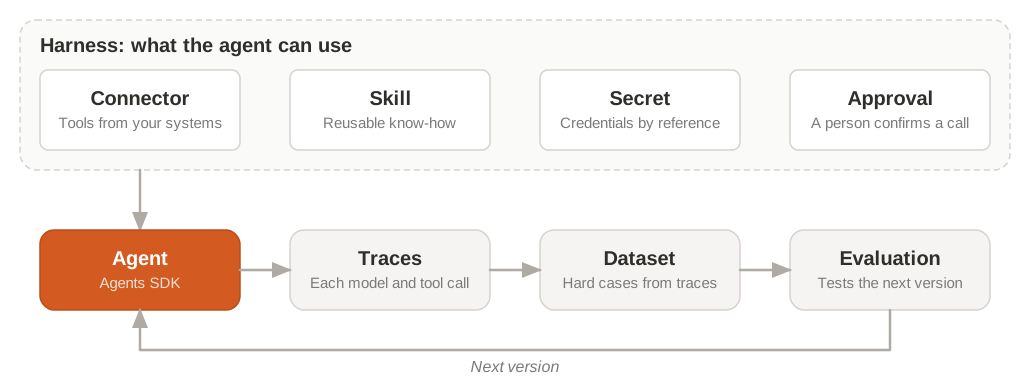
The agent reaches your systems through a connector, follows a skill your team wrote once, and reads its credentials from a secret by reference. Before a sensitive tool call, it pauses until a person approves. Its traces show every step; the hard cases become a dataset, and the evaluation on that dataset tests the next version. Traces, datasets, and evaluations are available to Enterprise-tier organizations only: see Observability.
The same components work from the other systems. A workflow uses the same connectors, secrets, and evaluations, and can run an agent as one of its steps. An app runs agents and workflows behind its interface, where people review results, give feedback, and act on them.