- Studio
- What is Mistral Workflows?
- Interacting with Workflows
Conversational Workflows
Conversational Workflows
Conversational workflows are meant to be integrated in conversation interfaces, allowing a user to trigger a workflow, interact with it by providing inputs during its execution, and follow its progress.
The primary rendering surface for these workflows is Vibe Work, where users attach published workflows from the + menu. See Run Workflows in Vibe Work for the consumer-side experience.
This section covers the basics: sending messages, waiting for input, and streaming agent responses. Specialized topics live in their own sub-pages:
Forms and confirmations
Structured form inputs and quick confirmation prompts.
Progress tracking
Show a checklist of steps with live status updates.
Canvas
Return rich content (markdown, code, diagrams) and let the user edit it.
Tool UI
Render rich UI components and visualize tool execution.
Publish in Vibe
Surface a workflow as an assistant in Vibe Work.
Getting started
To use conversational workflow features, install the Mistral plugin:
uv add 'mistralai-workflows[mistralai]'
The simplest conversational workflow sends an assistant message to the user, then waits for their response. Extend InteractiveWorkflow and use send_assistant_message() followed by wait_for_input() with ChatInput:
import mistralai.workflows as workflows
import mistralai.workflows.plugins.mistralai as workflows_mistralai

@workflows.workflow.define(
    name="greeting-workflow",
    workflow_display_name="Greeting",
    workflow_description="A simple conversational workflow",
)
class GreetingWorkflow(workflows.InteractiveWorkflow):
    @workflows.workflow.entrypoint
    async def run(self) -> workflows_mistralai.ChatAssistantWorkflowOutput:
        # Send a message to the user
        await workflows_mistralai.send_assistant_message(
            "Hello! I'm here to help you get started. What's your name?"
        )

        # Wait for the user's response
        user_input = await self.wait_for_input(
            workflows_mistralai.ChatInput()
        )

        name = user_input.message[0].text if user_input.message else "friend"

        return workflows_mistralai.ChatAssistantWorkflowOutput(
            content=[workflows_mistralai.TextOutput(text=f"Nice to meet you, {name}!")]
        )
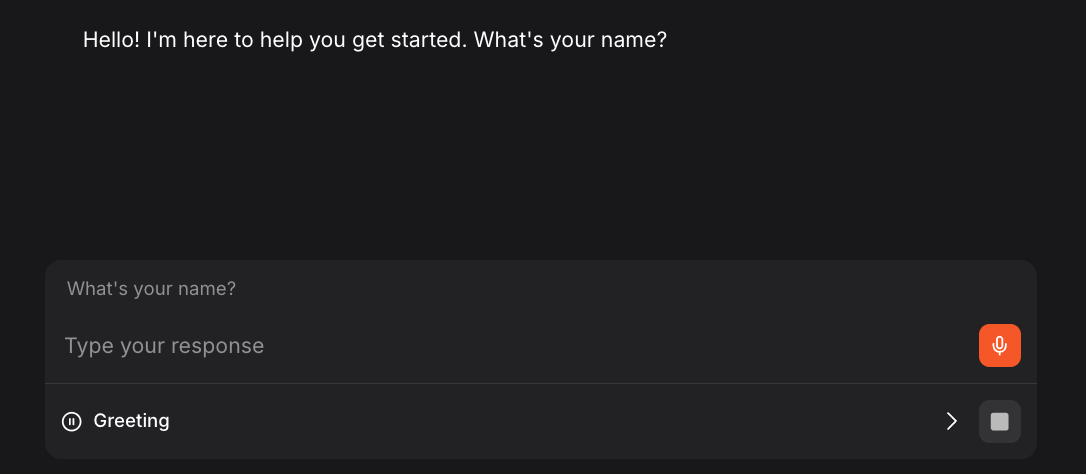
send_assistant_message() displays a message to the user in the Vibe Work chat interface. It also accepts an optional canvas keyword argument to include a CanvasResource alongside the text (see Canvas). ChatInput() pauses the workflow and waits for the user to respond. You can optionally pass a prompt to ChatInput() to provide additional context (in placeholder) and suggestions to offer pre-filled options that users can select directly.
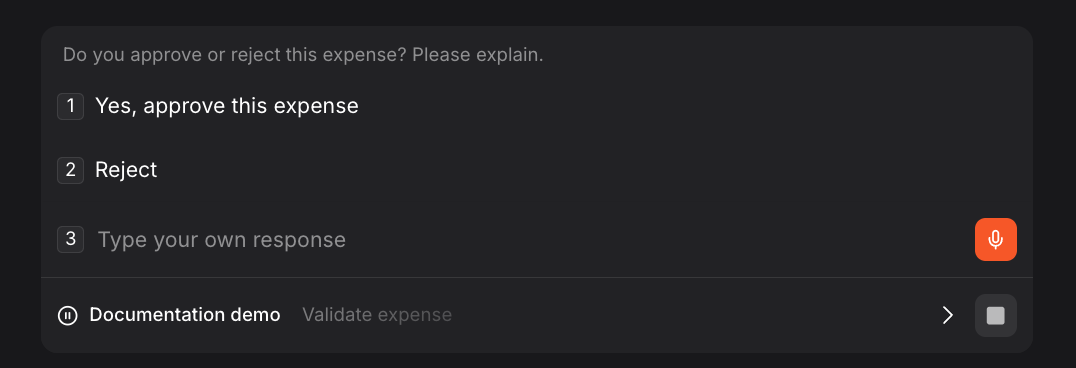
Timeout
wait_for_input() accepts an optional timeout parameter. If the user doesn't respond within the specified duration, an asyncio.TimeoutError is raised. The timeout can be a timedelta or a number of seconds (float). By default, the workflow waits indefinitely.
from datetime import timedelta

# Wait for user response, but time out after 5 minutes
user_input = await self.wait_for_input(
    workflows_mistralai.ChatInput(),
    timeout=timedelta(minutes=5),
)
Wrap the call in a try/except asyncio.TimeoutError block to handle the timeout gracefully instead of failing the workflow.
Streaming agent responses
When using agents with RemoteSession(stream=True), responses are automatically streamed to the UI as custom events. No additional code is needed:
import mistralai.workflows as workflows
import mistralai.workflows.plugins.mistralai as workflows_mistralai

@workflows.workflow.define(
    name="expense-analysis-workflow",
    workflow_display_name="Expense Analysis",
    workflow_description="AI-powered expense analysis",
)
class ExpenseAnalysisWorkflow:
    @workflows.workflow.entrypoint
    async def run(self, expense_data: str) -> workflows_mistralai.ChatAssistantWorkflowOutput:
        # Create a streaming session - responses will automatically
        # stream to the UI as they are generated
        session = workflows_mistralai.RemoteSession(stream=True)

        analyst_agent = workflows_mistralai.Agent(
            model="mistral-medium-2508",
            name="expense-analyst",
            description="Analyzes expense reports for policy compliance",
            instructions="""You are an expense report analyst. Review the expense data
and provide insights on:
1. Policy compliance
2. Unusual patterns
3. Optimization suggestions

Be concise and professional.""",
        )

        # The agent's response streams automatically custom events with JSON patches to update the UI.
        await workflows_mistralai.Runner.run(
            agent=analyst_agent,
            inputs=f"Analyze this expense report:\n\n{expense_data}",
            session=session,
        )

        return workflows_mistralai.ChatAssistantWorkflowOutput(
            content=[workflows_mistralai.TextOutput(text="Analysis complete.")]
        )
When stream=True, the agent's text output is streamed token-by-token to the UI. This provides a responsive experience for longer responses.
Complete example
Here's a full expense approval workflow combining todo list, user input, and streaming agent analysis:
import mistralai.workflows as workflows
import mistralai.workflows.plugins.mistralai as workflows_mistralai

@workflows.workflow.define(
    name="full-expense-workflow",
    workflow_display_name="Full Expense Processing",
    workflow_description="Complete expense workflow with AI analysis and approval",
)
class FullExpenseWorkflow(workflows.InteractiveWorkflow):
    @workflows.workflow.entrypoint
    async def run(self, expense_data: str) -> workflows_mistralai.ChatAssistantWorkflowOutput:
        # Define workflow steps
        analyze_item = workflows_mistralai.TodoListItem(
            title="AI Analysis",
            description="Analyze expense for compliance"
        )
        review_item = workflows_mistralai.TodoListItem(
            title="Manager Review",
            description="Get manager approval"
        )
        process_item = workflows_mistralai.TodoListItem(
            title="Process",
            description="Complete processing"
        )

        async with workflows_mistralai.TodoList(
            items=[analyze_item, review_item, process_item]
        ) as todo_list:
            # Step 1: AI Analysis with streaming (using context manager)
            async with analyze_item:
                session = workflows_mistralai.RemoteSession(stream=True)
                analyst = workflows_mistralai.Agent(
                    model="mistral-medium-2508",
                    name="expense-analyst",
                    description="Expense policy analyst",
                    instructions="Analyze the expense for policy compliance. Be brief.",
                )

                await workflows_mistralai.Runner.run(
                    agent=analyst,
                    inputs=expense_data,
                    session=session,
                )

            # Step 2: Manager Review (using context manager)
            async with review_item:
                decision = await self.wait_for_input(
                    workflows_mistralai.ChatInput(
                        "Do you approve or reject this expense? Please explain.",
                        suggestions=[
                            [workflows_mistralai.TextChunk(text="Yes, approve this expense")],
                            [workflows_mistralai.TextChunk(text="Reject")],
                        ],
                    )
                )

            # Step 3: Process (using manual status control for conditional logic)
            await process_item.set_status("in_progress")
            decision_text = decision.message[0].text if decision.message else ""
            if "approve" in decision_text.lower():
                result = f"Expense approved. {decision_text}"
            else:
                result = f"Expense rejected. {decision_text}"
            await process_item.set_status("done")

        return workflows_mistralai.ChatAssistantWorkflowOutput(
            content=[workflows_mistralai.TextOutput(text=result)]
        )

if __name__ == "__main__":
    import asyncio
    asyncio.run(workflows.run_worker([FullExpenseWorkflow]))