Realtime transcription
Realtime transcription turns live audio, such as a microphone, a phone line, or a broadcast, into text while the person is still speaking. This page explains how a session runs from start to finish, how to configure it, how to read its events, and how to trade speed for accuracy.
If the audio is already recorded, use File transcription instead. To choose between the two, see Offline and realtime audio. For a first live transcript in a few minutes, follow the realtime quickstart.
Understand the lifecycle
A session is one WebSocket connection that goes through four stages, always in the same order. Your application sends the audio, and the API sends the text back while the audio still flows.
Read from top to bottom: each arrow is one message, from your application on the left or from the API on the right.
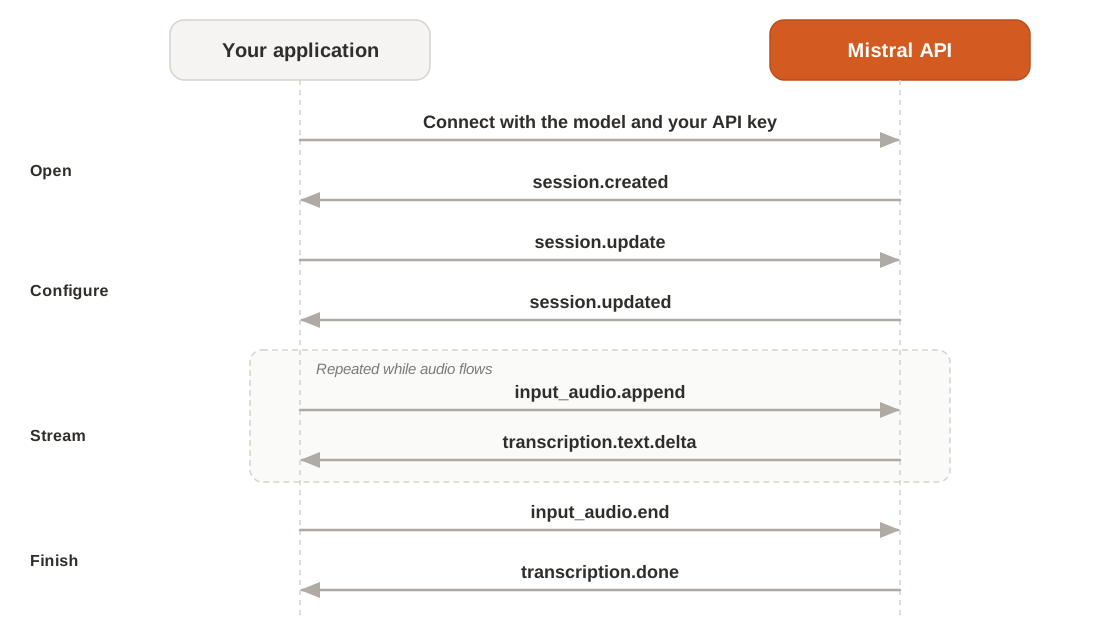
At each stage, your application does the following:
| Stage | You send | You receive | What your application does |
|---|---|---|---|
| Open | A connection with the model and your API key | session.created, with the default settings | Wait for it before you send anything else. |
| Configure | session.update, with your settings | session.updated, with the settings the session applies | Check the values. They're fixed from the first audio chunk. |
| Stream | input_audio.append, one chunk of audio at a time | transcription.text.delta, with each piece of new text | Add each piece of text to the end of the transcript you show. |
| Finish | input_audio.end, when the audio stops | transcription.done, with the full transcript | Save the full transcript, then close the connection. |
If the API rejects a message, it sends an error event at that stage instead. See Common issues.
Connect to a session
Open a WebSocket connection to the realtime endpoint, with the model in the query string and your API key in the Authorization header:
wss://api.mistral.ai/v1/audio/transcriptions/realtime?model=voxtral-mini-transcribe-realtime-3
Authorization: Bearer $MISTRAL_API_KEYWith the Python or TypeScript SDK, connect() opens the connection and returns once the session is created:
import asyncio
import os

from mistralai.client import Mistral

async def main():
    client = Mistral(api_key=os.environ["MISTRAL_API_KEY"])
    async with await client.audio.realtime.connect(
        model="voxtral-mini-transcribe-realtime-3",
    ) as connection:
        print(connection.session.model_dump_json(indent=2))

asyncio.run(main())Configure the session
Send your settings in a session.update message, before the first audio chunk. The session answers with session.updated, which echoes every setting it applies:
{
  "type": "session.update",
  "session": {
    "audio_format": { "encoding": "pcm_s16le", "sample_rate": 24000 },
    "target_streaming_delay_ms": 480,
    "language": "en",
    "context_bias": ["Northwind", "Quillara", "Alder Creek Design", "Rotterdam"]
  }
}The following script sends these settings, streams a WAV file in chunks of 100 ms, and prints the transcript as it arrives.
The Voice Agents SDK sends language, context_bias, and turn_detection through the stt config. For raw WebSocket sessions without the SDK, send session.update with websockets in Python and ws in TypeScript.
import asyncio
import base64
import json
import os
import wave

import websockets

MODEL = "voxtral-mini-transcribe-realtime-3"
URL = f"wss://api.mistral.ai/v1/audio/transcriptions/realtime?model={MODEL}"
HEADERS = {"Authorization": f"Bearer {os.environ['MISTRAL_API_KEY']}"}
AUDIO_FILE = "customer_call.wav"  # 16-bit mono PCM WAV

async def send_audio(ws, path):
    with wave.open(path, "rb") as wav:
        while chunk := wav.readframes(wav.getframerate() // 10):
            await ws.send(json.dumps({"type": "input_audio.append", "audio": base64.b64encode(chunk).decode()}))
    await ws.send(json.dumps({"type": "input_audio.end"}))

async def main():
    with wave.open(AUDIO_FILE, "rb") as wav:
        sample_rate = wav.getframerate()

    async with websockets.connect(URL, additional_headers=HEADERS) as ws:
        print(json.loads(await ws.recv())["type"])  # session.created

        await ws.send(json.dumps({
            "type": "session.update",
            "session": {
                "audio_format": {"encoding": "pcm_s16le", "sample_rate": sample_rate},
                "target_streaming_delay_ms": 480,
                "language": "en",
                "context_bias": ["Northwind", "Quillara", "Alder Creek Design", "Rotterdam"],
            },
        }))
        sender = asyncio.create_task(send_audio(ws, AUDIO_FILE))

        async for message in ws:
            event = json.loads(message)
            if event["type"] == "session.updated":
                print("session.updated:", json.dumps(event["session"]))
            elif event["type"] == "transcription.text.delta":
                print(event["text"], end="", flush=True)
            elif event["type"] == "transcription.done":
                print("\ntranscription.done")
                break
            elif event["type"] == "error":
                print("error:", event["error"]["message"])
                break
        sender.cancel()

asyncio.run(main())The settings are fixed once audio has started. A session.update sent after the first input_audio.append returns the error Session fields cannot be changed after audio has started. To change a setting, open a new session.
Session fields
session.update takes the following fields. Send only the ones you want to change: the others keep the default that session.created reports.
| Field | Type | Default | Use it to |
|---|---|---|---|
audio_format | Object: encoding, sample_rate | pcm_s16le at 16000 Hz | Describe the audio you send: 16-bit signed little-endian PCM, mono, at the sample rate of your source. The format is inferred automatically from the PCM payload if you don't set it. |
target_streaming_delay_ms | Integer | 480 ms (recommended starting point) | Trade speed for accuracy: any value from 80 to 1200, or 2400. See Control latency. |
language | String, a two-letter ISO 639-1 code such as "en" | Not set | Pin the language of the audio. Leave it out and the model detects the language. See Languages. |
| context_bias | Array of strings | [] | Help the model spell names and terms. See Bias context and vocabulary. |
| diarize | Boolean | false | Label each piece of text with its speaker. See Diarize speakers. |
| speaker_references | Object: a name for each base64 audio clip | Not set | Name known speakers, up to 8 clips of 3 to 15 seconds. Requires diarize. See Diarize speakers. |
| turn_detection | Object | Not set | Know when the user starts and finishes speaking. See Turn detection. |
diarize and turn_detection can't be used in the same session: the session returns the error Diarization is not compatible with turn detection.
Events: receive updates and finish
Everything the API sends arrives as a JSON message with a type. Read the type first, then the fields of that event:
| Event | Fields | Sent when |
|---|---|---|
session.created | session | The connection opens, with the default settings. |
session.updated | session | After each session.update, with the settings the session applies. |
transcription.text.delta | text | New text is ready, as the audio flows. |
transcription.segment | text, speaker_id, start, end | With diarize on, instead of transcription.text.delta. See Diarize speakers. |
turn.start, turn.eager_end, turn.resume, turn.end | time_s, and end_reason on turn.end | With turn_detection on, at the moments of each turn. See Turn detection. |
transcription.done | text, segments, language, model, usage | After input_audio.end, once all the audio is transcribed. |
error | error.message, error.code | The API rejects a message or a setting. |
Show the text as it arrives
Each transcription.text.delta adds new text after the text already sent. A delta never corrects earlier text, so your application only appends: there's nothing to replace.
- Show each delta as soon as it arrives. It's final when you receive it.
- Append it as is. Deltas carry their own spaces and punctuation, such as
" for"or".", so don't add separators. - Save the
textoftranscription.doneas the transcript of record.
To show fast text first and replace it with more accurate text later, you need two sessions on the same audio. See Variable transcription rate.
Finish the session
When the audio stops, send input_audio.end. The API sends the last deltas, then transcription.done with the full transcript. Close the connection once you've received it.
Control latency
The model doesn't write a word as soon as it hears it: it waits to hear what follows, because the next sounds help it pick the right word. target_streaming_delay_ms sets that wait for the session.
- A shorter delay gets the text out sooner, but less accurately.
- A longer delay gives the model more context, and more accurate text, but later.
The delay takes any integer from 80 to 1200, or 2400. Any other value returns an error. The Python SDK can set it with update_session(), along with the audio format.
For where the delay fits in the wait your users notice, see Latency. Turn events don't wait for the delay: see Turn detection.
Variable transcription rate
Readers see words at once, and the text they keep is the accurate one. Live captions and note-taking benefit most.
Common issues
Most issues come back as an error event with a message. These are the ones specific to live sessions:
| Error or symptom | Cause | Fix |
|---|---|---|
Session fields cannot be changed after audio has started. | A session.update sent after the first audio chunk | Send every setting before the first input_audio.append. To change one, open a new session. |
target_streaming_delay_ms must be one of the trained values | A delay outside 80 to 1200, other than 2400 | Pick a value in the accepted range. See Control latency. |
Diarization is not compatible with turn detection. | diarize and turn_detection in the same session | Keep one of them. See Turn detection. |
Speaker references require diarization, set diarize=true. | speaker_references without diarize | Set diarize to true. |
An error that mentions Invalid language alpha2 code | A language that isn't a two-letter ISO 639-1 code | Use a code such as "en" or "fr". |
| Latency measured on a file doesn't match live use | The file is sent faster than real time | To measure latency, send each chunk at the pace of the audio, for example 100 ms of audio every 100 ms. |
For other errors, see Troubleshooting.