Offline and realtime audio
Every audio capability runs in one of two modes, and the question is whether the input exists before you call the API:
- Offline: you already have the whole input, such as a call recording, a podcast episode, or a script to voice. You send it in one request. The API processes all of it and returns the result: a full transcript, or a full audio file.
- Realtime: the input is still being produced, such as a microphone, a phone line, or text that a model is writing. You open a session and send the input in small pieces, for example 100 ms of audio at a time. The API sends results back as they're ready: partial transcripts, events such as the end of a speaker's turn, or chunks of speech.
Pick the mode first, before the model and the options: it decides how you connect, how fast results arrive, and which features you can use.
Choose a mode
Answer the questions from the top.
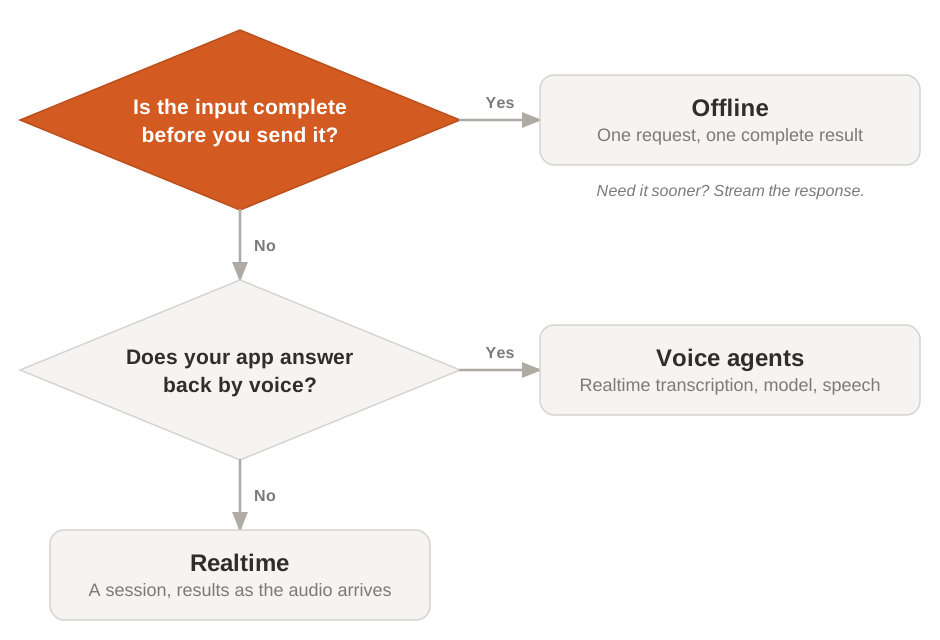
If the audio or the text exists before you call the API, start offline: it's simpler, and the model hears the whole input before it answers. If it's being produced while the user waits, you need realtime. If your app also answers back by voice, use voice agents, which run the whole conversation for you. To choose the model for each mode, see the Speech to Text and Text to Speech overviews.
What changes between the modes
The mode changes how you connect, what you get back, and which latency you measure.
| Offline | Realtime | |
|---|---|---|
| Input | Complete, sent in one request | Live, sent in pieces during a session |
| Connection | One HTTP request | A WebSocket session that stays open |
| Result | One complete result, or the same result streamed in pieces | Incremental results and events while the session runs |
| Speed to watch | Time to the complete result, which grows with the length of the input | Delay between the input and its result, which you can tune |
| Only in this mode | Turn detection: knowing when a speaker has finished | |
| Models | One model per capability, see the Speech to Text and Text to Speech overviews | A dedicated realtime model per capability |
In realtime transcription, you choose the trade-off between speed and accuracy: a longer streaming delay, from 80 to 1,200 ms or 2,400 ms, gives the model more context before it commits to the text. For what drives each delay, see Latency.
Across the three capabilities
Each capability supports the modes differently. Find yours, then follow the link to the article that covers it.
| Capability | Offline | Realtime |
|---|---|---|
| Speech to text | Transcribe a recorded file. File transcription | Transcribe live audio, with end-of-turn detection built in. Realtime transcription |
| Text to speech | Generate speech for a complete text, and optionally stream the audio back as it's generated. Speech generation | Stream speech |
| Voice agents | Not applicable | Always realtime: a session chains realtime transcription, a model, and speech. Voice agents |
Streaming the response of an offline request isn't the realtime mode. When you set stream on a transcription or speech request, the input is still complete when you send it: only the result arrives in pieces, so you see or hear it sooner. Realtime starts before the input is complete.