- Studio
- Managed Agents
- Tools
Code Interpreter
Code Interpreter
Code Interpreter adds the capability to safely execute code in an isolated container, this built-in tool allows Agents to run code at any point on demand, practical to draw graphs, data analysis, mathematical operations, code validation, and much more.
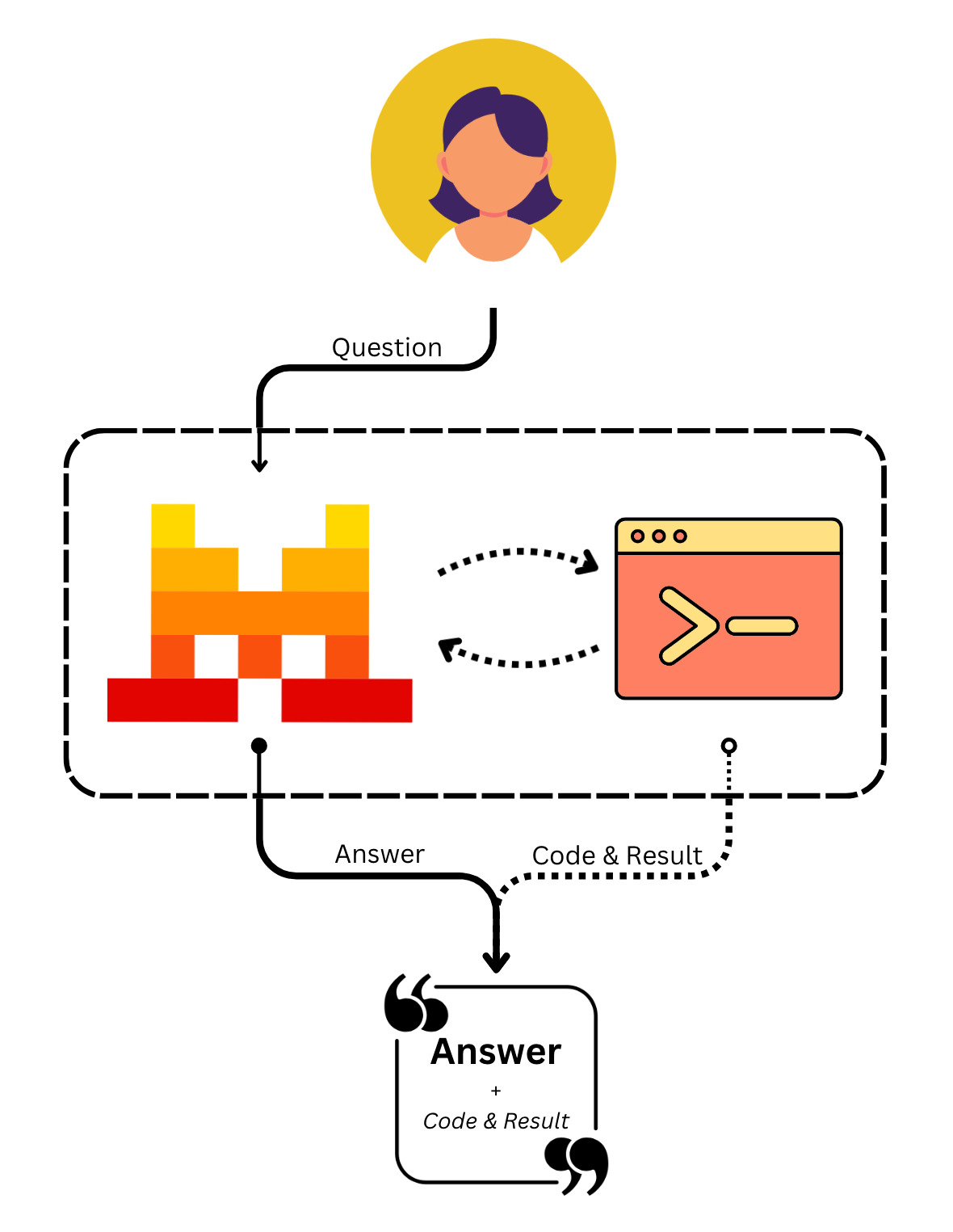
code_interpreter works with the Conversations API (/v1/conversations) and the Agents API. It isn't supported in the Chat Completions API (/v1/chat/completions). To use it with an Agent, create the Agent with code_interpreter, then start the conversation with /v1/conversations.
To use the code interpreter, create an Agent with the code interpreter tool. Then start a conversation with the Agent, and it runs code on demand to answer your questions.
Create a Code Interpreter Agent
You can create an agent with access to our code interpreter by providing it as one of the tools.<br /> Note that you can still add more tools to the agent, the model is free to run code or not on demand.
code_agent = client.beta.agents.create(
    model="mistral-medium-latest",
    name="Coding Agent",
    description="Agent used to execute code using the interpreter tool.",
    instructions="Use the code interpreter tool when you have to run code.",
    tools=[{"type": "code_interpreter"}],
    completion_args={
        "temperature": 0.3,
        "top_p": 0.95,
    }
)
{
  "model": "mistral-medium-latest",
  "name": "Coding Agent",
  "description": "Agent used to execute code using the interpreter tool.",
  "id": "ag_06830595b7ea7e70800087c4ec8a74e7",
  "version": 0,
  "created_at": "2025-05-23T11:17:47.497956Z",
  "updated_at": "2025-05-23T11:17:47.497959Z",
  "instructions": "Use the code interpreter tool when you have to run code.",
  "tools": [
    {
      "type": "code_interpreter"
    }
  ],
  "completion_args": {
    "stop": null,
    "presence_penalty": null,
    "frequency_penalty": null,
    "temperature": 0.3,
    "top_p": 0.95,
    "max_tokens": null,
    "random_seed": null,
    "prediction": null,
    "response_format": null,
    "tool_choice": "auto"
  },
  "handoffs": null,
  "object": "agent"
}
As for other agents, when creating one you will receive an agent id corresponding to the created agent that you can use to start a conversation.
How it Works
Now that we have our coding agent ready, we can at any point make use of it to run code.
Conversations with Code Interpreter
To start a conversation with our code interpreter agent, we can use the following code:
response = client.beta.conversations.start(
    agent_id=code_agent.id,
    inputs="Run a fibonacci function for the first 20 values."
)
{
  "conversation_id": "conv_06835b9dc0c7749180001958779d13c5",
  "outputs": [
    {
      "content": "Sure, I can help with that. Here's a simple Python function to generate the first 20 Fibonacci numbers.",
      "object": "entry",
      "type": "message.output",
      "created_at": "2025-05-27T13:10:52.208822Z",
      "completed_at": "2025-05-27T13:10:52.470589Z",
      "id": "msg_06835b9dc35772be800073298138bacc",
      "agent_id": "ag_06835b9dbded7f39800034281a63e4f0",
      "model": "mistral-medium-latest",
      "role": "assistant"
    },
    {
      "name": "code_interpreter",
      "object": "entry",
      "type": "tool.execution",
      "created_at": "2025-05-27T13:10:52.561656Z",
      "completed_at": "2025-05-27T13:10:54.431304Z",
      "id": "tool_exec_06835b9dc8fc763880004b7aa94286d8",
      "info": {
        "code": "def fibonacci(n):\n    fib_sequence = [0, 1]\n    for i in range(2, n):\n        fib_sequence.append(fib_sequence[-1] + fib_sequence[-2])\n    return fib_sequence[:n]\n\nfibonacci_20 = fibonacci(20)\nfibonacci_20",
        "code_output": "[0,\n 1,\n 1,\n 2,\n 3,\n 5,\n 8,\n 13,\n 21,\n 34,\n 55,\n 89,\n 144,\n 233,\n 377,\n 610,\n 987,\n 1597,\n 2584,\n 4181]\n"
      }
    },
    {
      "content": "The first 20 values of the Fibonacci sequence are:\n\n[0, 1, 1, 2, 3, 5, 8, 13, 21, 34, 55, 89, 144, 233, 377, 610, 987, 1597, 2584, 4181]",
      "object": "entry",
      "type": "message.output",
      "created_at": "2025-05-27T13:10:54.517935Z",
      "completed_at": "2025-05-27T13:10:55.314698Z",
      "id": "msg_06835b9de84974fa8000f1a97be62f2e",
      "agent_id": "ag_06835b9dbded7f39800034281a63e4f0",
      "model": "mistral-medium-latest",
      "role": "assistant"
    }
  ],
  "usage": {
    "prompt_tokens": 95,
    "completion_tokens": 209,
    "total_tokens": 399,
    "connector_tokens": 95,
    "connectors": {
      "code_interpreter": 1
    }
  },
  "object": "conversation.response"
}
Explanation of the Output
Below we will explain the different outputs of the response of the previous snippet example:
-
message.output: This entry corresponds to the initial response from the assistant, indicating that it can help generate the first 20 Fibonacci numbers.
-
tool.execution: This entry corresponds to the execution of the code interpreter tool. It includes metadata about the execution, such as:
- name: The name of the tool, which in this case is code_interpreter.
- object: The type of object, which is entry.
- type: The type of entry, which is tool.execution.
- created_at and completed_at: Timestamps indicating when the tool execution started and finished.
- id: A unique identifier for the tool execution.
- info: This section contains additional information specific to the tool execution. For the code_interpreter tool, the info section includes:
- code: The actual code that was executed. In this example, it contains a Python function fibonacci(n) that generates the first n numbers in the Fibonacci sequence and a call to this function to get the first 20 Fibonacci numbers.
- code_output: The output of the executed code, which is the list of the first 20 Fibonacci numbers.
-
message.output: This entry corresponds to the final response from the assistant, providing the first 20 values of the Fibonacci sequence.