Interface d’outil
Affichez des composants d’interface riches et interactifs dans l’interface de chat Vibe Work et visualisez l’exécution des outils avec un retour d’état structuré. Utilisez les composants d’interface pour la mise en page et la visualisation ; exploitez les états UI des outils pour montrer en temps réel ce que font vos outils.
Composants d’interface riches
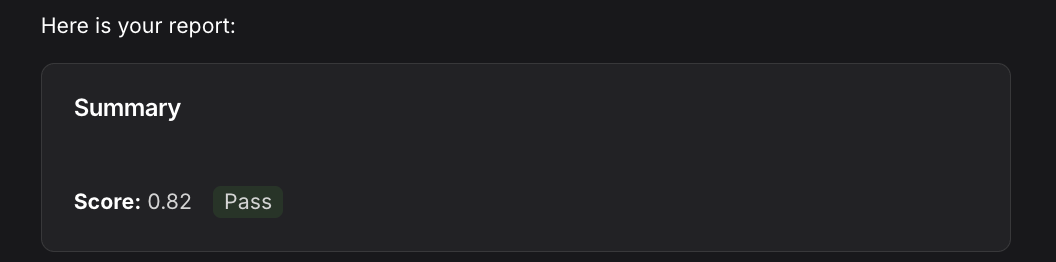
Les workflows peuvent afficher des composants d’interface riches et interactifs dans le chat Vibe Work via la bibliothèque de composants du design system. Les composants sont définis comme objets Python et envoyés comme ressources UIComponentResource.
Utilisation de base
import mistralai.workflows as workflows
import mistralai.workflows.plugins.mistralai as workflows_mistralai
from mistralai.workflows.plugins.mistralai.conversational_ui_components import (
    Badge,
    Card,
    Column,
    Markdown,
    Row,
)


@workflows.workflow.define(
    name="report-workflow",
    workflow_display_name="Report",
    workflow_description="Generate a rich UI report",
)
class ReportWorkflow:
    @workflows.workflow.entrypoint
    async def run(self) -> workflows_mistralai.ChatAssistantWorkflowOutput:
        report = Card(
            title="Summary",
            children=[
                Row(
                    children=[
                        Markdown(content="**Score:** 0.82"),
                        Badge(variant="success", children="Pass"),
                    ],
                ),
            ],
        )

        await workflows_mistralai.send_assistant_message(
            [
                workflows_mistralai.TextOutput(text="Here is your report:"),
                workflows_mistralai.ResourceOutput(
                    resource=workflows_mistralai.UIComponentResource(component=report),
                ),
            ]
        )

        return workflows_mistralai.ChatAssistantWorkflowOutput(
            content=[
                workflows_mistralai.ResourceOutput(
                    resource=workflows_mistralai.UIComponentResource(component=report),
                ),
            ],
        )
Composants disponibles
Tous les composants sont importés depuis mistralai.workflows.plugins.mistralai.conversational_ui_components.
| Composant | Description | Propriétés principales |
|---|---|---|
Alert | Messages importants avec niveaux de sévérité | title, variant (info/warning/error/success), children |
Avatar | Image d’avatar utilisateur | src, alt, text, size |
Badge | Petit libellé pour indicateurs de statut | variant (default/primary/success/warning/error), size, children |
ButtonLink | Lien présenté comme un bouton | href, variant, size, external, children |
Card | Conteneur avec titre/description optionnels | title, description, padding, children |
Chart | Graphique linéaire ou en barres | variant (line/bar), data, xAxis, yAxis, title |
Column | Conteneur vertical | alignment, distribution, gap, children |
Image | Affichage d’une image | src, alt, size |
Markdown | Texte formaté en Markdown | content |
PieChart | Diagramme circulaire avec segments nommés | data, title |
Row | Conteneur horizontal | alignment, distribution, gap, wrap, children |
Tooltip | Info supplémentaire au survol | trigger, children |
Imbrication de composants
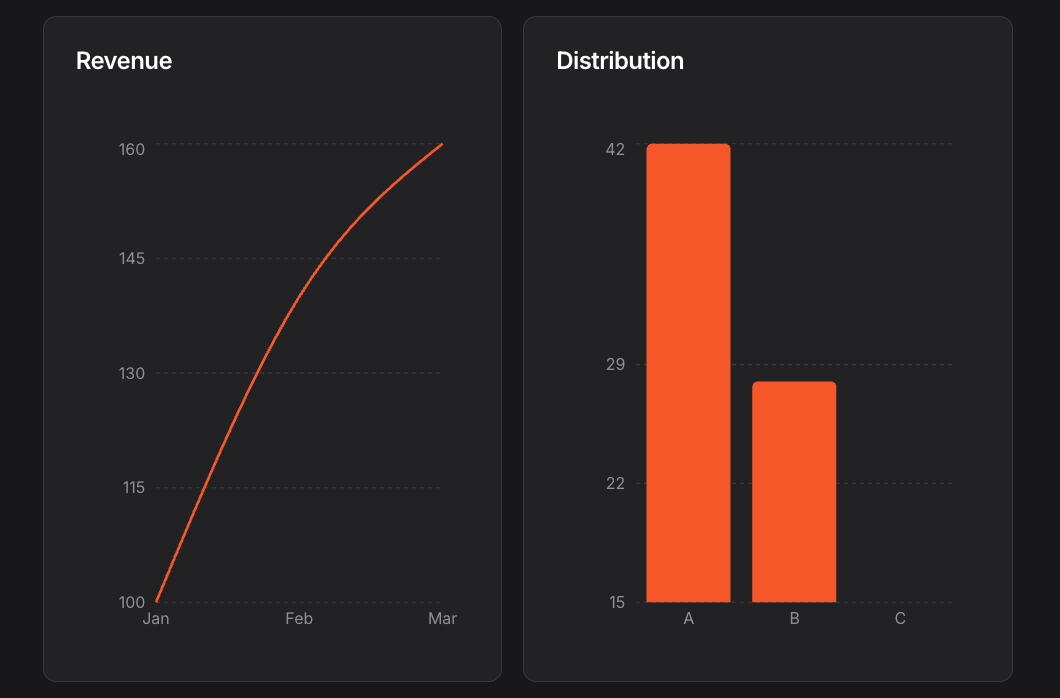
Les composants qui acceptent children peuvent en contenir d’autres, ce qui permet de créer des mises en page complexes :
from mistralai.workflows.plugins.mistralai.conversational_ui_components import (
    Card,
    Chart,
    Column,
    Row,
)

layout = Row(
    children=[
        Card(
            title="Revenue",
            children=[
                Chart(
                    variant="line",
                    xAxis="month",
                    yAxis=["actual", "target"],
                    data=[
                        {"month": "Jan", "actual": 100, "target": 120},
                        {"month": "Feb", "actual": 140, "target": 130},
                        {"month": "Mar", "actual": 160, "target": 140},
                    ],
                ),
            ],
        ),
        Card(
            title="Distribution",
            children=[
                Chart(
                    variant="bar",
                    xAxis="category",
                    yAxis="count",
                    data=[
                        {"category": "A", "count": 42},
                        {"category": "B", "count": 28},
                        {"category": "C", "count": 15},
                    ],
                ),
            ],
        ),
    ],
)
États de l’interface outil
Les états d’interface outil offrent une représentation visuelle optionnelle de l’exécution des outils dans l’interface de chat Vibe Work. Attachés à ChatAssistantWorkingTask, ils permettent un retour d’interface dédié selon le type d’opération, ce qui autorise les workflows à afficher statut et résultats des appels d’outils de façon structurée et lisible.
Types d’états d’interface outil
Il existe trois types d’états d’interface outil :
État d’interface fichier
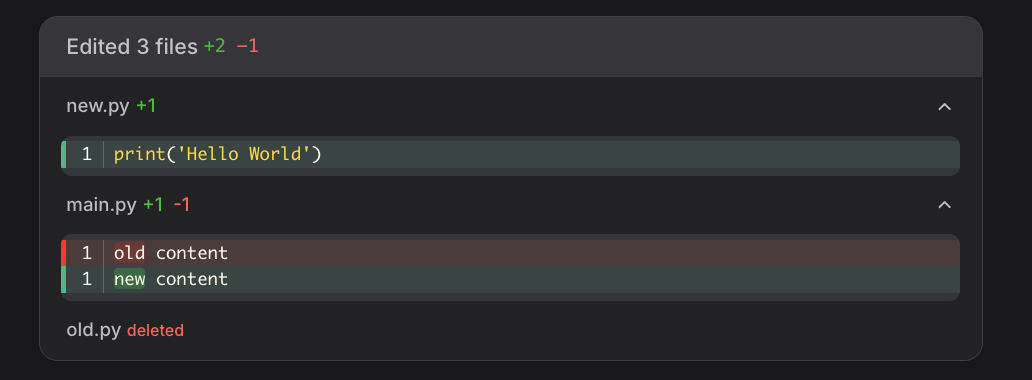
Représente les opérations sur fichiers : création, remplacement, suppression :
from mistralai.workflows.conversational import (
    FileToolUIState,
    CreateFileOperation,
    ReplaceFileOperation,
    DeleteFileOperation,
)

# Créer un fichier
create_state = FileToolUIState(
    toolCallId="tc-1",
    operations=[
        CreateFileOperation(
            uri="file:///workspace/new.py",
            content="print('Hello World')"
        )
    ],
)

# Remplacer le contenu d’un fichier
replace_state = FileToolUIState(
    toolCallId="tc-2",
    operations=[
        ReplaceFileOperation(
            uri="file:///workspace/main.py",
            fileContentBefore="old content",
            blocks=[SearchReplaceBlock(search="old", replace="new")],
        )
    ],
)

# Supprimer un fichier
delete_state = FileToolUIState(
    toolCallId="tc-3",
    operations=[
        DeleteFileOperation(uri="file:///workspace/old.py")
    ],
)
État d’interface générique
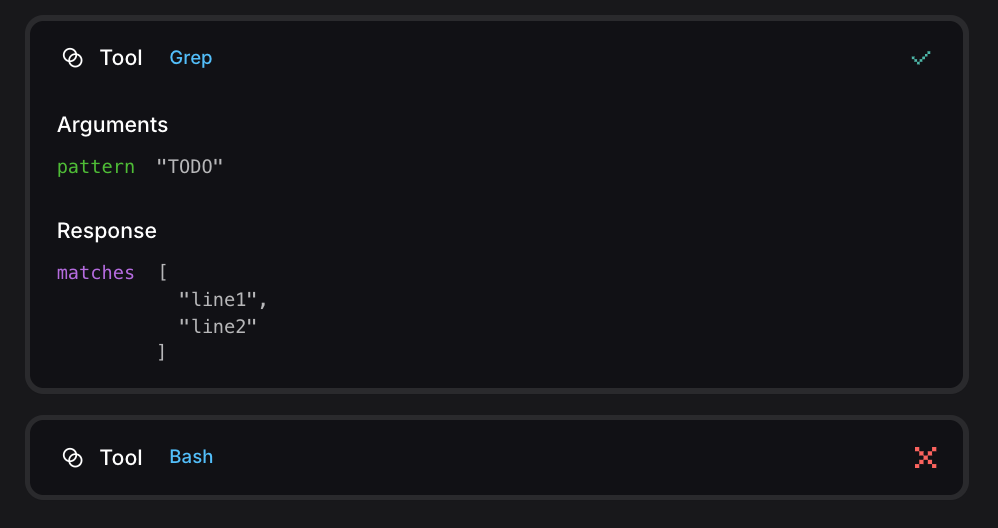
Représente l’exécution générique d’un outil avec plusieurs états de statut :
from mistralai.workflows.conversational import (
    GenericToolUIState,
    ToolResultRunning,
    ToolResultSuccess,
    ToolResultFailed,
)

# Outil en cours d’exécution
running_state = GenericToolUIState(
    toolCallId="tc-1",
    name="bash",
    arguments={"command": "ls -la"},
    result=ToolResultRunning(),
)

# Outil terminé avec succès
success_state = GenericToolUIState(
    toolCallId="tc-2",
    name="grep",
    arguments={"pattern": "TODO"},
    result=ToolResultSuccess(value={"matches": ["line1", "line2"]}),
)

# Échec de l’outil
failed_state = GenericToolUIState(
    toolCallId="tc-3",
    name="bash",
    arguments={"command": "false"},
    result=ToolResultFailed(error="exit code 1"),
)
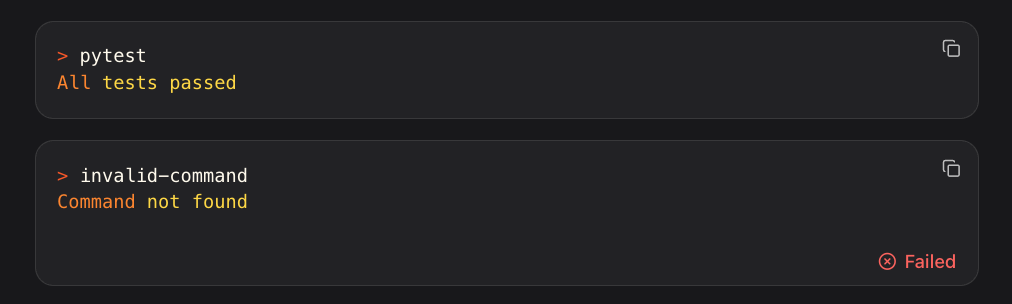
État d’interface commande
Représente l’exécution de commandes avec états : en cours, réussi, échec :
from mistralai.workflows.conversational import (
    CommandToolUIState,
    CommandResultRunning,
    CommandResultSuccess,
    CommandResultFailed,
)

# Commande en cours d’exécution
running_state = CommandToolUIState(
    toolCallId="tc-1",
    command="npm install",
    result=CommandResultRunning(),
)

# Commande terminée avec succès
success_state = CommandToolUIState(
    toolCallId="tc-2",
    command="pytest",
    result=CommandResultSuccess(output="All tests passed"),
)

# Échec de la commande
failed_state = CommandToolUIState(
    toolCallId="tc-3",
    command="invalid-command",
    result=CommandResultFailed(error="Command not found"),
)
Utiliser les états d’interface outil dans les tâches en cours
Les états d’interface outil peuvent être attachés à ChatAssistantWorkingTask afin d’afficher un retour visuel pendant l’exécution de l’outil :
from mistralai.workflows.conversational import ChatAssistantWorkingTask

# Afficher une tâche en cours avec opérations sur fichier
task = ChatAssistantWorkingTask(
    title="Création de fichier",
    content="Génération de new.py",
    toolUIState=FileToolUIState(
        toolCallId="tc-1",
        operations=[CreateFileOperation(uri="file:///workspace/new.py", content="print('hi')")],
    ),
)

# Afficher une tâche en cours avec exécution de commande
command_task = ChatAssistantWorkingTask(
    title="Exécution des tests",
    content="Exécution de pytest",
    toolUIState=CommandToolUIState(
        toolCallId="tc-2",
        command="pytest",
        result=CommandResultRunning(),
    ),
)