What is Mistral Workflows?
Workflows is in Public Preview. We don't plan major changes to APIs and features, but they might still happen. We'll notify you in advance when they do.
Mistral Workflows is a platform for building production-grade AI workflows: multi-step processes that combine LLM calls, tool use, external APIs, and human input. They survive crashes, restarts, and failures of any individual step.
You write workflows in code. The platform handles execution: durability, retries, scheduling, streaming, observability, and integration with the rest of Mistral.
What workflows solve
LLM applications often need to do more than answer one prompt. They orchestrate multiple model calls, wait for human approvals, hit external APIs, and run for minutes, hours, or days. Building this on raw infrastructure means writing your own retries, your own state machine, and your own recovery logic — and watching half of it break the first time a process restarts.
Workflows take that off your plate:
- Crashes don't lose work. Every step is recorded in an event history. When a process dies, another one resumes from the last completed step.
- Retries are first-class. Configure backoff per activity; the platform handles the rest.
- Long-running orchestration. Pause a workflow on a human signal or external event; resume when input arrives. Workflows run from seconds to months.
- Observable by default. Events stream live, history is queryable, and OpenTelemetry traces work without extra wiring.
- AI primitives included. Run an agent loop, stream LLM tokens to clients, and call Mistral's API without writing the integration code.
Durable execution is powered by Temporal, an open-source engine for fault-tolerant workflow orchestration.
When to use workflows
Reach for workflows when you need:
- Multi-step LLM pipelines that must survive crashes and restarts.
- Human-in-the-loop processes that pause for hours or days.
- Scheduled or recurring AI tasks (cron-style or one-shot).
- Multi-agent orchestration with hand-offs and shared state.
- Anything you currently build with a queue, a state machine, and a lot of retry code.
If you're calling a single LLM endpoint with no orchestration, plain SDK calls are enough.
Composing with the rest of Mistral
Workflows are the durable execution layer for AI applications you build on Mistral. When you compose other building blocks — Agents, Judges, Datasets, and more — inside a workflow, they inherit its durability, retries, observability, and human-in-the-loop primitives.
You can call a workflow you build from:
- The Mistral API:
POST /v1/workflows/{name}/executefrom any client, in any language. - Studio: trigger executions from the UI, with input forms generated from your workflow signature, and watch them run on a live execution timeline.
- Vibe Work: workflows appear as assistants that users can invoke in a conversation.
What runs where
Workflows runs in hybrid mode: we host the orchestrator, and your workflow and activity code runs in your environment.
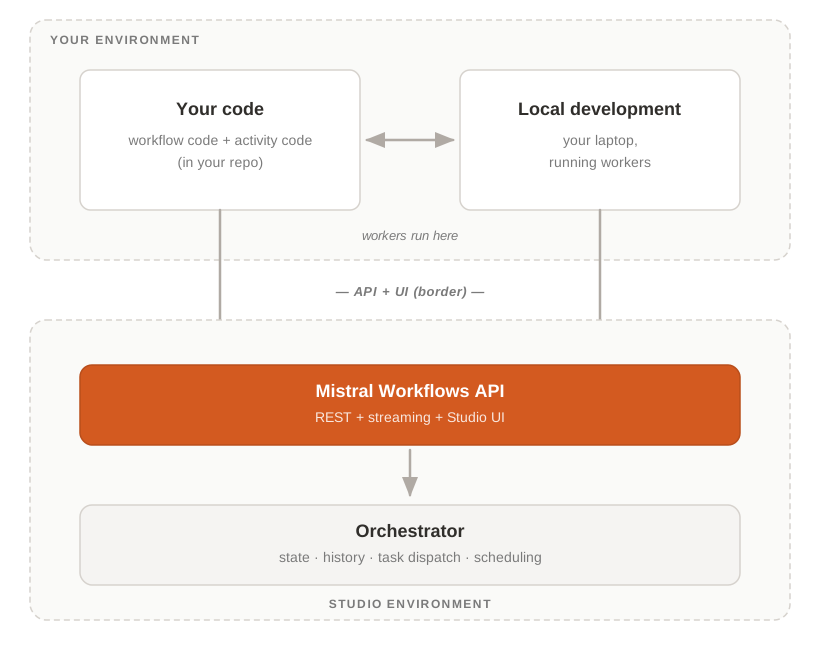
Your environment holds the code you write (typically in your repository) and the workers that execute it. Workers run on your laptop for local development, or in your own infrastructure such as Kubernetes or virtual machines for production.
The Studio environment holds the orchestrator (state, history, task dispatch) behind a public REST API and the Studio UI. Workers connect outbound; the orchestrator does not initiate connections into your network.
For enterprise customers, the Studio environment can also run in your private cloud or on-premises.
Hybrid mode: your data stays where you want it. Workflow inputs and outputs flow through the platform, but you can keep them under your control:
- Encryption at the SDK layer: the SDK encrypts payloads before they leave your worker; the platform stores ciphertext only.
- Payload offloading: the platform offloads inputs and outputs above 2MB to your blob storage (S3, GCS, or Azure), keeping only references on its side.
For details, see Payload offloading and Encryption.
Next steps
| If you want to | Start here |
|---|---|
| Install the SDK | Installation |
| See a working workflow in 5 minutes | Your First Workflow |
| Understand how the pieces fit together | Core concepts |
| Build an LLM agent inside a workflow | Durable Agents |
| Schedule a recurring workflow | Scheduling |