Core concepts
This section explains the building blocks of Mistral Workflows and how they fit together. Each block has its own deep-dive page; start here to see the big picture.
The mental model
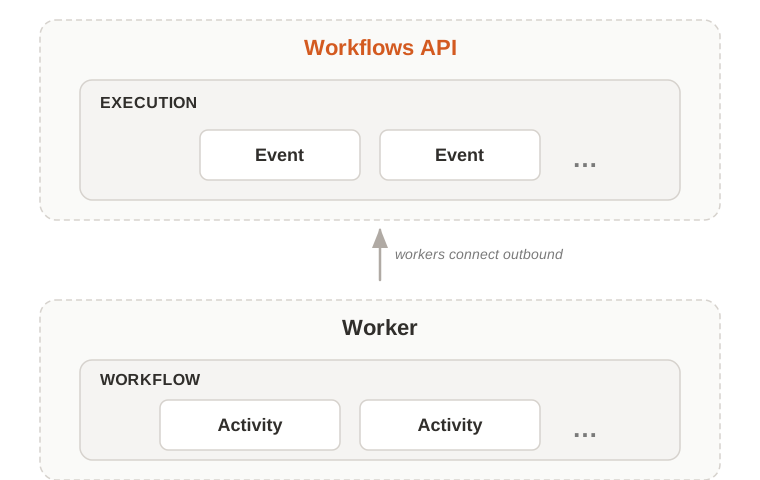
Everything starts at the Workflows API: the orchestrator you call to start, query, and signal runs. For full endpoint details, see the API reference.
Your code lives outside the API, in Workers: processes you deploy that connect outbound to the API and pull work from it. The code a worker runs splits in two:
- A Workflow is your orchestration logic: deterministic code that decides what to do, in what order, and how to handle results.
- Activities are the units of real work the workflow calls into: an LLM call, an HTTP request, a database write, a tool invocation. Side effects happen here.
Starting a workflow produces an Execution: a single run with its own ID, result, and history of Events. Events record what happens during the run, such as started, activity completed, or signal received. They stream live to clients and remain in the execution history.
Workers belong to a Deployment — a named group that owns a set of workflow definitions and receives executions for those definitions.
| Term | What it is |
|---|---|
| Workflows API | The orchestrator. The entry point you call to start, query, and signal runs. |
| Worker | A process you deploy that connects to the API and runs your workflow and activity code. |
| Workflow | The orchestration logic. Defines what happens, in what order, and how to handle results. Deterministic (re-running it always produces the same plan from the same history). |
| Activity | A single unit of real work the workflow calls into, such as calling an LLM, making an HTTP request, writing to a database, or running a tool. Where side effects happen. |
| Execution | A single run of a workflow. Has a unique ID, an event history, and a result. |
| Event | A record of something that happened during an execution, such as started, activity completed, or signal received. Streamed in real time and stored in history. |
| Deployment | A named group of workers that shares workflow definitions and receives executions routed to those definitions. |
How it fits together
A typical run plays out like this:
- A client (your code, Studio, Vibe Work, or a schedule) calls the Workflows API to start an execution.
- The orchestrator records the request as an event and routes it to the right deployment.
- A worker in that deployment picks up the task, instantiates the workflow class, and runs the entrypoint.
- The workflow calls activities. Each activity call becomes a task; any worker in the deployment can pick it up and run it.
- Every step is recorded as an event in the execution's history. Clients can stream events live or read history later.
- If a worker crashes mid-run, another worker resumes from the recorded history. The execution survives.
The orchestrator never holds your code — it only dispatches tasks. Workers hold your code and connect outbound. This is why workflows can run in your private network without inbound traffic from the platform.
Deep dive
Once the model is clear, dive into each piece:
- Workflows — orchestration logic, determinism, replay.
- Activities — units of work, retries, heartbeats.
- Executions — lifecycle, statuses, executions vs runs.
- Events — the event history, replay, streaming.
- Workers — process model, registration, fault tolerance.
- Deployments — worker grouping, isolation, scaling.