Send images to vision-capable models through the Chat Completions API and analyze visual content alongside text.
Vision capabilities enable models to analyze images and provide insights based on visual content in addition to text. This multimodal approach opens up new possibilities for applications that require both textual and visual understanding.
We provide a variety of models with vision capabilities, all available via the Chat Completions API.
For document parsing, OCR, and data extraction, see Document AI.
Before You Start
Recommended Models with Vision Capabilities
Mistral Large 4 via mistral-large-4-0
Mistral Large 3 via mistral-large-2512
Mistral Medium 3.1 via mistral-medium-2508
Mistral Small 3.2 via mistral-small-2506
Ministral 3:
Ministral 3 14B via ministral-14b-2512
Ministral 3 8B via ministral-8b-2512
Ministral 3 3B via ministral-3b-2512
Sending an Image
Use Vision Models
There are two ways to send an image to the Chat Completions API, either by passing a URL or by passing a base64 encoded image.
Before continuing, we recommend reading the Chat Completions documentation to learn more about the chat completions API and how to use it before proceeding.
If the image is hosted online, you can simply provide the publicaly accessible URL of the image in the request. This method is straightforward and does not require any encoding.
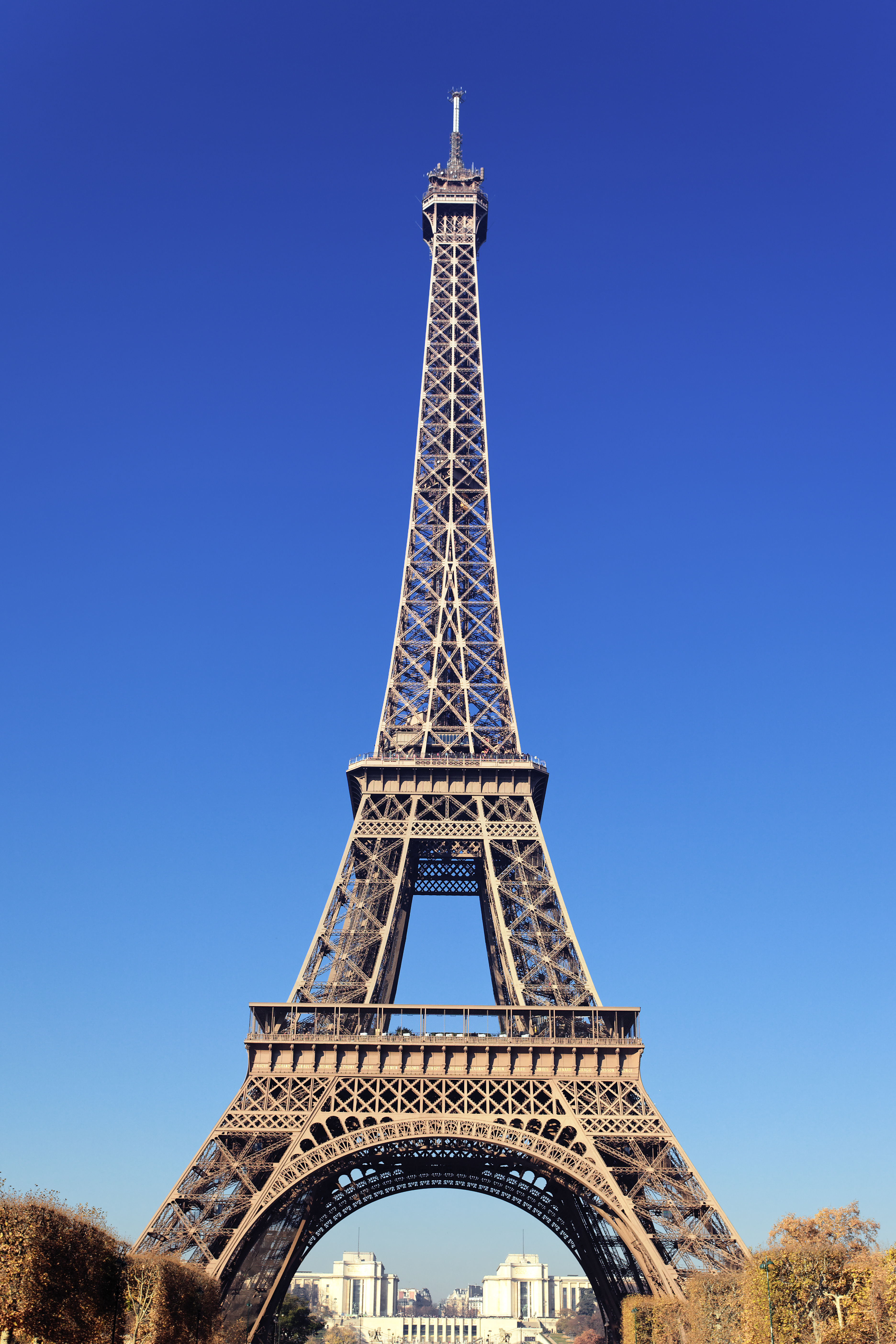
{ "id": "a8251fb1c4a64014b80141bd5685f6c7", "created": 1756318369, "model": "mistral-small-latest", "usage": { "prompt_tokens": 2099, "total_tokens": 2235, "completion_tokens": 136 }, "object": "chat.completion", "choices": [ { "index": 0, "finish_reason": "stop", "message": { "role": "assistant", "tool_calls": null, "content": "The image depicts the Eiffel Tower, an iconic landmark located in Paris, France. The photograph is taken from a low angle, looking up towards the sky, emphasizing the tower's impressive height and intricate iron lattice structure. The Eiffel Tower is composed of three main levels, each offering viewing platforms for visitors. The sky is clear and blue, providing a striking contrast to the brownish hue of the iron tower. The base of the tower is framed by trees, adding a touch of natural greenery to the scene. In the background, beyond the tower, some buildings are visible, indicating the urban setting of the Eiffel Tower in the heart of Paris." } } ]}
If you have an image or a set of images stored locally, you can pass them to the model in base64 encoded format. Base64 encoding is a common method for converting binary data into a text format that can be easily transmitted over the internet. This is particularly useful when you need to include images in API requests.
import base64import requestsimport osfrom mistralai import Mistralapi_key = os.environ["MISTRAL_API_KEY"]model = "mistral-small-latest"client = Mistral(api_key=api_key)def encode_image(image_path): with open(image_path, "rb") as image_file: return base64.b64encode(image_file.read()).decode('utf-8')image_path = "eiffel-tower-paris.jpg" # path to your imagebase64_image = encode_image(image_path)messages = [ { "role": "user", "content": [ { "type": "text", "text": "What's in this image?" }, { "type": "image_url", "image_url": f"data:image/jpeg;base64,{base64_image}" } ] }]chat_response = client.chat.complete( model=model, messages=messages)
import base64import requestsimport osfrom mistralai.client import Mistralapi_key = os.environ["MISTRAL_API_KEY"]model = "mistral-small-latest"client = Mistral(api_key=api_key)def encode_image(image_path): with open(image_path, "rb") as image_file: return base64.b64encode(image_file.read()).decode('utf-8')image_path = "eiffel-tower-paris.jpg" # path to your imagebase64_image = encode_image(image_path)messages = [ { "role": "user", "content": [ { "type": "text", "text": "What's in this image?" }, { "type": "image_url", "image_url": f"data:image/jpeg;base64,{base64_image}" } ] }]chat_response = client.chat.complete( model=model, messages=messages)
import { Mistral } from "@mistralai/mistralai";import fs from 'fs';const apiKey = process.env["MISTRAL_API_KEY"];const client = new Mistral({ apiKey: apiKey });async function encodeImage(imagePath) { const imageBuffer = fs.readFileSync(imagePath); const base64Image = imageBuffer.toString('base64'); return base64Image;}const imagePath = "eiffel-tower-paris.jpg"; // path to your imageconst base64Image = await encodeImage(imagePath)const chatResponse = await client.chat.complete({ model: "mistral-small-latest", messages: [ { role: "user", content: [ { type: "text", text: "What's in this image?" }, { type: "image_url", imageUrl: "data:image/jpeg;base64," + base64Image, }, ], }, ],});
{ "id": "fc486ba226804d92b07d1b5ba8f18ee7", "created": 1756318720, "model": "mistral-small-latest", "usage": { "prompt_tokens": 2099, "total_tokens": 2214, "completion_tokens": 115 }, "object": "chat.completion", "choices": [ { "index": 0, "finish_reason": "stop", "message": { "role": "assistant", "tool_calls": null, "content": "The image showcases the Eiffel Tower, an iconic landmark located in Paris, France. The photograph is taken from a low angle, emphasizing the tower's impressive height and intricate iron lattice structure. The sky is clear and blue, providing a striking contrast to the brownish hue of the Eiffel Tower. The base of the tower is visible, with its characteristic arches and detailed ironwork. In the background, some trees and buildings can be seen, adding depth to the image. The overall composition highlights the architectural beauty and grandeur of the Eiffel Tower." } } ]}
Use cases
Below you can find a few examples of use cases leveraging our models vision, from understanding graphs to extract data, the use cases are diverse.
These are simple examples you can use as inspiration to build your own use cases. For OCR and structured outputs, see Document AI.
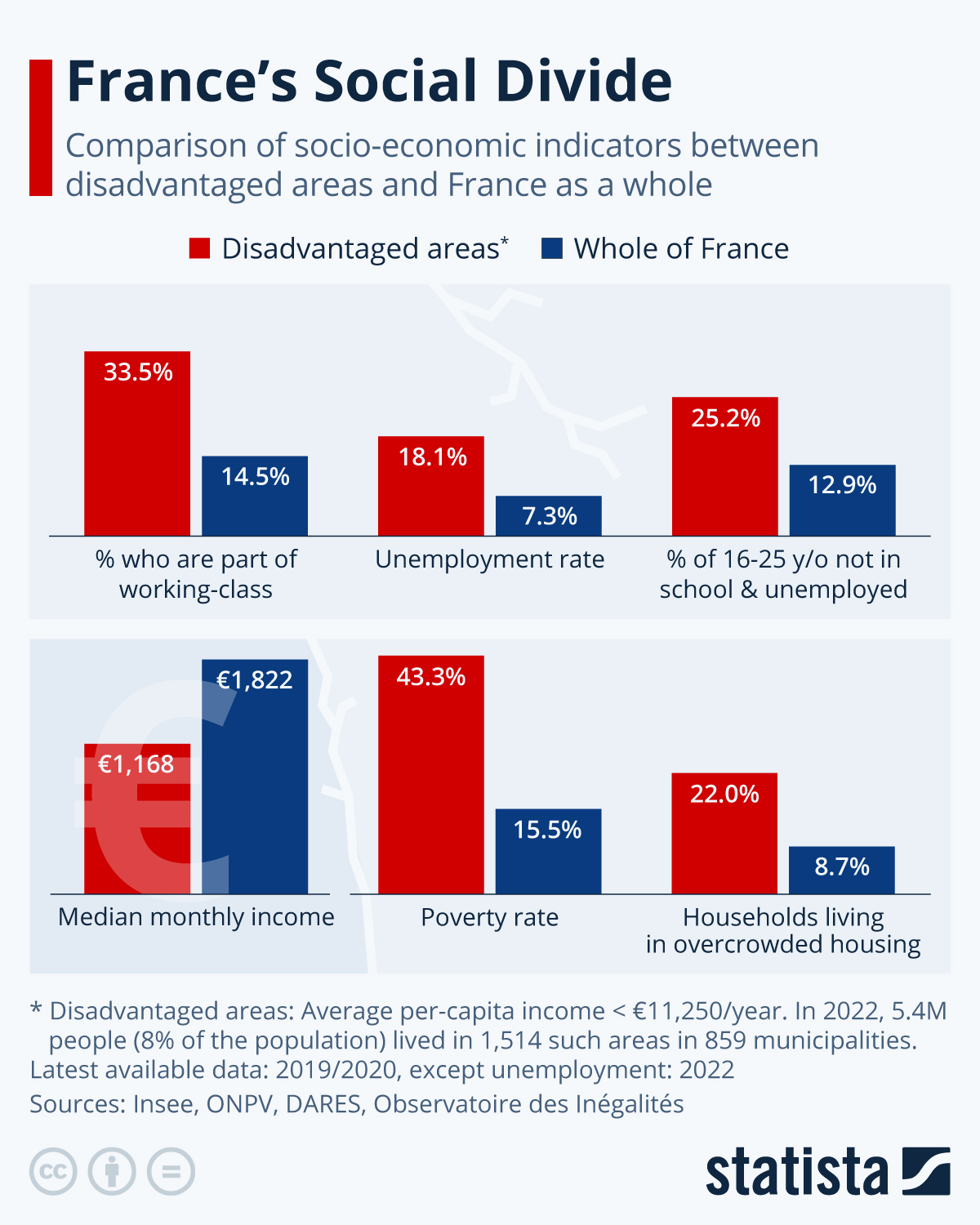
The chart is a bar chart titled 'France's Social Divide,' comparing socio-economic indicators between disadvantaged areas and the whole of France. It comprises two sections: the first section includes three bar groups representing the percentage of people part of the working-class, unemployment rate, and percentage of 16-25-year-olds not in school and unemployed. The second section includes three bar groups representing median monthly income, poverty rate, and households living in overcrowded housing. Each bar group contains two bars: one for disadvantaged areas (red) and one for the whole of France (blue). The data indicate that disadvantaged areas have higher percentages of working-class individuals (33.5% vs. 14.5%), unemployment (18.1% vs. 7.3%), and young people not in school and unemployed (25.2% vs. 12.9%). They also show a lower median monthly income (€1,168 vs. €1,822), a higher poverty rate (43.3% vs. 15.5%), and a higher percentage of households living in overcrowded housing (22.0% vs. 8.7%). The chart highlights significant disparities in socio-economic conditions between disadvantaged areas and the rest of France, emphasizing the challenges faced by these communities.
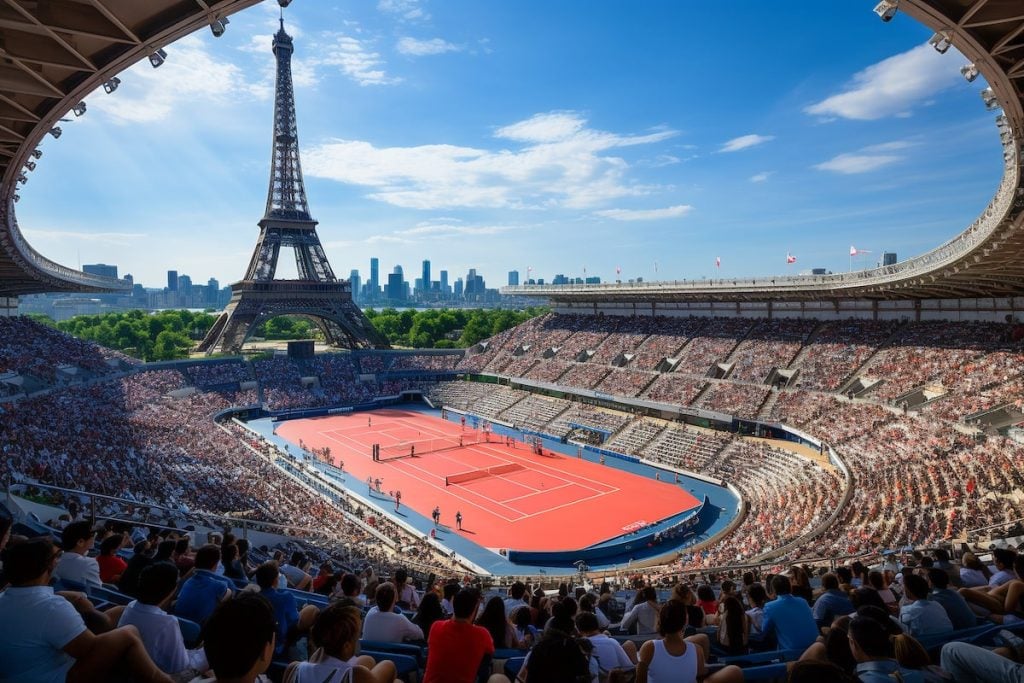
{ "id": "66cf17260e4b4abe8f0c3de97ea5864c", "created": 1764253564, "model": "ministral-14b-2512", "usage": { "prompt_tokens": 3051, "total_tokens": 3312, "completion_tokens": 261 }, "object": "chat.completion", "choices": [ { "index": 0, "finish_reason": "stop", "message": { "role": "assistant", "tool_calls": null, "content": "The two images you provided both feature the Eiffel Tower, but they depict different scenes and perspectives:\n\n1. **First Image:**\n - This image shows a close-up, clear view of the Eiffel Tower from a low angle, emphasizing its intricate iron lattice structure.\n - The background is a clear blue sky, and the focus is solely on the Eiffel Tower itself.\n - There are no other elements such as crowds or sporting events visible.\n\n2. **Second Image:**\n - This image captures the Eiffel Tower in the background, but it is part of a larger scene that includes a tennis stadium.\n - The stadium is filled with spectators, indicating a major tennis event, likely the French Open, which is held at Roland Garros in Paris.\n - The Eiffel Tower is visible in the distance behind the stadium, adding a sense of scale and context to the event.\n - The sky is partly cloudy, and the stadium is bustling with activity, contrasting with the serene and solitary depiction of the Eiffel Tower in the first image.\n\nIn summary, the first image focuses on the architectural details of the Eiffel Tower, while the second image situates the Eiffel Tower within a lively, crowded sports event setting." } } ]}
The two images you provided both feature the Eiffel Tower, but they depict different scenes and perspectives:
1.
First Image:
This image shows a close-up, clear view of the Eiffel Tower from a low angle, emphasizing its intricate iron lattice structure.
The background is a clear blue sky, and the focus is solely on the Eiffel Tower itself.
There are no other elements such as crowds or sporting events visible.
1.
**Second Image:
This image captures the Eiffel Tower in the background, but it is part of a larger scene that includes a tennis stadium.
The stadium is filled with spectators, indicating a major tennis event, likely the French Open, which is held at Roland Garros in Paris.
The Eiffel Tower is visible in the distance behind the stadium, adding a sense of scale and context to the event.
The sky is partly cloudy, and the stadium is bustling with activity, contrasting with the serene and solitary depiction of the Eiffel Tower in the first image.
In summary, the first image focuses on the architectural details of the Eiffel Tower, while the second image situates the Eiffel Tower within a lively, crowded sports event setting.
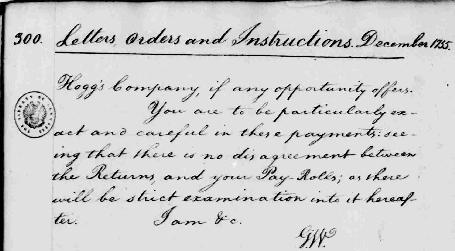
{ "id": "e8f4bf33baf3474abfcd0c24d4a56939", "created": 1764254337, "model": "ministral-14b-2512", "usage": { "prompt_tokens": 168, "total_tokens": 238, "completion_tokens": 70 }, "object": "chat.completion", "choices": [ { "index": 0, "finish_reason": "stop", "message": { "role": "assistant", "tool_calls": null, "content": "300. Letters Orders and Instructions, December 1855.\n\nHogg's Company if any opportunity offers,\n\nYou are to be particularly exact and careful in these payments, seeing that there is no disagreement between the Returns and your Pay Rolls; or there will be strict examination into it hereafter.\n\nJam & Co.\n\nJ.F." } } ]}
1.
Letters Orders and Instructions, December 1855.
Hogg's Company if any opportunity offers,
You are to be particularly exact and careful in these payments, seeing that there is no disagreement between the Returns and your Pay Rolls; or there will be strict examination into it hereafter.
Jam & Co.
J.F.
curl https://api.mistral.ai/v1/chat/completions \
  -H "Content-Type: application/json" \
  -H "Authorization: Bearer $MISTRAL_API_KEY" \
  -d '{
    "model": "ministral-14b-latest",
    "messages": [
            {
                "role": "system",
                "content": [
                    {"type": "text",
                     "text" : "Extract the text elements described by the user from the picture, and return the result formatted as a json in the following format : {name_of_element : [value]}"
                    }
                ]
            },
            {
                "role": "user",
                "content": [
                    {
                        "type": "text",
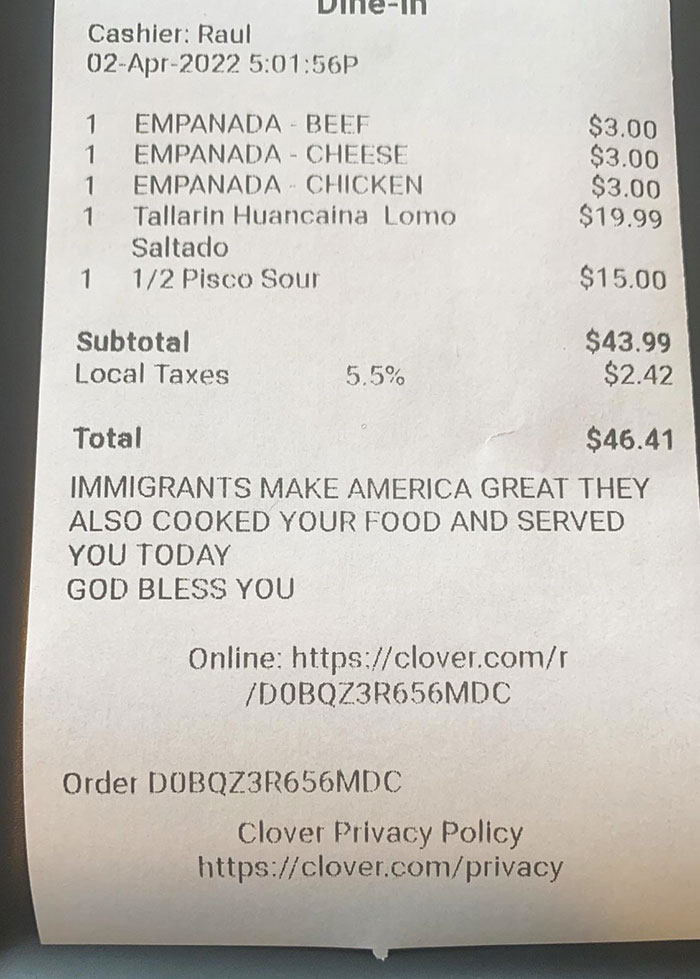
                        "text": "From this restaurant bill, extract the order id, item names and associated prices, and total price and return it as a string in a Json object"
                    },
                    {
                        "type": "image_url",
                        "image_url": "/images/food-receipt.jpg"
                    }
                ]
            }
        ],
    "response_format":
      {
        "type": "json_object"
      }
  }'
The price is calculated using the same pricing as input tokens per image, with each image being tokenized.
Depending on the model and resolution, an image will be tokenized differently. Below is a summary.
Model
Max Resolution
≈ Formula
≈ N Max Tokens
Mistral Large 3
1540x1540
≈ (ResolutionX * ResolutionY) / 784
≈ 3025
Mistral Small 3.2
1540x1540
≈ (ResolutionX * ResolutionY) / 784
≈ 3025
Mistral Medium 3
1540x1540
≈ (ResolutionX * ResolutionY) / 784
≈ 3025
Ministral 3
1540x1540
≈ (ResolutionX * ResolutionY) / 784
≈ 3025
Pixtral Large
1024x1024
≈ (ResolutionX * ResolutionY) / 256
≈ 4096
Pixtral 12B
1024x1024
≈ (ResolutionX * ResolutionY) / 256
≈ 4096
If the resolution of the image sent is higher than the maximum resolution of the model, the image will be downscaled to its maximum resolution. An error will be sent if the resolution is higher than 10000x10000.
No, they are designed to understand and analyze images, not to generate them.
We currently support the following image formats:
PNG (.png)
JPEG (.jpeg and .jpg)
WEBP (.webp)
Non-animated GIF with only one frame (.gif)
The current file size limit is 10Mb.
The maximum number images per request via API is 8.