- Models and inference
- Conversations
Reasoning
Reasoning
Reasoning is the next step of CoT (Chain of Thought), naturally used to describe the logical steps generated by the model before reaching a conclusion. Reasoning strengthens this characteristic by going through training steps that encourage the model to generate chains of thought freely before producing the final answer. This allows models to explore the problem more profoundly and ultimately reach a better solution to the best of their ability by using extra compute time to generate more tokens and improve the answer—also described as Test Time Computation.
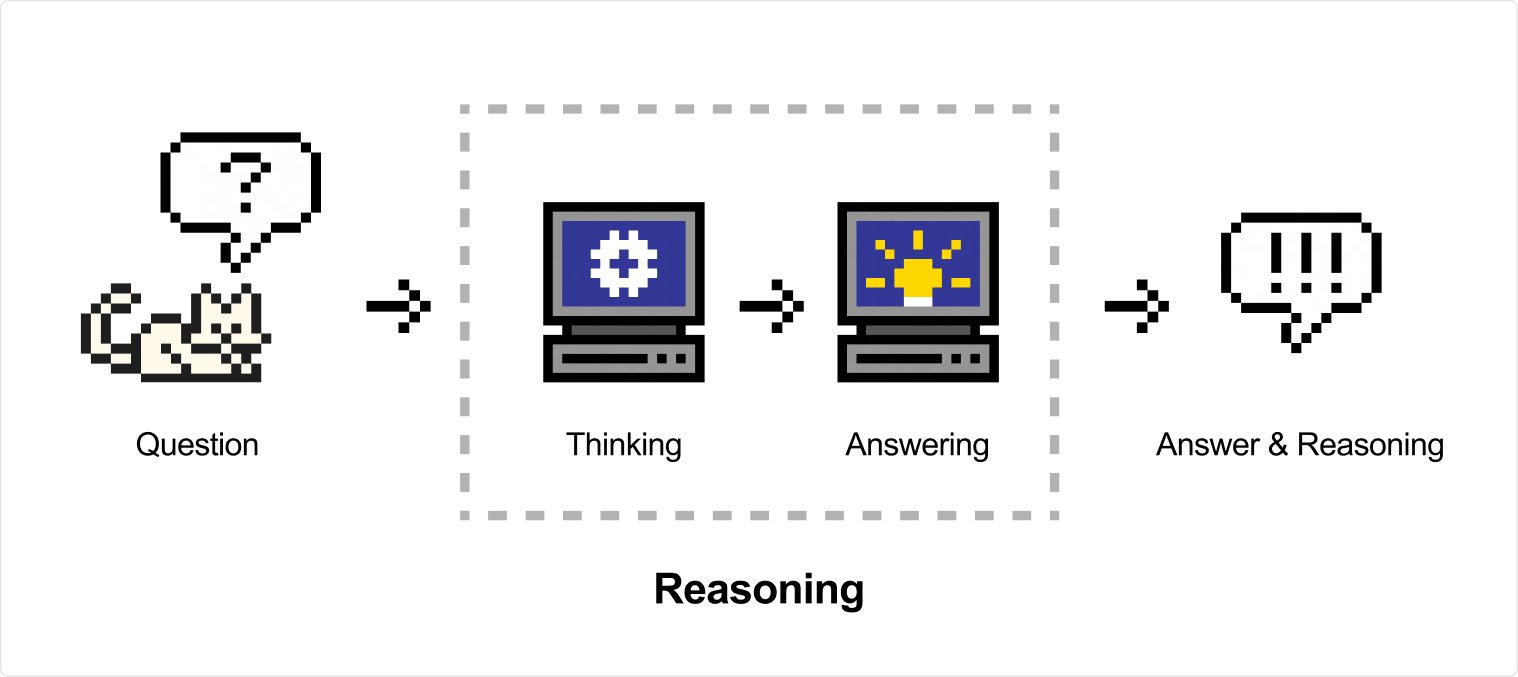
They excel at complex use cases like math and coding tasks, but can be used in a wide range of scenarios to solve diverse problems. The output of reasoning models includes a reasoning chunk with the model's thinking traces, followed by the final answer.
Earlier Magistral models with native reasoning have been deprecated. See Native reasoning (deprecated).
Before continuing, we recommend reading the Chat Completions documentation to learn more about the chat completions API and how to use it before proceeding.
Before you start
Model
- Mistral Small 4 (mistral-small-2603): Supports adjustable reasoning via the reasoning_effort parameter. No extra configuration required — just add the parameter to any chat completion request.
- Mistral Medium 3.5 (mistral-medium-3-5): Supports adjustable reasoning via the reasoning_effort parameter. For agentic and code use cases, reasoning_effort="high" is recommended.
- Mistral Large 4 (mistral-large-4-0): Supports low, medium, and high reasoning effort. We recommend reasoning_effort="high" for the best quality (see Mistral Large 4 reasoning effort).
- zai-glm-5-3: Supports adjustable reasoning via the reasoning_effort parameter. Supported values are low, high, and max (see note below).
- GLM 5.3 Flash (zai-glm-5-3-flash): Supports low, high, and max reasoning effort. none is not supported.
The reasoning_effort parameter controls how much compute the model spends reasoning. Supported values and how reasoning is surfaced in the output depend on the model. For mistral-small-2603 and mistral-medium-3-5:
- reasoning_effort = "high": The response includes a full thinking chunk before the final answer, at the cost of increased token usage.
- reasoning_effort = "none": The model thinks minimally and the thinking chunk is omitted from the response.
zai-glm-5-3 supports low, high, and max — not none. Unlike the none mode on Mistral Small and Mistral Medium, message.content is always returned as a list of chunks (thinking + text) regardless of the reasoning_effort value; there is no plain-string mode. The response shape follows the same chunk-list pattern described in Handling thinking chunks.
reasoning_effort is also available on the Agents and Conversations endpoints via the API, inside the completion_args field.
Mistral Large 4 reasoning effort
Mistral Large 4 (mistral-large-4 / mistral-large-4-0) supports three reasoning levels:
reasoning_effort | When to use it |
|---|---|
| low | Minimize reasoning compute for simpler tasks. |
| medium | Balance reasoning quality with token usage and latency. |
| high | Use the most reasoning compute for complex tasks. Recommended default for the best quality. |
Set reasoning_effort="high" explicitly as your starting point, then consider medium or low when token usage or latency is more important. If you omit reasoning_effort, Mistral Large 4 uses high. See the model card for Python, TypeScript, and curl examples.
This ladder applies only to Mistral Large 4, not to all Mistral models. Mistral Large 4 does not accept none, minimal, xhigh, or max; these are not aliases for its supported levels. The API-wide enum and SDKs include values used by other models, so a value appearing in the enum does not mean every model accepts it. In particular, zai-glm-5-3 continues to support low, high, and max.
Migrating from Mistral Large 4 Preview's none level? Mistral Large 4 always reasons, so no level matches none. Use low for the least reasoning. It still returns a thinking chunk and uses reasoning tokens, so expect more latency and output tokens than with none. high is unchanged. You can also use the new medium effort to balance quality, token usage, and latency for everyday tasks.
Usage
Reasoning with chat completions
Here is an example via our chat completions endpoint:
# Not available in the V1 SDK (mistralai 1.x).
# This feature requires the V2 SDK: pip install "mistralai>=2", then use the V2 tab.
# Migration guide: https://docs.mistral.ai/resources/migration-guides
{
  "id":"0d93cd053f4c4b3ca627ccd07cf2f18c",
  "created":1773842038,
  "model":"mistral-small-2603",
  "usage":
    {
      "prompt_tokens":77,
      "total_tokens":1191,
      "completion_tokens":1114,
      "prompt_tokens_details":
        {
          "cached_tokens":0
          }
    },
  "object":"chat.completion",
  "choices":
    [
      {
        "index":0,
        "finish_reason":"stop",
        "message":
          {
            "role":"assistant",
            "tool_calls":null,
            "content":
            [
              {"type":"thinking",
              "thinking":
                [
                  {
                    "type":"text",
                    "text":"Okay, let's try to figure out John's age. So, John is one of 4 children. There are three sisters and one brother (John). Wait, the problem says \"the first sister,\" \"the second sister,\" \"the third sister,\" so that means there are three sisters and John is the brother. So total four children: three sisters and John.\n\nFirst, the first sister is 4 years old. Let's note that down. Let's call the sisters S1, S2, S3, and John is J.\n\nGiven:\n- S1 = 4 years old (current age)\n- Next year, the second sister (S2) will be twice as old as the first sister (S1). Wait, \"next year\" meaning one year from now. So next year, S1 will be 5, and S2 will be twice that, so 10? Wait, but let's check.\n\nWait, the problem says: \"Next year, the second sister will be twice as old as the first sister.\" So next year, S2's age = 2 * S1's age next year.\n\nS1 is currently 4, so next year S1 will be 5. Therefore, next year S2 will be 2*5=10. Therefore, S2's current age is 10 - 1 = 9 years old.\n\nWait, let's confirm that. If S2 is currently X years old, then next year S2 will be X+1. At that time, S1 will be 4+1=5. So X+1 = 2*5 => X+1=10 => X=9. So S2 is currently 9.\n\nNext, \"The third sister is two years older than the second sister.\" So S3 = S2 + 2. Since S2 is 9, S3 is 11.\n\nThen, \"The third sister is half the age of her older brother.\" The older brother is John, since John is a brother (assuming he's older than the sisters; but wait, could John be younger? Wait, the problem says \"her older brother,\" so the brother is older than the third sister. So John is older than S3.\n\nSo S3 = (1/2) * J => J = 2 * S3.\n\nSince S3 is 11, then J = 22.\n\nWait, let's check all steps again.\n\nCurrent ages:\n\nS1 = 4\n\nNext year, S1 will be 5. At that time, S2 will be twice S1's age next year, so 10. Therefore, S2's current age is 10 - 1 = 9.\n\nS3 = S2 + 2 = 9 + 2 = 11.\n\nS3 is half the age of her older brother (John), so John's age is 2 * 11 = 22.\n\nSo John is 22 years old.\n\nWait, but let's make sure there's no mistake here. Let's verify each statement with these ages.\n\nFirst sister is 4: correct.\n\nNext year, first sister will be 5. Second sister next year will be 9 + 1 = 10, which is twice 5: correct.\n\nThird sister is two years older than second sister: 9 + 2 = 11, correct.\n\nThird sister (11) is half the age of her older brother: so brother is 22, which is older than 11: correct.\n\nSo all conditions are satisfied. Therefore, John is 22."}]},{"type":"text","text":"Let's denote the ages of the sisters as follows:\n- \\( S_1 \\): age of the first sister\n- \\( S_2 \\): age of the second sister\n- \\( S_3 \\): age of the third sister\n- \\( J \\): age of John\n\nFrom the problem statement, we have the following information:\n1. The first sister is currently 4 years old: \\( S_1 = 4 \\).\n2. Next year, the second sister will be twice as old as the first sister: \\( S_2 + 1 = 2 \\times (S_1 + 1) \\).\n3. The third sister is two years older than the second sister: \\( S_3 = S_2 + 2 \\).\n4. The third sister is half the age of her older brother: \\( S_3 = \\frac{1}{2}J \\).\n\nFirst, we calculate the age of the second sister:\n\\[ S_2 + 1 = 2 \\times (4 + 1) \\]\n\\[ S_2 + 1 = 2 \\times 5 \\]\n\\[ S_2 + 1 = 10 \\]\n\\[ S_2 = 9 \\]\n\nNext, we calculate the age of the third sister:\n\\[ S_3 = S_2 + 2 \\]\n\\[ S_3 = 9 + 2 \\]\n\\[ S_3 = 11 \\]\n\nFinally, we calculate John's age:\n\\[ S_3 = \\frac{1}{2}J \\]\n\\[ 11 = \\frac{1}{2}J \\]\n\\[ J = 22 \\]\n\nTherefore, John is \\(\\boxed{22}\\) years old."
                    }
                  ]
            }
        }
    ]
}
Handling thinking chunks
When reasoning_effort is set to "high", the response message.content is a list of chunks instead of a plain string. Two chunk types appear:
- ThinkChunk (type: "thinking"): contains the model's reasoning trace. The thinking field is itself a list of TextChunk objects.
- TextChunk (type: "text"): contains the final answer.
When reasoning_effort is "none", message.content is a plain str with no thinking trace.
Parsing the response
from mistralai.client.models import TextChunk, ThinkChunk

# Assuming chat_response from the example above
content = chat_response.choices[0].message.content

# reasoning_effort="none" returns a plain string
if isinstance(content, str):
    print(content)
else:
    for chunk in content:
        if isinstance(chunk, ThinkChunk):
            print("--- thinking ---")
            for inner in chunk.thinking:
                if isinstance(inner, TextChunk):
                    print(inner.text)
            print("--- /thinking ---")
        elif isinstance(chunk, TextChunk):
            print(chunk.text)
Streaming
When streaming, delta.content changes shape during the response:
1.
Thinking phase: delta.content is a list containing a ThinkChunk2.
Transition: a single list containing both a closing ThinkChunk and the first TextChunk3.
Answer phase: delta.content is a plain string
import os
from mistralai.client import Mistral
from mistralai.client.models import TextChunk, ThinkChunk

client = Mistral(api_key=os.environ["MISTRAL_API_KEY"])

in_thinking = False

for event in client.chat.stream(
    model="mistral-large-4-0",
    messages=[{"role": "user", "content": "What is 17 * 23?"}],
    reasoning_effort="high",
):
    delta = event.data.choices[0].delta.content
    if not delta:
        continue

    # After thinking ends, delta is a plain string
    if isinstance(delta, str):
        if in_thinking:
            print("\n--- /thinking ---")
            in_thinking = False
        print(delta, end="", flush=True)
        continue

    # During thinking, delta is a list of chunks
    for chunk in delta:
        if isinstance(chunk, ThinkChunk):
            if not in_thinking:
                print("--- thinking ---")
                in_thinking = True
            for inner in chunk.thinking:
                if isinstance(inner, TextChunk):
                    print(inner.text, end="", flush=True)
        elif isinstance(chunk, TextChunk):
            if in_thinking:
                print("\n--- /thinking ---")
                in_thinking = False
            print(chunk.text, end="", flush=True)
Multi-turn conversations
When building multi-turn conversations with reasoning, always replay the full assistant message (including ThinkChunk) back into the message history. Dropping the reasoning trace across turns degrades model performance.
from mistralai.client import Mistral
from mistralai.client.models import TextChunk, ThinkChunk, UserMessage

client = Mistral(api_key="your-api-key", timeout_ms=300_000)

messages = []

for user_text in ["What is 17 * 23?", "Now multiply that by 3."]:
    messages.append(UserMessage(content=user_text))

    response = client.chat.complete(
        model="mistral-large-4-0",
        messages=messages,
        reasoning_effort="high",
    )

    assistant_message = response.choices[0].message

    # Print only the final answer (for display purposes)
    content = assistant_message.content
    if isinstance(content, str):
        print(content)
    else:
        answer = "".join(
            c.text for c in (content or []) if isinstance(c, TextChunk)
        )
        print(answer)

    # IMPORTANT: append the full assistant message to history.
    # This preserves ThinkChunk so the model can see its own
    # reasoning trace in subsequent turns.
    # Do NOT rebuild the message with only the answer text.
    messages.append(assistant_message)
--- Turn 1: "What is 17 * 23?" ---
Usage: prompt=25, completion=187

ThinkChunk:
  Let me think about this multiplication problem. I know that
  17 times 20 is 340, and 17 times 3 is 51. So, if I add those
  together, 340 + 51 = 391. So, 17 * 23 should be 391.

TextChunk:
  17 * 23 = 391.

--- Turn 2: "Now multiply that by 3." ---
Usage: prompt=221, completion=143

ThinkChunk:
  The user wants me to multiply the previous result, which was
  391, by 3.
  391 * 3:
  - 300 * 3 = 900
  - 90 * 3 = 270
  - 1 * 3 = 3
  900 + 270 + 3 = 1173

TextChunk:
  391 * 3 = 1173.
Notice how the prompt token count grows between turns:
- Turn 1: prompt=25 — just the user message
- Turn 2: prompt=221 — the original user message (25) + the full assistant reply from turn 1 including its ThinkChunk (187) + the new user message (9) = 221
The 187 completion tokens from turn 1 are replayed as prompt tokens in turn 2 because we appended the full assistant_message (ThinkChunk + TextChunk) to the history. This is what allows the model to correctly reference "the previous result" without ambiguity.
Do not strip ThinkChunk from assistant messages before replaying them. The model relies on the reasoning trace to maintain coherence across turns. Stripping them increases token efficiency but significantly degrades output quality.