Fine-tuning API (legacy)
Deprecated
This feature is deprecated and is no longer actively supported.
When creating an application with an LLM, you may want to customize the model to better fit your use case. This guide will walk you through the process of customizing a model for your application.
Overview
How to build an application with a custom model
The following is a quick guide on how to build an application with a custom model. Our goal is to help developers build product operations for LLMs to go from a prototype to deployment.
AI is a tool, building applications that harness AI make them more useful and practical to your end users.
Before LLMs, AI applications were built around personalization, precision, and prediction. Traditional AI applications are catered towards predicting your next choice and recommending it to you based on your previous behavior and “customers like you”.
In contrast, LLM applications are built around Human-AI collaboration. As a developer and the end user, you have more agency in the customisation of your product. You can create something that did not exist before.
Applications built with custom LLMs require an iterative development cycle, relying on continuous end user feedback and rigorous evals to ensure that your custom model behavior is aligned to the intended application behavior.
We provide a few developer examples of model customization via Fine-Tuning here.
Key Terms
Before we get started, let’s define key terms:
Application behavior can be defined as the user interaction. It takes into account usability, performance, safety, and adaptability. Application behavior includes Objectives and Values.
Model behavior can be defined as the expected, appropriate, and acceptable way of an LLM acting in a specific context or application boundaries. Model behavior includes Objectives and Values.
Objectives determine whether the model behavior is in line with the expected application behavior.
Values denotes the developers’ intended policy for the model and application. This can be a set of rules, a Constitution, or even a fictional character’s morals.
Steerability: three methods
There are several techniques (with varying levels of engineering complexity) available to steer model behavior within your application context. We recommend leveraging the three methods below to do so:
- System prompt
- Tune a model
- Deploy a moderation layer for input/output processing
A System Prompt is a method to provide context, instructions, and guidelines to your model before the model is tasked with user input data (prompt guide). By using a system prompt, you can steer the model to better align to your intended product behavior - whether the application is a conversation or task, you can specify a persona, personality, tone, values, or any other relevant information that may help your model better perform in response to the end user’s input.
System prompts can include:
- Clear and specific instructions and objectives
- Roles, desired persona and tone
- Guidance on style e.g. verbosity constraints
- Value definitions e.g. policies, rules and safeguards
- Desired output format
Tuning a model is a method to train the model on your intended application behavior (fine-tuning guide). Two popular approaches for tuning LLMs:
- Application tuning, where you leverage a dataset of examples specified to the desired behavior of your application.
- Safety tuning, where you leverage a dataset that specifies both example inputs that might result in unsafe behavior, along with the desired safe output in that situation.
Deploying a classifier for content moderation is a third method to create guardrails for your model’s behavior within the application. This is considered an extra security measure in case you are deploying your application to end users.
Guide for tuning a model to your intended application behavior
Below you have a step-by-step guide to help you build your application with a custom model.
Step 1: Define your intended Application Behavior
The first step is to define the Objectives, i.e. how you want users to interact with your LLM product.
For inspiration, look to developers building with Mistral models:
- standalone products like conversational assistants;
- within pre-existing products to complete a specific task like “Summarize” or “Translate” or enable new capabilities like function calling with API access for “Knowledge retrieval”.
Learn how others are building products with custom models here: developer examples.
Step 2: Define your policies based on your Values
When you deploy an LLM within an end-user facing application, you identify which Values the model will need to abide by in order to meet your Content Moderation guidelines along with your user expectations.
For Content Moderation, look for inspiration from Llama Guard’s categories like Privacy, Hate, and Specialized Advice and ML Commons Taxonomy categories like CSAM and Hate.
Step 3: Create your Application Evals
The goal of your evals is to enable you to have better signal on whether your custom model’s behavior will meet your Application behavior before deployment. Identifying how you want to evaluate your custom model will help determine the type of training data to include in the fine-tuning.
There are two methods to evaluate an LLM:
- Automated Evals
- Metrics-based, similar to the public benchmark evaluations where you can derive a metric from pre-annotated data for example.
- LLM-based, where you leverage a different LLM like Mistral Large to evaluate or judge the output of your custom model.
- Human-based Evals, where you employ Content Annotators to evaluate or judge the output of your custom model and collect Human annotations.
For more on how to conduct an LLM Evaluation, check out our evaluation guide.
Step 4: Test your application behavior hypothesis with an MVP
Once you understand the intent of your custom LLM and the contours of how you want the model to behave, begin by testing your application hypothesis with Mistral Large and collect the interaction data to better understand how your end users may interact with your LLM. For example, many developers begin their process by creating a demo or MVP with limited access as a Public Preview.
For some applications, a system prompt is the best solution for an aligned model behavior. If you need help deciding between the two, look to our fine-tuning guide.
If a system prompt works creating a Custom Model, skip to Step 6.
Step 5: Tune for model alignment
Now that you have sense of the Application Behavior - Values and Objectives included - you are intending to adopt a custom model, you can begin the process of replacing Mistral Large for a smaller, custom model.
Look to our guide on how to prepare your Tuning dataset.
Areas to consider when preparing your Tuning Dataset for better model performance:
- Data Comprehension, include all content policies for each application use case in your dataset (such as question-answering, summarization, and reasoning).
- Data Variety, ensure dataset diversity across query length, structure, tone, topic, levels of complexity, and demographic considerations.
- Deduplication, remove duplicates to prevent your tuning data being memorized.
- Avoid Data Contamination, isolate evaluation data from the tuning dataset.
- Ethical Data Practices, provide clear labeling guidelines and Annotator diversity to minimize model errors and bias.
For content moderation, get started with open source datasets like Safety-Tuned LlaMAs.
At Mistral, we support two ways to customize our models:
- OSS with the FT Codebase
- Via the AI Studio
Head to our FT API within the AI Studio, upload and validate your training data. Run the job, and when completed, you can access your custom model via your own model API endpoint.
Step 6: Test your custom model with your Evals
Now that you have your custom model API endpoint, you can run Application Evals from Step 4. Depending on your Application, remember to include Safety Evals in your Eval set:
- Development Evaluations, include ongoing assessments during training and fine-tuning to compare model performance against launch criteria and evaluate the impact of mitigation strategies. These evaluations use adversarial queries or external academic benchmarks.
- Assurance Evaluations, set up governance and review assessments at key milestones by an external group. These standardized evaluations use strictly managed datasets and provide high-level insights for mitigation efforts. They test safety policies and dangerous capabilities, such as biohazards, persuasion, and cybersecurity.
- Red Teaming requires adversarial testing by specialist teams using less structured methods to discover potential weaknesses and improve risk mitigation and evaluation approaches.
- External Evaluations, includes assessments by independent, external domain experts to identify model limitations and stress-test performance.
Based on the model performance, either retrain your model with new training data to support better model performance or deploy into your application by switching the Mistral Large API with your custom model endpoint.
Step 7: Once deployed, continuously monitor and update
Continuously monitor and update your custom model, evals, and testing based on real life application data.
Congrats! You’ve deployed your custom model into your application.
Developer Examples
The following are developer examples from the startup community using our fine-tuning API. Check out our fine-tuning doc to learn the benefits of fine-tuning and how to use our fine-tuning API.
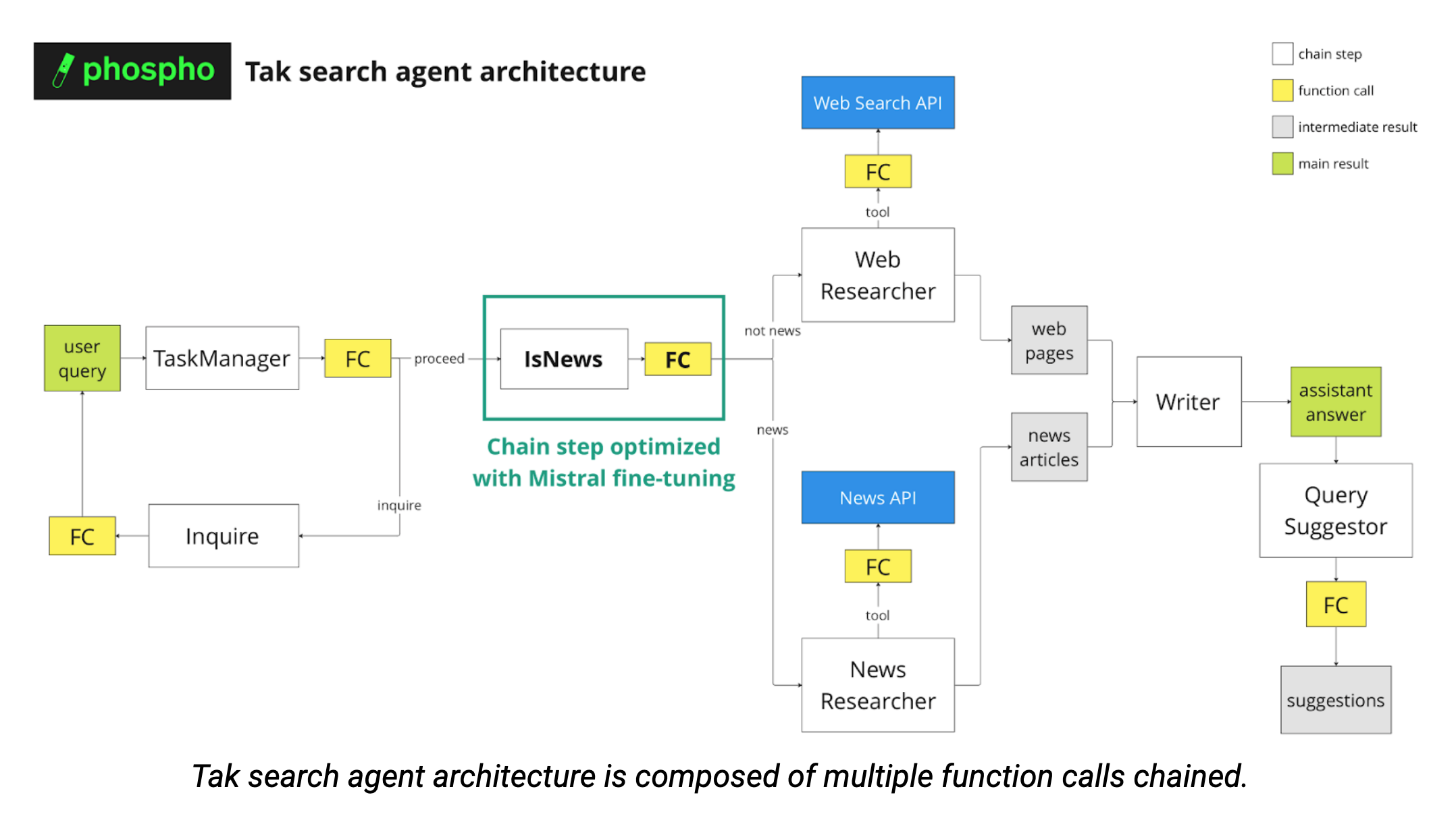
The video showcases the behavior of Tak. When a user inputs a query, Tak will use the LLM knowledge, a tool to search the web and a tool to fetch the news to generate the most relevant answer to the user query. Its behavior depends on the type of query by the user.
Description
Tak is a B2C internet search app powered by Mistral Large and other models with RAG and Function Calling.
In order to provide the most relevant answer to the user query, several function calls are performed to categorize the request (see diagram below). As the multiple agents are chained, ensuring consistently formatted outputs is crucial.
Company Description
At phospho, we developed the Tak chatbot as an experimental playground to test new phospho features and showcase the power of phospho analytics. A great thing is that you can use the data logged to phospho to finetune LLM models. We are phospho, an open-source text analytics platform for LLM apps. Companies of all sizes use phospho to understand what users do with their LLM app and how well the app performs at the product level.
Data
We used a dataset of user queries in Tak and the corresponding GPT-4-turbo function calls, collected and filtered through the phospho platform. We then divided the dataset into a train set (70%), an evaluation set (15%) and a test set (15%).
To determine the optimal training duration, we followed the rule of thumb that each token should be seen three times (in our case, 150 training steps, which is approximately 10 minutes).
For the learning rate, we used the suggested learning rate of 6e-5.
Eval
To evaluate our fine-tuned model, we run inference of the test set of our dataset, then use binary classification metrics (Accuracy, Recall, F1 score). We test whether we were able to align the behavior of Mistral 7b to the classification behavior of OpenAI GPT-4-turbo, while maintaining the expected structured output. Indeed, we removed the function calling.
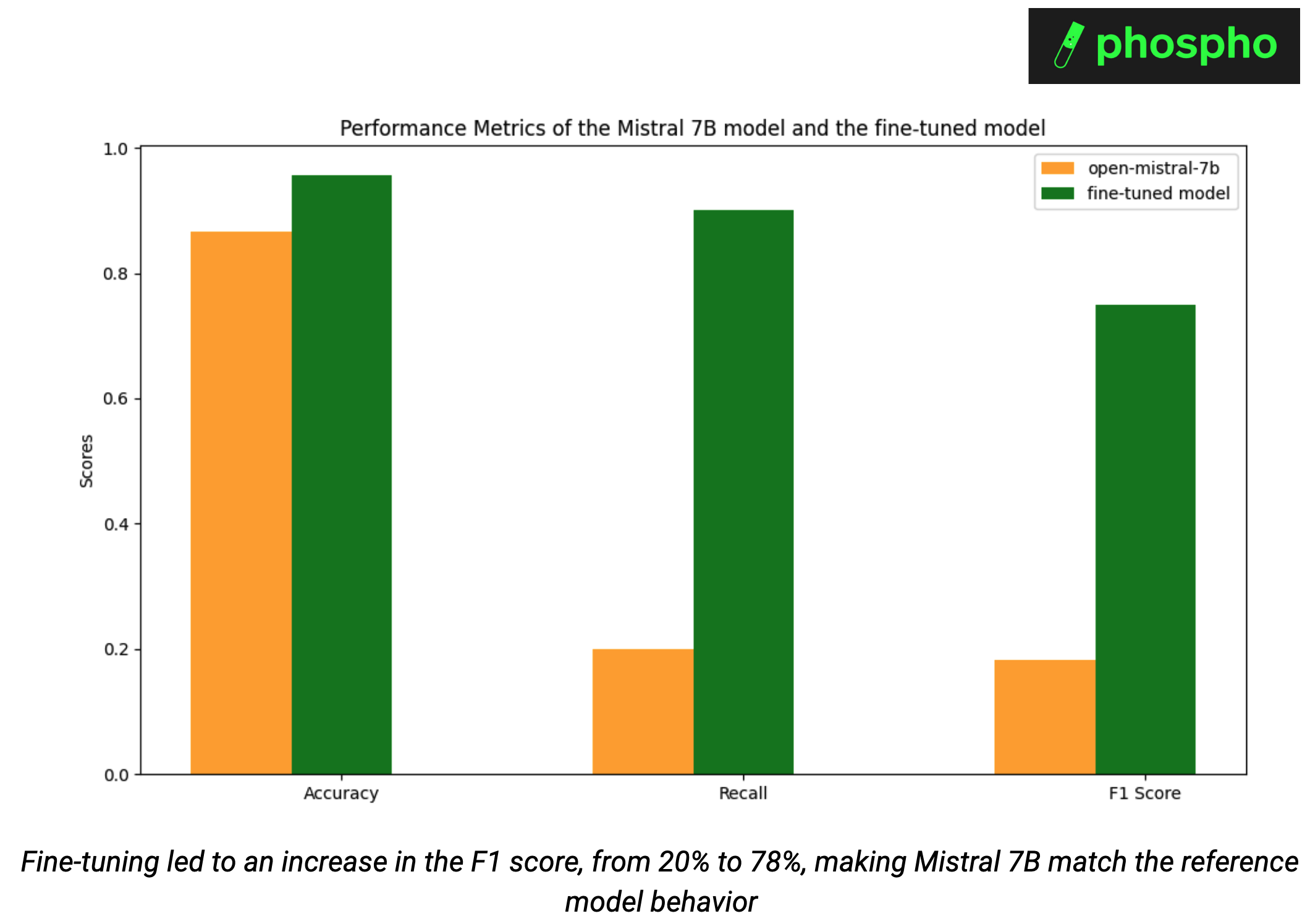
Fine-tuning made Mistral 7B match the reference model, increasing the F1 score from 20% to 78%. Without fine-tuning, Mistral 7B achieved 87% accuracy and 20% recall on our classification task. With the fine-tuned model, we achieved 96% accuracy and 90% recall.
As we fine-tuned the model to only answer with news_related or not_news_related, we do not need to use function calling anymore. This led to a 34% decrease in the number of tokens used excluding the user query, which further decreases costs.
Conclusion
In conclusion, by combining phospho data collection and labeling with Mistral's fine-tuning services, we significantly enhanced our ability to deliver precise and relevant answers to user queries while decreasing cost. We have successfully aligned the behavior of Mistral 7B with GPT-4-turbo. This fine-tuning process not only ensures consistent output formatting but also reduces operational costs by minimizing token usage.
If you also want to improve your RAG agent, we encourage you to try fine tuning with Mistral using the data collected and labeled with phospho. This can lead to significant improvement on your user experience.