Envoyez des images à des modèles dotés de capacités de vision via la Chat Completions API et analysez du contenu visuel en plus du texte.
Les capacités de vision permettent aux modèles d’analyser des images et de fournir des informations basées sur le contenu visuel, en plus du texte. Cette approche multimodale ouvre de nouvelles possibilités pour les applications qui nécessitent une compréhension à la fois textuelle et visuelle.
Nous proposons plusieurs modèles dotés de capacités de vision, tous disponibles via la Chat Completions API.
Pour l’analyse de documents, l’OCR et l’extraction de données, consultez Document AI.
Avant de commencer
Modèles recommandés avec capacités de vision
Mistral Large 4 via mistral-large-4-0
Mistral Large 3 via mistral-large-2512
Mistral Medium 3.1 via mistral-medium-2508
Mistral Small 3.2 via mistral-small-2506
Ministral 3 :
Ministral 3 14B via ministral-14b-2512
Ministral 3 8B via ministral-8b-2512
Ministral 3 3B via ministral-3b-2512
Envoyer une image
Utiliser les modèles de vision
Il existe deux façons d’envoyer une image à la Chat Completions API : en transmettant une URL ou en transmettant une image encodée en base64.
Avant de continuer, nous vous recommandons de lire la documentation Chat Completions pour en savoir plus sur l’API chat completions et son utilisation.
Si l’image est hébergée en ligne, vous pouvez simplement fournir l’URL publiquement accessible de l’image dans la requête. Cette méthode est simple et ne nécessite aucun encodage.
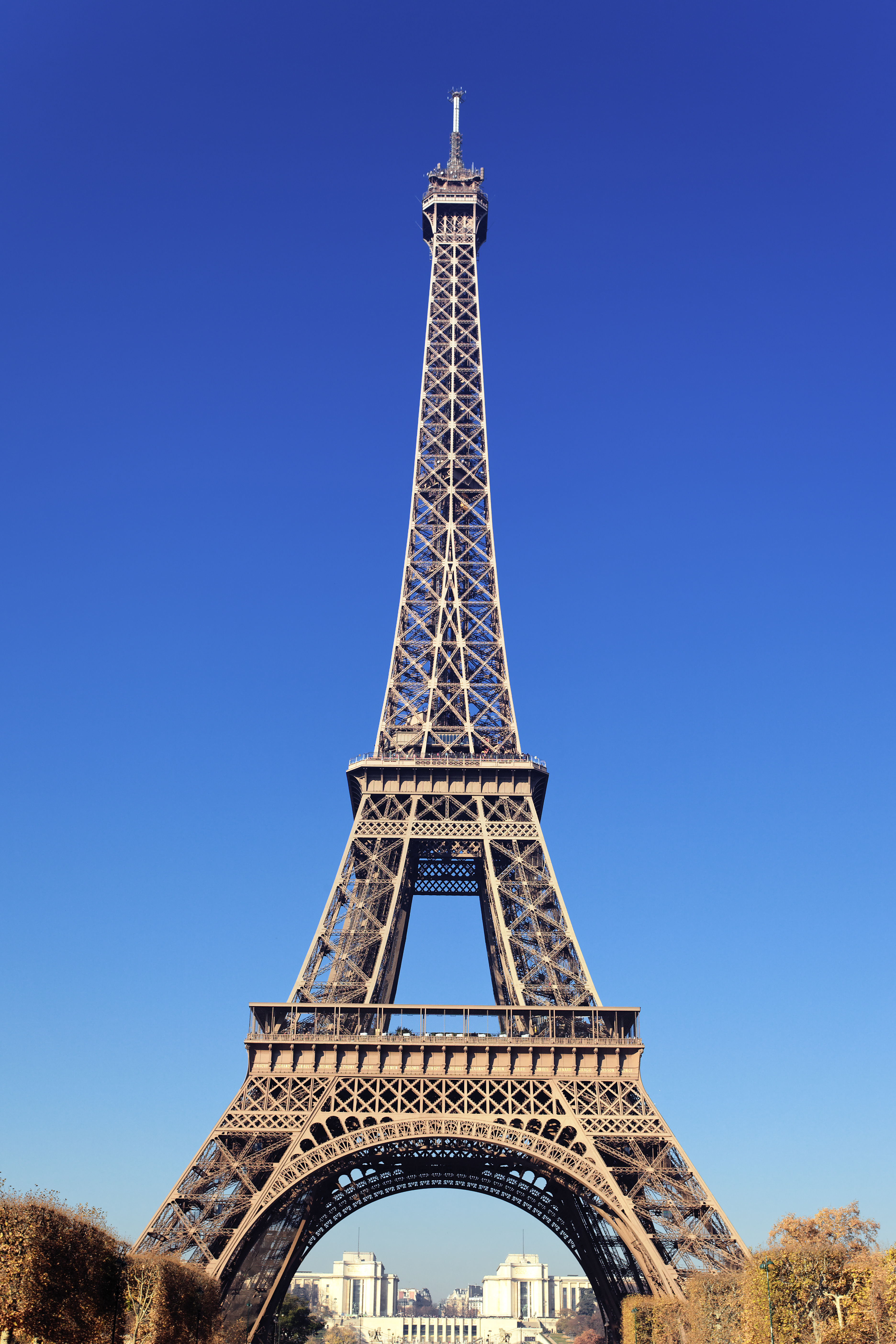
{ "id": "a8251fb1c4a64014b80141bd5685f6c7", "created": 1756318369, "model": "mistral-small-latest", "usage": { "prompt_tokens": 2099, "total_tokens": 2235, "completion_tokens": 136 }, "object": "chat.completion", "choices": [ { "index": 0, "finish_reason": "stop", "message": { "role": "assistant", "tool_calls": null, "content": "The image depicts the Eiffel Tower, an iconic landmark located in Paris, France. The photograph is taken from a low angle, looking up towards the sky, emphasizing the tower's impressive height and intricate iron lattice structure. The Eiffel Tower is composed of three main levels, each offering viewing platforms for visitors. The sky is clear and blue, providing a striking contrast to the brownish hue of the iron tower. The base of the tower is framed by trees, adding a touch of natural greenery to the scene. In the background, beyond the tower, some buildings are visible, indicating the urban setting of the Eiffel Tower in the heart of Paris." } } ]}
Si vous disposez d’une image ou d’un ensemble d’images stockés localement, vous pouvez les transmettre au modèle au format encodé en base64. L’encodage base64 est une méthode courante pour convertir des données binaires en texte facilement transmissible sur Internet. C’est particulièrement utile lorsque vous devez inclure des images dans des requêtes API.
import base64import requestsimport osfrom mistralai import Mistralapi_key = os.environ["MISTRAL_API_KEY"]model = "mistral-small-latest"client = Mistral(api_key=api_key)def encode_image(image_path): with open(image_path, "rb") as image_file: return base64.b64encode(image_file.read()).decode('utf-8')image_path = "eiffel-tower-paris.jpg" # path to your imagebase64_image = encode_image(image_path)messages = [ { "role": "user", "content": [ { "type": "text", "text": "What's in this image?" }, { "type": "image_url", "image_url": f"data:image/jpeg;base64,{base64_image}" } ] }]chat_response = client.chat.complete( model=model, messages=messages)
import base64import requestsimport osfrom mistralai.client import Mistralapi_key = os.environ["MISTRAL_API_KEY"]model = "mistral-small-latest"client = Mistral(api_key=api_key)def encode_image(image_path): with open(image_path, "rb") as image_file: return base64.b64encode(image_file.read()).decode('utf-8')image_path = "eiffel-tower-paris.jpg" # path to your imagebase64_image = encode_image(image_path)messages = [ { "role": "user", "content": [ { "type": "text", "text": "What's in this image?" }, { "type": "image_url", "image_url": f"data:image/jpeg;base64,{base64_image}" } ] }]chat_response = client.chat.complete( model=model, messages=messages)
import { Mistral } from "@mistralai/mistralai";import fs from 'fs';const apiKey = process.env["MISTRAL_API_KEY"];const client = new Mistral({ apiKey: apiKey });async function encodeImage(imagePath) { const imageBuffer = fs.readFileSync(imagePath); const base64Image = imageBuffer.toString('base64'); return base64Image;}const imagePath = "eiffel-tower-paris.jpg"; // path to your imageconst base64Image = await encodeImage(imagePath)const chatResponse = await client.chat.complete({ model: "mistral-small-latest", messages: [ { role: "user", content: [ { type: "text", text: "What's in this image?" }, { type: "image_url", imageUrl: "data:image/jpeg;base64," + base64Image, }, ], }, ],});
{ "id": "fc486ba226804d92b07d1b5ba8f18ee7", "created": 1756318720, "model": "mistral-small-latest", "usage": { "prompt_tokens": 2099, "total_tokens": 2214, "completion_tokens": 115 }, "object": "chat.completion", "choices": [ { "index": 0, "finish_reason": "stop", "message": { "role": "assistant", "tool_calls": null, "content": "The image showcases the Eiffel Tower, an iconic landmark located in Paris, France. The photograph is taken from a low angle, emphasizing the tower's impressive height and intricate iron lattice structure. The sky is clear and blue, providing a striking contrast to the brownish hue of the Eiffel Tower. The base of the tower is visible, with its characteristic arches and detailed ironwork. In the background, some trees and buildings can be seen, adding depth to the image. The overall composition highlights the architectural beauty and grandeur of the Eiffel Tower." } } ]}
Cas d’usage
Vous trouverez ci-dessous quelques exemples de cas d’usage tirant parti des capacités de vision de nos modèles : de la compréhension de graphiques à l’extraction de données, les cas d’usage sont variés.
Ce sont des exemples simples dont vous pouvez vous inspirer pour créer vos propres cas d’usage. Pour l’OCR et les sorties structurées, consultez Document AI.
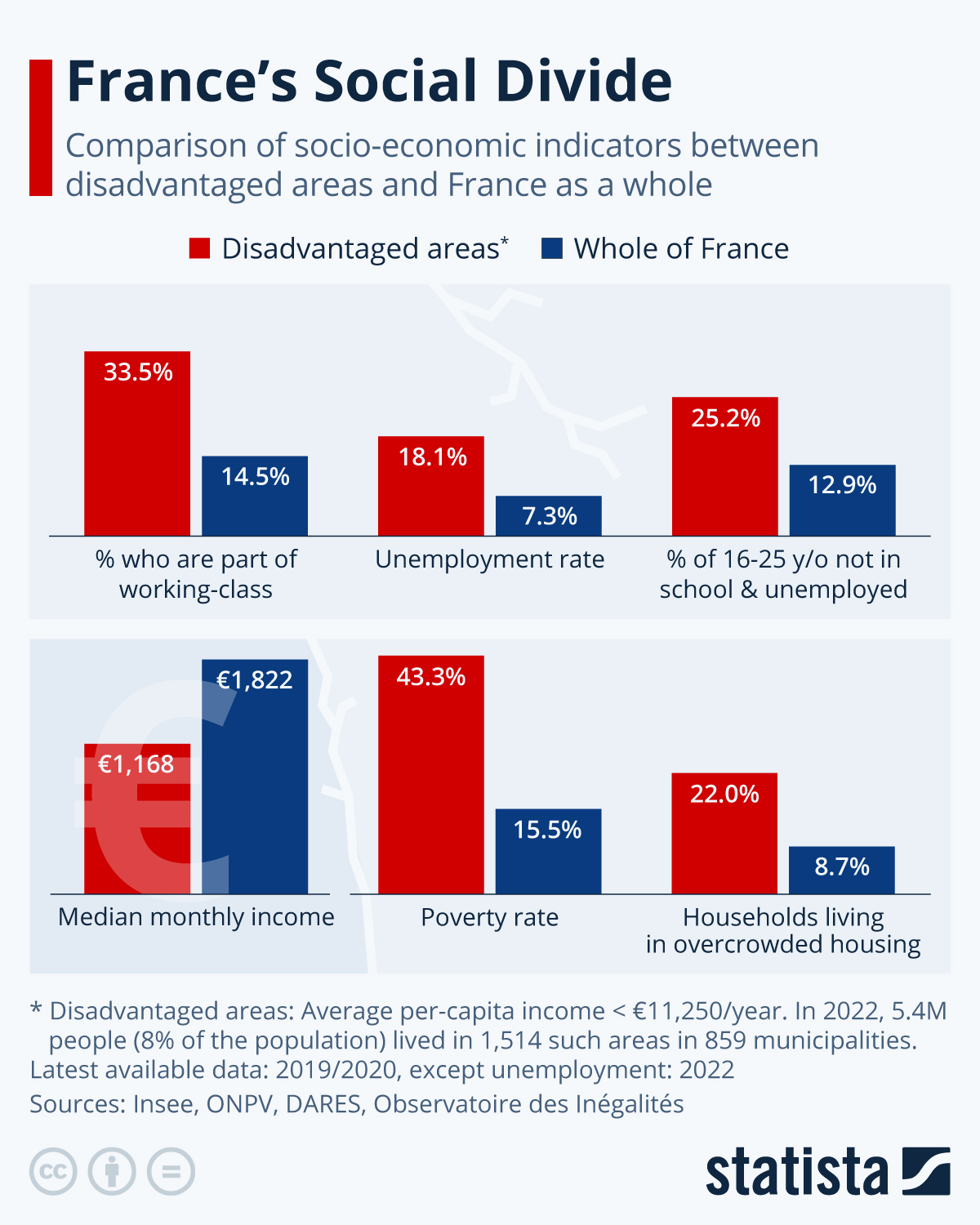
The chart is a bar chart titled 'France's Social Divide,' comparing socio-economic indicators between disadvantaged areas and the whole of France. It comprises two sections: the first section includes three bar groups representing the percentage of people part of the working-class, unemployment rate, and percentage of 16-25-year-olds not in school and unemployed. The second section includes three bar groups representing median monthly income, poverty rate, and households living in overcrowded housing. Each bar group contains two bars: one for disadvantaged areas (red) and one for the whole of France (blue). The data indicate that disadvantaged areas have higher percentages of working-class individuals (33.5% vs. 14.5%), unemployment (18.1% vs. 7.3%), and young people not in school and unemployed (25.2% vs. 12.9%). They also show a lower median monthly income (€1,168 vs. €1,822), a higher poverty rate (43.3% vs. 15.5%), and a higher percentage of households living in overcrowded housing (22.0% vs. 8.7%). The chart highlights significant disparities in socio-economic conditions between disadvantaged areas and the rest of France, emphasizing the challenges faced by these communities.
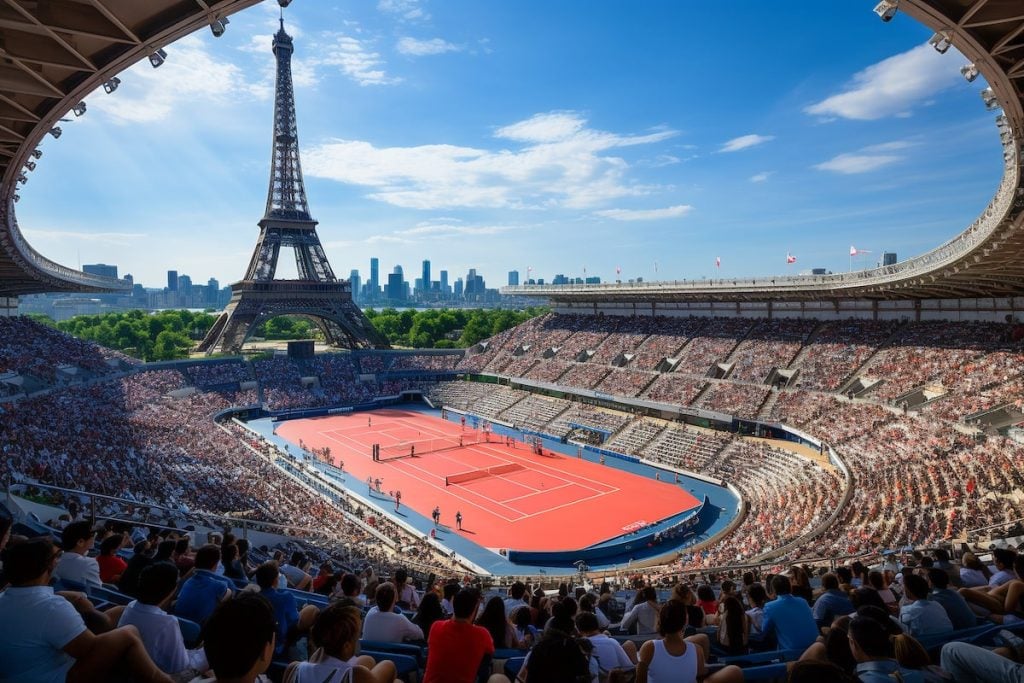
{ "id": "66cf17260e4b4abe8f0c3de97ea5864c", "created": 1764253564, "model": "ministral-14b-2512", "usage": { "prompt_tokens": 3051, "total_tokens": 3312, "completion_tokens": 261 }, "object": "chat.completion", "choices": [ { "index": 0, "finish_reason": "stop", "message": { "role": "assistant", "tool_calls": null, "content": "The two images you provided both feature the Eiffel Tower, but they depict different scenes and perspectives:\n\n1. **First Image:**\n - This image shows a close-up, clear view of the Eiffel Tower from a low angle, emphasizing its intricate iron lattice structure.\n - The background is a clear blue sky, and the focus is solely on the Eiffel Tower itself.\n - There are no other elements such as crowds or sporting events visible.\n\n2. **Second Image:**\n - This image captures the Eiffel Tower in the background, but it is part of a larger scene that includes a tennis stadium.\n - The stadium is filled with spectators, indicating a major tennis event, likely the French Open, which is held at Roland Garros in Paris.\n - The Eiffel Tower is visible in the distance behind the stadium, adding a sense of scale and context to the event.\n - The sky is partly cloudy, and the stadium is bustling with activity, contrasting with the serene and solitary depiction of the Eiffel Tower in the first image.\n\nIn summary, the first image focuses on the architectural details of the Eiffel Tower, while the second image situates the Eiffel Tower within a lively, crowded sports event setting." } } ]}
Les deux images que vous avez fournies montrent toutes deux la tour Eiffel, mais elles représentent des scènes et des perspectives différentes :
1.
Première image :
Cette image montre une vue rapprochée et nette de la tour Eiffel en contre-plongée, qui met en valeur sa structure complexe en treillis de fer.
L’arrière-plan est un ciel bleu dégagé, et l’attention se porte uniquement sur la tour Eiffel elle-même.
Aucun autre élément, comme une foule ou un événement sportif, n’est visible.
1.
**Deuxième image :
Cette image montre la tour Eiffel en arrière-plan, mais elle fait partie d’une scène plus vaste qui comprend un stade de tennis.
Le stade est rempli de spectateurs, ce qui indique un grand tournoi de tennis, probablement Roland-Garros, qui se tient à Paris.
La tour Eiffel est visible au loin derrière le stade, ce qui donne une idée de l’échelle et du contexte de l’événement.
Le ciel est partiellement nuageux et le stade est animé, ce qui contraste avec la représentation sereine et solitaire de la tour Eiffel dans la première image.
En résumé, la première image se concentre sur les détails architecturaux de la tour Eiffel, tandis que la seconde la situe dans le cadre d’un événement sportif animé et bondé.
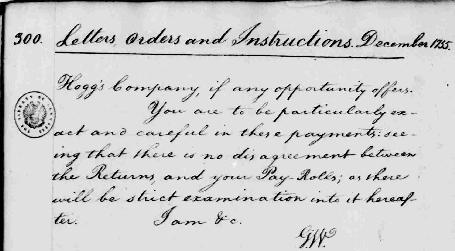
{ "id": "e8f4bf33baf3474abfcd0c24d4a56939", "created": 1764254337, "model": "ministral-14b-2512", "usage": { "prompt_tokens": 168, "total_tokens": 238, "completion_tokens": 70 }, "object": "chat.completion", "choices": [ { "index": 0, "finish_reason": "stop", "message": { "role": "assistant", "tool_calls": null, "content": "300. Letters Orders and Instructions, December 1855.\n\nHogg's Company if any opportunity offers,\n\nYou are to be particularly exact and careful in these payments, seeing that there is no disagreement between the Returns and your Pay Rolls; or there will be strict examination into it hereafter.\n\nJam & Co.\n\nJ.F." } } ]}
1.
Letters Orders and Instructions, December 1855.
Hogg's Company if any opportunity offers,
You are to be particularly exact and careful in these payments, seeing that there is no disagreement between the Returns and your Pay Rolls; or there will be strict examination into it hereafter.
Jam & Co.
J.F.
curl https://api.mistral.ai/v1/chat/completions \
  -H "Content-Type: application/json" \
  -H "Authorization: Bearer $MISTRAL_API_KEY" \
  -d '{
    "model": "ministral-14b-latest",
    "messages": [
            {
                "role": "system",
                "content": [
                    {"type": "text",
                     "text" : "Extract the text elements described by the user from the picture, and return the result formatted as a json in the following format : {name_of_element : [value]}"
                    }
                ]
            },
            {
                "role": "user",
                "content": [
                    {
                        "type": "text",
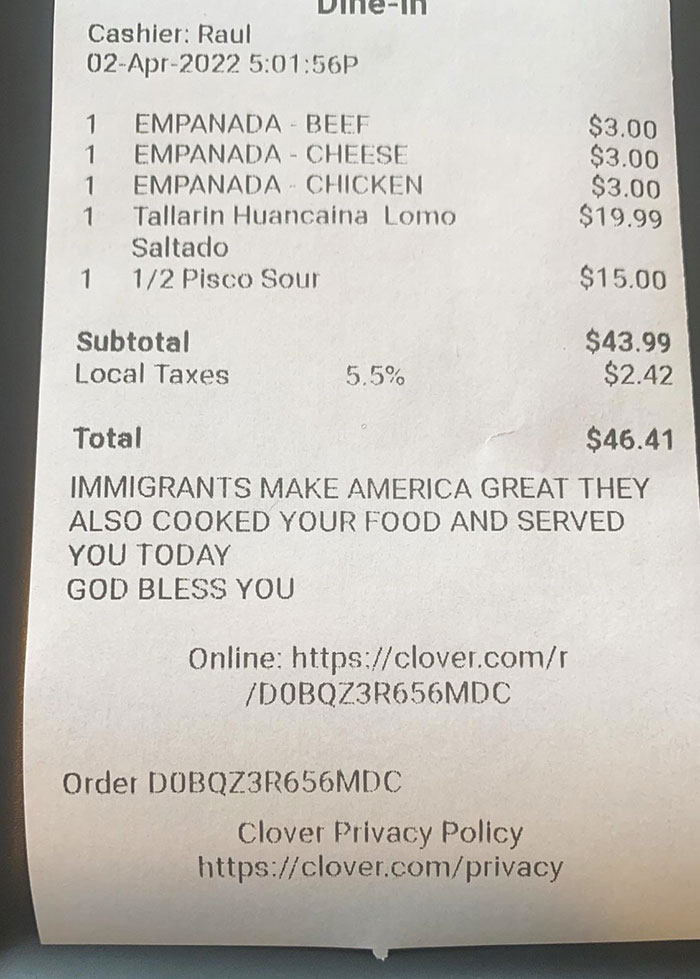
                        "text": "From this restaurant bill, extract the order id, item names and associated prices, and total price and return it as a string in a Json object"
                    },
                    {
                        "type": "image_url",
                        "image_url": "/images/food-receipt.jpg"
                    }
                ]
            }
        ],
    "response_format":
      {
        "type": "json_object"
      }
  }'
Le prix est calculé au même tarif que les tokens d’entrée, chaque image étant tokenisée.
Selon le modèle et la résolution, une image est tokenisée différemment. En voici un résumé.
Model
Résolution max.
≈ Formule
≈ N tokens max.
Mistral Large 3
1540x1540
≈ (ResolutionX * ResolutionY) / 784
≈ 3025
Mistral Small 3.2
1540x1540
≈ (ResolutionX * ResolutionY) / 784
≈ 3025
Mistral Medium 3
1540x1540
≈ (ResolutionX * ResolutionY) / 784
≈ 3025
Ministral 3
1540x1540
≈ (ResolutionX * ResolutionY) / 784
≈ 3025
Pixtral Large
1024x1024
≈ (ResolutionX * ResolutionY) / 256
≈ 4096
Pixtral 12B
1024x1024
≈ (ResolutionX * ResolutionY) / 256
≈ 4096
Si la résolution de l’image envoyée dépasse la résolution maximale du modèle, l’image est réduite à cette résolution maximale. Une erreur est renvoyée si la résolution dépasse 10000x10000.
Non, ils sont conçus pour comprendre et analyser des images, pas pour en générer.
Nous prenons actuellement en charge les formats d’image suivants :
PNG (.png)
JPEG (.jpeg et .jpg)
WEBP (.webp)
GIF non animé ne comportant qu’une seule image (.gif)
La taille maximale de fichier est actuellement de 10 Mo.
Le nombre maximal d’images par requête via l’API est de 8.
Pour en savoir plus sur les limites de débit, consultez Studio › Limits.