Document AI OCR processor
Use the Document AI OCR processor to extract text and structured content from PDF documents and images. The mistral-ocr-latest alias points to our latest OCR model.
Before you start
Key features
- Text extraction preserves the document structure and hierarchy.
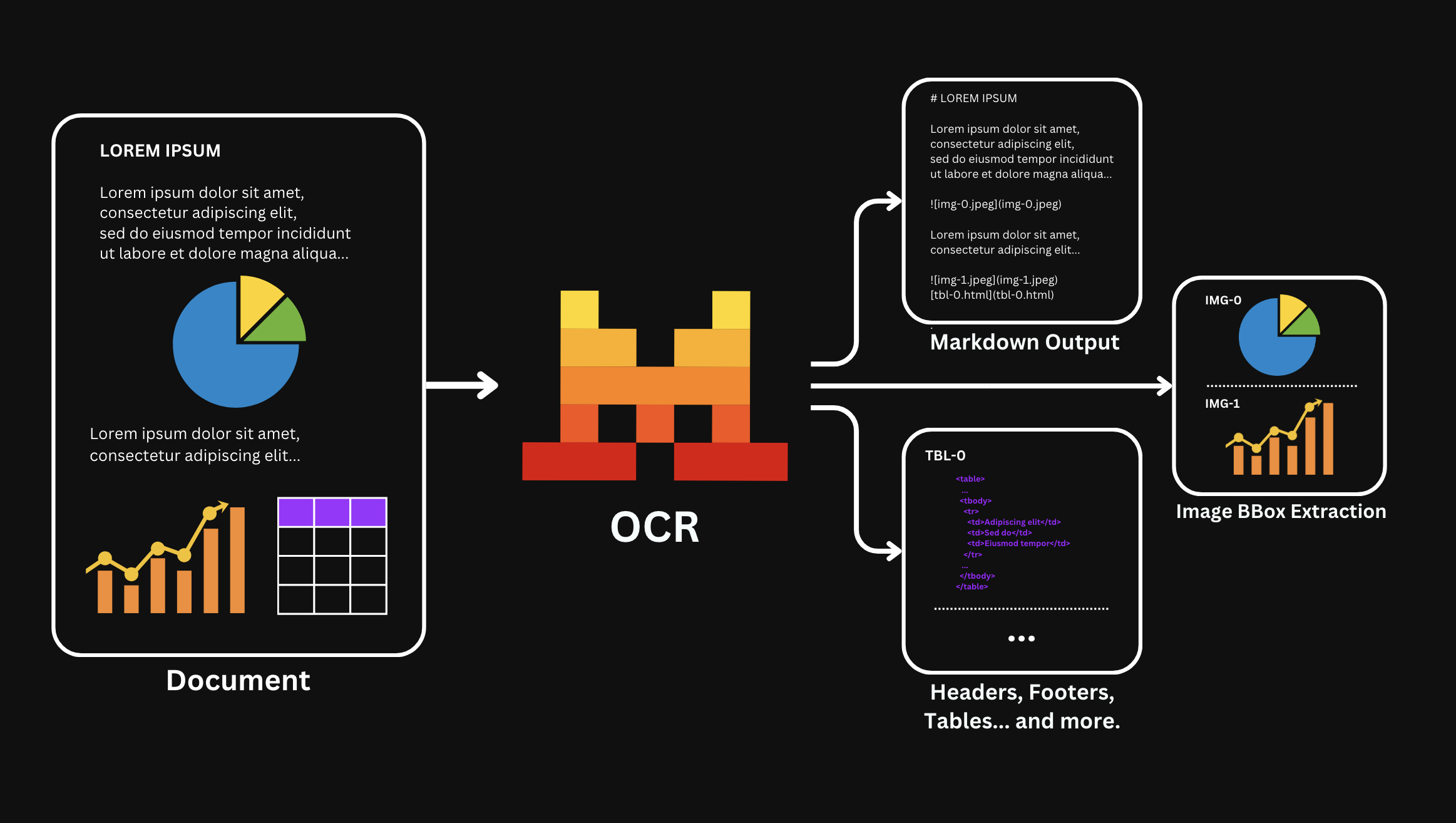
- Table formatting supports
null,markdown, andhtmlvalues through thetable_formatparameter.null: Returns tables inline as Markdown within the extracted page.markdown: Returns tables separately as Markdown tables.html: Returns tables separately as HTML tables.
- Header and footer extraction uses the
extract_headerandextract_footerparameters. When you use them, the response includes header and footer content in theheaderandfooterfields. By default, OCR treats headers and footers as part of the main content. - Block extraction uses the
include_blocksparameter. When enabled, each page contains ablocksarray with paragraph-level bounding boxes, structural block labels, and extracted content in reading order. - Confidence scores are available for extracted content at page, block, or word granularity through the
confidence_scores_granularityparameter. - Multilingual OCR performs strongly across more than 40 languages. For the full list, see supported languages.
- Document formats include:
image_url: PNG, JPEG/JPG, AVIF, and other image formats.document_url: PDF, PPTX, DOCX, and other document formats.- For more supported formats, see the FAQ.
For endpoint details, see the OCR API reference.
Table formatting as well as header and footer extraction is only available for OCR 2512 or newer.
Block extraction via include_blocks is only available for OCR 4 or newer.
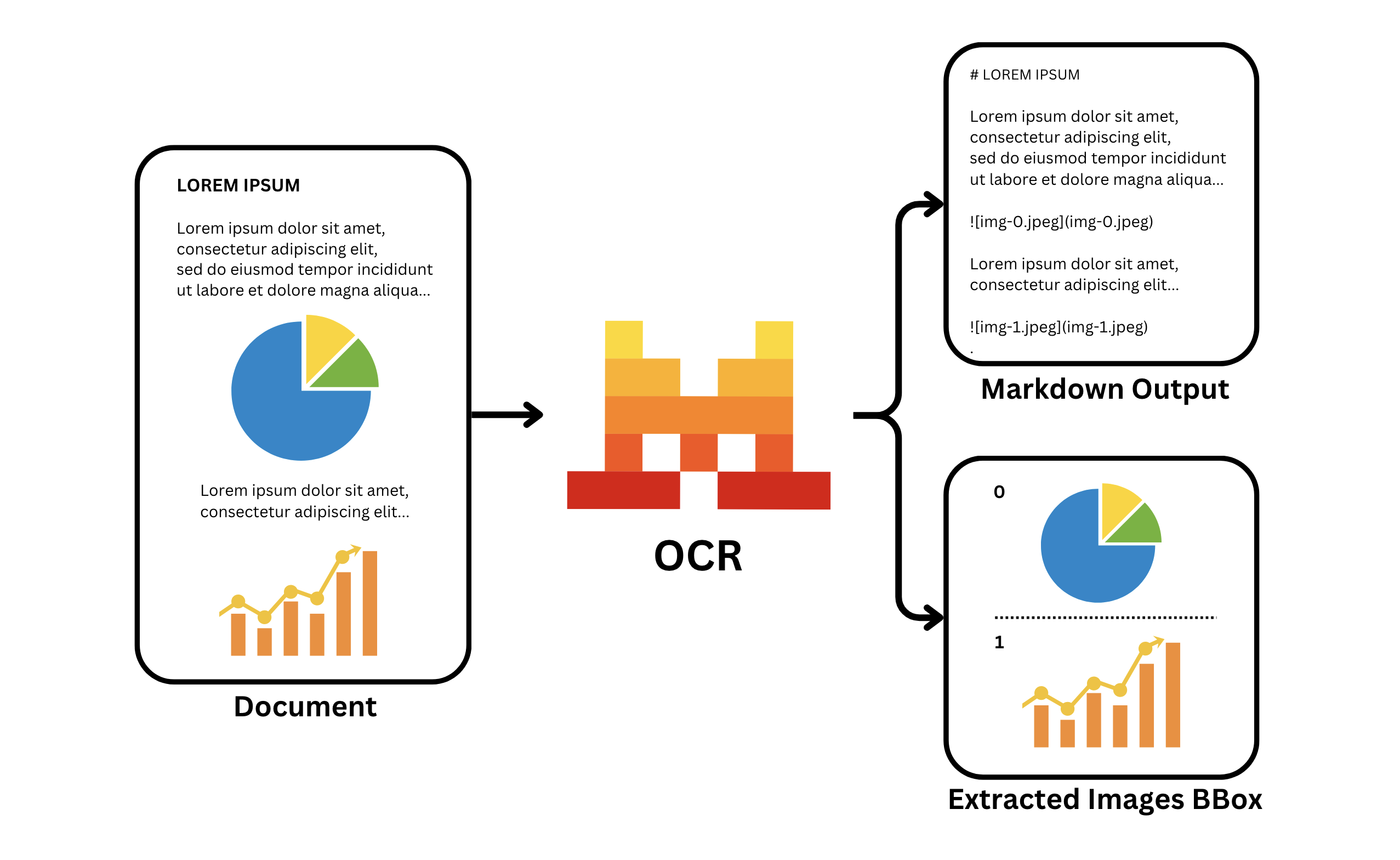
The OCR processor returns extracted text, image bounding boxes, and document-structure metadata.
OCR with images and PDFs
Process your documents
Use OCR with PDFs and images.
PDFs
For PDFs, pass a publicly available URL, pass a Base64-encoded PDF, or upload a PDF file.
Be sure the URL is public and accessible by our API.
import os
from mistralai.client import Mistral

api_key = os.environ["MISTRAL_API_KEY"]

client = Mistral(api_key=api_key)

ocr_response = client.ocr.process(
    model="mistral-ocr-latest",
    document={
        "type": "document_url",
        "document_url": "https://arxiv.org/pdf/2201.04234"
    },
    table_format="html", # default is None
    # extract_header=True, # default is False
    # extract_footer=True, # default is False
    include_image_base64=True
)The output is a JSON object that contains the extracted text, image bounding boxes, metadata, and other document-structure information.
{
  "pages": [ # The content of each page
    {
      "index": int, # The index of the corresponding page
      "markdown": str, # The main output and raw markdown content
      "images": list, # Image information when images are extracted
      "tables": list, # Table information when using `table_format=html` or `table_format=markdown`
      "hyperlinks": list, # Hyperlinks detected
      "header": str|null, # Header content when using `extract_header=True`
      "footer": str|null, # Footer content when using `extract_footer=True`
      "dimensions": dict, # The dimensions of the page
      "confidence_scores": dict|null, # Page confidence scores when `confidence_scores_granularity` is set (contains `word_confidence_scores` only for word granularity)
      "blocks": list|null # Paragraph-level bounding boxes with block labels when using `include_blocks=True`; each block includes `confidence_scores` only for block granularity
    }
  ],
  "model": str, # The model used for the OCR
  "document_annotation": dict|null, # Document annotation information when used, visit the Annotations documentation for more information
  "usage_info": dict # Usage information
}When OCR extracts images and tables, the Markdown output uses placeholders such as:
[tbl-3.html](tbl-3.html)
Use the images and tables fields to map each placeholder to the extracted image or table.
Images
For images, pass an image URL or a Base64-encoded image.
You can perform OCR with any public available image as long as a direct url is available.
import os
from mistralai.client import Mistral
api_key = os.environ["MISTRAL_API_KEY"]
client = Mistral(api_key=api_key)
ocr_response = client.ocr.process(
model="mistral-ocr-latest",
document={
"type": "image_url",
"image_url": "https://raw.githubusercontent.com/mistralai/cookbook/refs/heads/main/mistral/ocr/receipt.png"
},
# table_format=None,
include_image_base64=True
)The output is a JSON object that contains the extracted text, image bounding boxes, metadata, and other document-structure information.
{
  "pages": [ # The content of each page
    {
      "index": int, # The index of the corresponding page
      "markdown": str, # The main output and raw markdown content
      "images": list, # Image information when images are extracted
      "tables": list, # Table information when using `table_format=html` or `table_format=markdown`
      "hyperlinks": list, # Hyperlinks detected
      "header": str|null, # Header content when using `extract_header=True`
      "footer": str|null, # Footer content when using `extract_footer=True`
      "dimensions": dict, # The dimensions of the page
      "confidence_scores": dict|null, # Page confidence scores when `confidence_scores_granularity` is set (contains `word_confidence_scores` only for word granularity)
      "blocks": list|null # Paragraph-level bounding boxes with block labels when using `include_blocks=True`; each block includes `confidence_scores` only for block granularity
    }
  ],
  "model": str, # The model used for the OCR
  "document_annotation": dict|null, # Document annotation information when used, visit the Annotations documentation for more information
  "usage_info": dict # Usage information
}When OCR extracts images and tables, the Markdown output uses placeholders such as:
[tbl-3.html](tbl-3.html)
Use the images and tables fields to map each placeholder to the extracted image or table.
Block extraction
Extract structural blocks with bounding boxes
Set include_blocks=True to receive a blocks array on each page. Each block describes a single content region with its label (type), bounding box coordinates, and the extracted content. Blocks are returned in reading order.
Each block includes type, top_left_x, top_left_y, bottom_right_x, bottom_right_y, and content.
When confidence_scores_granularity is set to "block", each block also includes confidence_scores with:
average_content_confidence_score: Average confidence score for the extracted block content.minimum_content_confidence_score: Lowest confidence score in the extracted block content.block_type_confidence_score: Confidence score for the detected block type.
Content confidence scores can be null for blocks without textual content, such as image blocks.
Available block types
| Block type | Description |
|---|---|
text | A paragraph of body text. |
title | A document title or section heading. |
list | A bulleted or numbered list. |
table | A table region. When tables are extracted, includes a table_id referencing the corresponding entry in tables. |
image | An image region. Includes an image_id referencing the corresponding entry in images. |
equation | A math equation. |
caption | A caption associated with a figure or table. |
code | A code block. |
references | A bibliography or references section. |
aside_text | A sidebar, callout, or other marginal text block. |
header | A page header. |
footer | A page footer. |
signature | A signature region. content holds the transcribed name when legible, otherwise an empty string. |
import os
from mistralai.client import Mistral

api_key = os.environ["MISTRAL_API_KEY"]

client = Mistral(api_key=api_key)

ocr_response = client.ocr.process(
    model="mistral-ocr-latest",
    document={
        "type": "document_url",
        "document_url": "https://arxiv.org/pdf/2201.04234"
    },
    include_blocks=True,
    confidence_scores_granularity="block"
)Block extraction is only available for OCR 4 or newer. Older models accept the parameter but return an empty array.
Confidence scores
Extract confidence scores
The OCR processor can return confidence scores for extracted content to help you assess recognition quality. Use the confidence_scores_granularity parameter to control the level of detail:
| Value | Description |
|---|---|
"page" | Returns a confidence_scores object on each page with aggregate statistics (average_page_confidence_score, minimum_page_confidence_score). |
"block" | Returns everything from "page", plus confidence_scores on each block when include_blocks is set to true. |
"word" | Returns everything from "page", plus a word_confidence_scores array with per-word confidence values on each page and each table entry. |
import os
from mistralai.client import Mistral

api_key = os.environ["MISTRAL_API_KEY"]

client = Mistral(api_key=api_key)

ocr_response = client.ocr.process(
    model="mistral-ocr-latest",
    document={
        "type": "document_url",
        "document_url": "https://arxiv.org/pdf/2201.04234"
    },
    confidence_scores_granularity="word"  # Use "block" with include_blocks=True
)OCR at scale
For high-volume OCR workloads, use the Batch Inference service to process documents in parallel. For structured outputs, use Annotations.
Cookbooks
For more OCR examples, see these cookbooks: