---
id: annotations
title: Document Annotations
slug: annotations
sidebar_position: 3.2
---
# Annotations
In addition to the basic OCR functionality, Mistral Document AI API adds the `annotations` functionality, which allows you to extract information in a structured json-format that you provide.
Before You Start
### What can you do with Annotations?
Specifically, it offers two types of annotations:
- `bbox_annotation`: gives you the annotation of the bboxes extracted by the OCR model (charts/ figures etc) based on user requirement and provided bbox/image annotation format. The user may ask to describe/caption the figure for instance.
- `document_annotation`: returns the annotation of the entire document based on the provided document annotation format.
Key Capabilities
* Labeling and annotating data
* Extraction and structuring of specific information from documents into a predefined JSON format
* Automation of data extraction to reduce manual entry and errors
* Efficient handling of large document volumes for enterprise-level applications
Common Use Cases
* Parsing of forms, classification of documents, and processing of images, including text, charts, and signatures
* Conversion of charts to tables, extraction of fine print from figures, or definition of custom image types
* Capture of receipt data, including merchant names and transaction amounts, for expense management.
* Extraction of key information like vendor details and amounts from invoices for automated accounting.
* Extraction of key clauses and terms from contracts for easier review and management
How it Works
BBOX Annotations
- All document types:
- After regular OCR is finished; we call a Vision capable LLM for all bboxes individually with the provided annotation format.
Document Annotation
- All document types:
- We run OCR and send the output text in Markdown, along with the first eight extracted image bounding boxes, to a vision-capable LMM, together with the provided annotation format.
Accepted Formats
You can use our API with the following document formats:
- [OCR with pdf](basic_ocr#ocr-with-pdf)
- [OCR with image](basic_ocr#ocr-with-image): even from low-quality or handwritten sources.
- scans, DOCX, PPTX...
In the code snippets below, we will consider the `OCR with pdf` format.
Usage
### How to Annotate
As previously mentionned, you can either:
- Use the `bbox_annotation` functionality, allowing you to extract information from the bboxes of the document.
- Use the `document_annotation` functionality, allowing you to extract information from the entire document.
- Optionally, we also provide the ability to add a `document_annotation_prompt`, a high level general prompt to guide and instruct on how to annotate the document.
- Use both functionalities at the same time.
Here is an example of how to use our BBox Annotation functionalities.
Define the Data Model
First, define the response formats for `BBox Annotation`, using either Pydantic or Zod schemas for our SDKs, or a JSON schema for a curl API call.
Pydantic/Zod/JSON schemas accept nested objects, arrays, enums, etc...
```python
from pydantic import BaseModel
# BBOX Annotation response formats
class Image(BaseModel):
image_type: str
short_description: str
summary: str
```
```typescript
import { z } from 'zod';
// BBOX Annotation response formats
const ImageSchema = z.object({
image_type: z.string(),
short_description: z.string(),
summary: z.string(),
});
```
```bash
{
"type": "json_schema",
"json_schema": {
"schema": {
"properties": {
"document_type": {
"title": "Document_Type",
"type": "string"
},
"short_description": {
"title": "Short_Description",
"type": "string"
},
"summary": {
"title": "Summary",
"type": "string"
}
},
"required": [
"document_type",
"short_description",
"summary"
],
"title": "BBOXAnnotation",
"type": "object",
"additionalProperties": false
},
"name": "document_annotation",
"strict": true
}
}
```
You can also provide a description for each entry, the description will be used as detailed information and instructions during the annotation; for example:
```python
from pydantic import BaseModel, Field
# BBOX Annotation response formats
class Image(BaseModel):
image_type: str = Field(..., description="The type of the image.")
short_description: str = Field(..., description="A description in english describing the image.")
summary: str = Field(..., description="Summarize the image.")
```
```typescript
import { z } from 'zod';
// Define the schema for the Image type
const ImageSchema = z.object({
image_type: z.string().describe("The type of the image."),
short_description: z.string().describe("A description in English describing the image."),
summary: z.string().describe("Summarize the image."),
});
```
```bash
{
"type": "json_schema",
"json_schema": {
"schema": {
"properties": {
"document_type": {
"title": "Document_Type",
"description": "The type of the image.",
"type": "string"
},
"short_description": {
"title": "Short_Description",
"description": "A description in English describing the image.",
"type": "string"
},
"summary": {
"title": "Summary",
"description": "Summarize the image.",
"type": "string"
}
},
"required": [
"document_type",
"short_description",
"summary"
],
"title": "BBOXAnnotation",
"type": "object",
"additionalProperties": false
},
"name": "document_annotation",
"strict": true
}
}
```
Start Request
Next, make a request and ensure the response adheres to the defined structures using `bbox_annotation_format` set to the corresponding schemas:
```python
import os
from mistralai import Mistral
from mistralai import DocumentURLChunk, ImageURLChunk, ResponseFormat
from mistralai.extra import response_format_from_pydantic_model
api_key = os.environ["MISTRAL_API_KEY"]
client = Mistral(api_key=api_key)
response = client.ocr.process(
model="mistral-ocr-latest",
document=DocumentURLChunk(
document_url="https://arxiv.org/pdf/2410.07073"
),
bbox_annotation_format=response_format_from_pydantic_model(Image),
include_image_base64=True
)
```
```python
import os
from mistralai.client import Mistral, DocumentURLChunk, ImageURLChunk, ResponseFormat
from mistralai.extra import response_format_from_pydantic_model
api_key = os.environ["MISTRAL_API_KEY"]
client = Mistral(api_key=api_key)
response = client.ocr.process(
model="mistral-ocr-latest",
document=DocumentURLChunk(
document_url="https://arxiv.org/pdf/2410.07073"
),
bbox_annotation_format=response_format_from_pydantic_model(Image),
include_image_base64=True
)
```
```typescript
import { Mistral } from "@mistralai/mistralai";
import { responseFormatFromZodObject } from '@mistralai/mistralai/extra/structChat.js';
const apiKey = process.env.MISTRAL_API_KEY;
const client = new Mistral({ apiKey: apiKey });
async function processDocument() {
try {
const response = await client.ocr.process({
model: "mistral-ocr-latest",
document: {
type: "document_url",
documentUrl: "https://arxiv.org/pdf/2410.07073"
},
bboxAnnotationFormat: responseFormatFromZodObject(ImageSchema),
includeImageBase64: true,
});
console.log(response);
} catch (error) {
console.error("Error processing document:", error);
}
}
processDocument();
```
```bash
curl --location 'https://api.mistral.ai/v1/ocr' \
--header 'Content-Type: application/json' \
--header "Authorization: Bearer ${MISTRAL_API_KEY}" \
--data '{
"model": "mistral-ocr-latest",
"document": {"document_url": "https://arxiv.org/pdf/2410.07073"},
"bbox_annotation_format": {
"type": "json_schema",
"json_schema": {
"schema": {
"properties": {
"document_type": {"title": "Document_Type", "description": "The type of the image.", "type": "string"},
"short_description": {"title": "Short_Description", "description": "A description in English describing the image.", "type": "string"},
"summary": {"title": "Summary", "description": "Summarize the image.", "type": "string"}
},
"required": ["document_type", "short_description", "summary"],
"title": "BBOXAnnotation",
"type": "object",
"additionalProperties": false
},
"name": "document_annotation",
"strict": true
}
},
"include_image_base64": true
}'
```
```json
{
"pages": [
{
"index": 0,
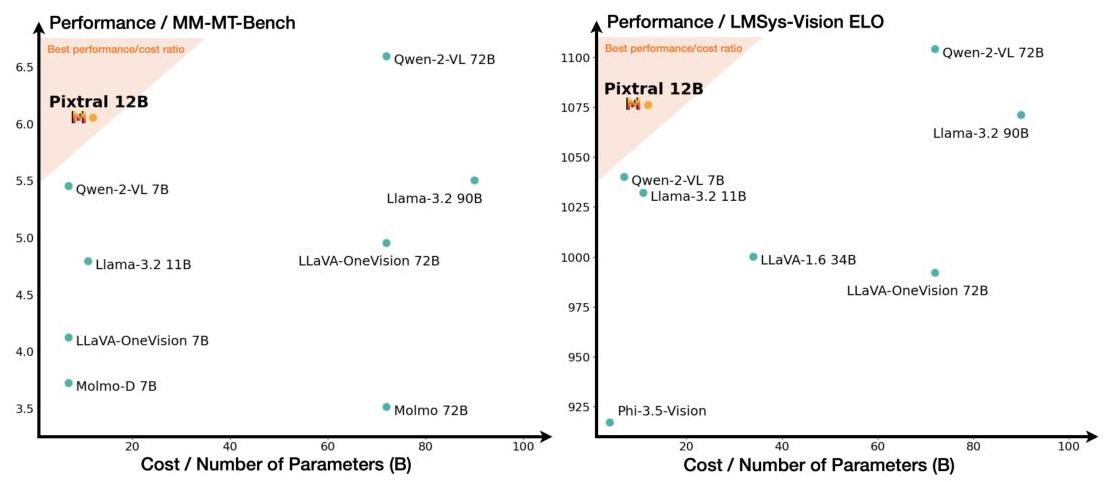
"markdown": "# Pixtral 12B \n\n\n\n## Abstract\n\nWe introduce Pixtral 12B, a 12-billion-parameter multimodal language model. Pixtral 12B is trained to understand both natural images and documents, achieving leading performance on various multimodal benchmarks, surpassing a number of larger models. Unlike many open-source models, Pixtral is also a cutting-edge text model for its size, and does not compromise on natural language performance to excel in multimodal tasks. Pixtral uses a new vision encoder trained from scratch, which allows it to ingest images at their natural resolution and aspect ratio. This gives users flexibility on the number of tokens used to process an image. Pixtral is also able to process any number of images in its long context window of 128 K tokens. Pixtral 12B substanially outperforms other open models of similar sizes (Llama-3.2 11B \\& Qwen-2-VL 7B). It also outperforms much larger open models like Llama-3.2 90B while being 7x smaller. We further contribute an open-source benchmark, MM-MT-Bench, for evaluating vision-language models in practical scenarios, and provide detailed analysis and code for standardized evaluation protocols for multimodal LLMs. Pixtral 12B is released under Apache 2.0 license.\n\nWebpage: https://mistral.ai/news/pixtral-12b/\nInference code: https://github.com/mistralai/mistral-inference/\nEvaluation code: https://github.com/mistralai/mistral-evals/\n\n## 1 Introduction\n\nThis paper describes Pixtral 12B, a multimodal language model trained to understand both images and text, released with open weights under an Apache 2.0 license. Pixtral is an instruction tuned model which is pretrained on large scale interleaved image and text documents, and hence is capable of multi-turn, multi-image conversation.\n\nPixtral comes with a new vision encoder which is trained with a novel RoPE-2D implementation, allowing it to process images at their native resolution and aspect ratio. In this way, the model can flexibly process images at low resolution in latency-constrained settings, while processing images at high resolution when fine-grained reasoning is required.\nWhen compared against models of a similar size in the same evaluation setting, we find that Pixtral delivers strong multimodal reasoning capabilities without sacrificing text-only reasoning performance.",
"images": [
{
"id": "img-0.jpeg",
"top_left_x": 413,
"top_left_y": 563,
"bottom_right_x": 1286,
"bottom_right_y": 862,
"image_base64": "data:image/jpeg;base64,/9j/4AAQSkZJRgABAQ...",
"image_annotation": "{\n \"image_type\": \"Logo\",\n \"short_description\": \"A 3D-rendered logo of the text 'Mistral AI' with a gradient color scheme transitioning from orange to yellow.\",\n \"summary\": \"The image features a 3D-rendered logo of the text 'Mistral AI'. The text is stylized with a gradient color scheme that transitions from a warm orange to a bright yellow, giving it a vibrant and modern appearance. The letters are slightly tilted to the right, adding a dynamic touch to the overall design.\"\n}"
}
],
"dimensions": {
"dpi": 200,
"height": 2200,
"width": 1700
}
},
{
"index": 1,
"markdown": "\n\nFigure 1: Pixtral Performance. Pixtral outperforms all open-models within its weight class on multimodal tasks by a substantial margin. Left: Performance on MM-MT-Bench, a new multimodal, multiturn, instruction following benchmark designed to reflect real world usage of multimodal language models. Right: Performance on the public LMSys leaderboard (Vision arena, October 2024).\n\nFor instance, our model matches or exceeds the performance of models like Qwen2-VL 7B [23] and Llama-3.2 11B [6] on popular multimodal benchmarks like MMMU [24] and MathVista [14], while outperforming most open-source models on popular text-only tasks like MATH [7] and HumanEval [26]. Pixtral even outperforms much larger models like Llama-3.2 90B [6], as well as closed models such as Claude-3 Haiku [1] and Gemini-1.5 Flash 8B [18], on multimodal benchmarks.\n\nDuring evaluation of Pixtral and the baselines, we found that evaluation protocols for multimodal language models is not standardized, and that small changes in the setup can dramatically change the performance of some models. We provide thorough analysis of our experience in re-evaluating vision-language models under a common evaluation protocol.\n\nSpecifically, we identify two issues with evaluation:\n\n- Prompts: Several benchmarks have default prompts which are under-specified, and dramatically reduce the performance of leading closed source models [16, 1] compared to reported figures.\n- Evaluation Metrics: The official metrics typically require exact match, which score model generations as correct only if they exactly match the reference answer. However, this metric penalizes answers which are substantively correct but in a slightly different format (e.g., \"6.0\" vs \"6\").\n\nTo alleviate these issues, we propose 'Explicit' prompts that explicitly specify the format required by the reference answer. We further analyze the impact of flexible parsing for various models, releasing the evaluation code and prompts in an effort to establish fair and standardized evaluation protocols ${ }^{1}$.\n\nMoreover, while current multimodal benchmarks mostly evaluate short-form or multiple-choice question answering given an input image, they do not fully capture a model's utility for practical use cases (e.g. in a multi-turn, long-form assistant setting). To address this, we open-source a novel multimodal, multi-turn evaluation: MM-MT-Bench ${ }^{2}$. We find that performance on MM-MT-Bench correlates highly with ELO rankings on the LMSys Vision Leaderboard.\n\nPixtral excels at multimodal instruction following, surpassing comparable open-source models on the MM-MT-Bench benchmark (see Figure 1). Based on human preferences on the LMSys Vision Leaderboard, Pixtral 12B is currently the highest ranked Apache 2.0 model, substantially outperforming other open-models such Llama-3.2 11B [6] and Qwen2-VL 7B [23]. It even ranks higher than several closed models such as Claude-3 Opus \\& Claude-3 Sonnet [1], and several larger models such as Llama-3.2 90B [6].\n\n[^0]\n[^0]: ${ }^{1}$ https://github.com/mistralai/mistral-evals/\n ${ }^{2}$ https://huggingface.co/datasets/mistralai/MM-MT-Bench",
"images": [
{
"id": "img-1.jpeg",
"top_left_x": 294,
"top_left_y": 193,
"bottom_right_x": 1405,
"bottom_right_y": 675,
"image_base64": "...",
"image_annotation": "{\n \"image_type\": \"scatter plot\",\n \"short_description\": \"This image shows two scatter plots comparing the performance and cost of various AI models.\",\n \"summary\": \"The image consists of two scatter plots. The left plot compares the performance on the MM-MT-Bench against the cost/number of parameters (in billions) for different AI models. The right plot compares the performance on the LMSys-Vision ELO against the same cost/number of parameters. In both plots, the Pixtral 12B model is highlighted as having the best performance/cost ratio. Other models like Qwen-2-VL 72B, Llama-3.2 90B, and Llama-3.2 11B are also shown, with varying performance and cost metrics. The plots indicate that Pixtral 12B offers a strong balance of performance and cost efficiency.\"\n}"
}
],
"dimensions": {
"dpi": 200,
"height": 2200,
"width": 1700
}
},
{
"index": 2,
"markdown": "\n\nFigure 2: Pixtral Vision Encoder. Pixtral uses a new vision encoder, which is trained from scratch to natively support variable image sizes and aspect ratios. Block-diagonal attention masks enable sequence packing for batching, while RoPE-2D encodings facilitate variable image sizes. Note that the attention mask and position encodings are fed to the vision transformer as additional input, and utilized only in the self-attention layers.\n\n# 2 Architectural details \n\nPixtral 12B is based on the transformer architecture [22], and consists of a multimodal decoder to perform highlevel reasoning, and a vision encoder to allow the model to ingest images. The main parameters of the model are summarized in Table 1.\n\n### 2.1 Multimodal Decoder\n\nPixtral 12B is built on top of Mistral Nemo 12B [15], a 12-billion parameter decoder-only language model that achieves strong performance across a range of knowledge and reasoning tasks.\n\n| Parameters | Decoder | Encoder |\n| :-- | --: | --: |\n| dim | 5120 | 1024 |\n| n_layers | 40 | 24 |\n| head_dim | 128 | 64 |\n| hidden_dim | 14336 | 4096 |\n| n_heads | 32 | 16 |\n| n_kv_heads | 8 | 16 |\n| context_len | 131072 | 4096 |\n| vocab_size | 131072 | - |\n| patch_size | - | 16 |\n\nTable 1: Decoder and encoder parameters.\n\n### 2.2 Vision Encoder\n\nIn order for Pixtral 12B to ingest images, we train a new vision encoder from scratch, named PixtralViT. Here, our goal is to instantiate a simple architecture which is capable of processing images across a wide range of resolutions and aspect ratios. To do this, we build a 400 million parameter vision transformer [5] (see Table 1) and make four key changes over the standard architectures [17]:\nBreak tokens: In order to assist the model in distinguishing between images with the same number of patches (same area) but different aspect ratios, we include [IMAGE BREAK] tokens between image rows [2]. We further include an [IMAGE END] token at the end of an image sequence.\nGating in FFN: Instead of standard feedforward layer in the attention block, we use gating in the hidden layer [19].\nSequence packing: In order to efficiently process images within a single batch, we flatten the images along the sequence dimension and concatenate them [3]. We construct a block-diagonal mask to ensure no attention leakage between patches from different images.\nRoPE-2D: We replace traditional learned and absolute position embeddings for image patches with relative, rotary position encodings [11, 20] in the self-attention layers. While learned position embeddings must be interpolated to deal with new image sizes (often at the cost of performance), relative position encodings lend themselves naturally to variable image sizes.",
"images": [
{
"id": "img-2.jpeg",
"top_left_x": 309,
"top_left_y": 191,
"bottom_right_x": 1387,
"bottom_right_y": 655,
"image_base64": "...",
"image_annotation": "{\n \"image_type\": \"diagram\",\n \"short_description\": \"A diagram illustrating the architecture of the Pixtral-ViT model.\",\n \"summary\": \"The diagram shows the architecture of the Pixtral-ViT model, which processes image patches through various stages. Starting with image patches, the model applies RoPE-2D positional embeddings and a block-diagonal attention mask. The processed data is then fed into a bidirectional transformer, followed by a vision-language projector, and finally, output embeddings are generated. The diagram also includes visual representations of the positional embeddings and attention mechanisms used in the model.\"\n}"
}
],
"dimensions": {
"dpi": 200,
"height": 2200,
"width": 1700
}
},
...
{
"index": 23,
"markdown": "| | Mathvista
2017 | MMMU
2017 | ChartQA
2017 | DocVQA
2017 | VQAr2
2017 March | MM-MT-Bench
2017 to 2020 | LMSys-Vision
Nov 2017 |\n| :--: | :--: | :--: | :--: | :--: | :--: | :--: | :--: |\n| Pixtral 12B | 58.3 | 52.0 | 81.8 | 90.7 | 78.6 | 6.05 | 1076 |\n| Qwen-2-VL 7B [23] | | | | | | | |\n| Measured (Exact Match) | 53.7 | 48.1 | 41.2 | 94.5 | 75.9 | 5.45 | |\n| Measured (Custom evaluation, see Section E.3) | 63.7 | 50.6 | 83.4 | 94.5 | 82.1 | - | 1040 |\n| Reported | 58.2 | 54.1 | 83.0 | 94.5 | - | - | |\n| Llama-3.2 11B [6] | | | | | | | |\n| Measured (Exact Match) | 24.3 | 23.0 | 14.8 | 91.1 | 67.1 | 4.79 | |\n| Measured (Custom evaluation, see Section E.4) | 47.9 | 46.6 | 78.5 | 91.1 | 67.1 | - | 1032 |\n| Reported | 51.5 | 50.7 | 83.4 | 88.4 | 75.2 | - | |\n| Molmo-D 7B [4] | | | | | | | |\n| Measured (Exact Match) | 12.3 | 24.3 | 27.0 | 72.2 | 57.1 | 3.72 | |\n| Measured (Custom evaluation, see Section E.6) | 43.2 | 47.0 | 76.7 | 72.2 | 70.0 | - | - |\n| Reported | 51.6 | 45.3 | 84.1 | 92.2 | 85.6 | - | |\n| LLaVA-OneVision 7B [9] | | | | | | | |\n| Measured (Exact Match) | 36.1 | 45.1 | 67.2 | 90.5 | 78.4 | 4.12 | |\n| Measured (Custom evaluation, see Section E.5) | 63.1 | 48.1 | 80.2 | 90.5 | 83.7 | - | - |\n| Reported | 63.2 | 48.8 | 80.0 | 87.5 | - | - | |\n| Molmo 72B [4] | | | | | | | - |\n| Measured (Exact Match) | 52.2 | 52.7 | 75.6 | 86.5 | 75.2 | 3.51 | |\n| Measured (Custom evaluation, see Section E.6) | 61.3 | 52.9 | 82.3 | 86.5 | 75.5 | - | - |\n| Reported | 58.6 | 54.1 | 87.3 | 93.5 | 86.5 | - | |\n| Llama-3.2 90B [6] | | | | | | | |\n| Measured (Exact Match) | 49.1 | 53.7 | 33.8 | 85.7 | 67.0 | 5.50 | |\n| Measured (Custom evaluation, see Section E.4) | 57.5 | 60.2 | 91.7 | 91.5 | 67.0 | - | 1071 |\n| Reported | 57.3 | 60.3 | 85.5 | 90.1 | 78.1 | - | |\n| Claude-3 Haiku [1] | | | | | | | |\n| Measured (Exact Match) | 44.8 | 50.4 | 69.6 | 74.6 | 68.4 | 5.46 | |\n| Measured (Custom evaluation, see Section E.2) | 44.8 | 51.3 | 79.8 | 74.6 | 68.4 | - | 1000 |\n| Reported | 46.4 | 50.2 | 81.7 | 88.8 | - | - | |\n| Gemini-1.5-Flash 8B[18,17, [18] | | | | | | | |\n| Measured (Exact Match) | 56.9 | 50.7 | 78.0 | 79.5 | 65.5 | 5.93 | |\n| Measured (Custom evaluation, see Section E.2) | 57.1 | 50.7 | 78.2 | 79.5 | 69.2 | - | 1111 |\n| Reported | - | 50.3 | - | 75.6 | - | - | |\n\nTable 8: Reproducing the reported performance of prior models. In Table 2 we conduct fair re-evaluation of all models through the same evaluation harness, with the same prompt and metric. Here, we endeavour to recover the reported performance of all models by tuning evaluation settings towards individual models. We highlight that Pixtral 12B, like strong closed-source models (e.g. Gemini-1.5-Flash 8B [18] and Claude-3 Haiku [1]) is able reports strong performance without such interventions.",
"images": [],
"dimensions": {
"dpi": 200,
"height": 2200,
"width": 1700
}
}
],
"model": "mistral-ocr-2505-completion",
"document_annotation": null,
"usage_info": {
"pages_processed": 24,
"doc_size_bytes": 12640953
}
}
```
BBox Annotation Example Output
The BBox Annotation feature allows to extract data and annotate images that were extracted from the original document, below you have one of the images of a document extracted by our OCR Processor.
The Image extracted is provided in a base64 encoded format.
```json
{
"image_base64": "data:image/jpeg;base64,/9j/4AAQSkZJRgABAQAAAQABAAD/2wBDAAgGB{LONG_MIDDLE_SEQUENCE}KKACiiigAooooAKKKKACiiigD//2Q==..."
}
```
And you can annotate the image with the model schema you want, below you have an example output.
```json
{
"image_type": "scatter plot",
"short_description": "Comparison of different models based on performance and cost.",
"summary": "The image consists of two scatter plots comparing various models on two different performance metrics against their cost or number of parameters. The left plot shows performance on the MM-MT-Bench, while the right plot shows performance on the LMSys-Vision ELO. Each point represents a different model, with the x-axis indicating the cost or number of parameters in billions (B) and the y-axis indicating the performance score. The shaded region in both plots highlights the best performance/cost ratio, with Pixtral 12B positioned within this region in both plots, suggesting it offers a strong balance of performance and cost efficiency. Other models like Qwen-2-VL 72B and Qwen-2-VL 7B also show high performance but at varying costs."
}
```
Here is an example of how to use our Document Annotation functionalities.
Define the Data Model
First, define the response formats for `Document Annotation`, using either Pydantic or Zod schemas for our SDKs, or a JSON schema for a curl API call.
Pydantic/Zod/JSON schemas accept nested objects, arrays, enums, etc...
```python
from pydantic import BaseModel
# Document Annotation response format
class Document(BaseModel):
language: str
chapter_titles: list[str]
urls: list[str]
```
```typescript
import { z } from 'zod';
// Document Annotation response format
const DocumentSchema = z.object({
language: z.string(),
chapter_titles: z.array(z.string()),
urls: z.array(z.string()),
});
```
```json
{
"type": "json_schema",
"json_schema": {
"schema": {
"properties": {
"language": {
"title": "Language",
"type": "string"
},
"chapter_titles": {
"title": "Chapter_Titles",
"type": "string"
},
"urls": {
"title": "urls",
"type": "string"
}
},
"required": [
"language",
"chapter_titles",
"urls"
],
"title": "DocumentAnnotation",
"type": "object",
"additionalProperties": false
},
"name": "document_annotation",
"strict": true
}
}
```
You can also provide a description for each entry, the description will be used as detailed information and instructions during the annotation; for example:
```python
from pydantic import BaseModel, Field
# Document Annotation response format
class Document(BaseModel):
language: str = Field(..., description="The language of the document.")
chapter_titles: list[str] = Field(..., description="List of chapter titles found in the document.")
urls: list[str] = Field(..., description="List of URLs found in the document.")
```
```typescript
import { z } from 'zod';
// Document Annotation response format
const DocumentSchema = z.object({
language: z.string().describe("The language of the document."),
chapter_titles: z.array(z.string()).describe("List of chapter titles found in the document."),
urls: z.array(z.string()).describe("List of URLs found in the document."),
});
```
```json
{
"type": "json_schema",
"json_schema": {
"schema": {
"properties": {
"language": {
"title": "Language",
"description": "The language of the document.",
"type": "string"
},
"chapter_titles": {
"title": "Chapter_Titles",
"description": "List of chapter titles found in the document.",
"type": "string"
},
"urls": {
"title": "urls",
"description": "List of URLs found in the document.",
"type": "string"
}
},
"required": [
"language",
"chapter_titles",
"urls"
],
"title": "DocumentAnnotation",
"type": "object",
"additionalProperties": false
},
"name": "document_annotation",
"strict": true
}
}
```
Annotation Prompt (Optional)
After defining your annotation schema, you may need to provide more context and instructions around the annotation and document at stake. We allow the passing of a `document_annotation_prompt` that will be used as a high level system prompt for the annotation step, providing further context and instructions on how the annotation should be done. An example of prompt would be:
```python
document_annotation_prompt = """
Extract the following from the provided PDF document:
- Language (e.g., "English")
- All chapter/section titles (e.g., ["Abstract", "1 Introduction"])
- All URLs (e.g., ["https://example.com"])
Be precise and include only exact matches.
"""
```
```typescript
const documentAnnotationPrompt = `
Extract the following from the provided PDF document:
- Language (e.g., "English")
- All chapter/section titles (e.g., ["Abstract", "1 Introduction"])
- All URLs (e.g., ["https://example.com"])
Be precise and include only exact matches.
`;
```
```bash
"document_annotation_prompt": "Extract the following from the provided PDF document:\n- Language (e.g., \"English\")\n- All chapter/section titles (e.g., [\"Abstract\", \"1 Introduction\"])\n- All URLs (e.g., [\"https://example.com\"])\nBe precise and include only exact matches."
```
In production, you may want to provide context about the use case and refine instructions further if the output doesn’t match expectations exactly.
Start Request
Next, make a request and ensure the response adheres to the defined structures using `document_annotation_format` set to the corresponding schemas:
```python
import os
from mistralai import Mistral
from mistralai import DocumentURLChunk, ImageURLChunk, ResponseFormat
from mistralai.extra import response_format_from_pydantic_model
api_key = os.environ["MISTRAL_API_KEY"]
client = Mistral(api_key=api_key)
# Client call
response = client.ocr.process(
model="mistral-ocr-latest",
pages=list(range(8)),
document=DocumentURLChunk(
document_url="https://arxiv.org/pdf/2410.07073"
),
document_annotation_format=response_format_from_pydantic_model(Document),
# document_annotation_prompt=document_annotation_prompt,
include_image_base64=True
)
```
```python
import os
from mistralai.client import Mistral, DocumentURLChunk, ImageURLChunk, ResponseFormat
from mistralai.extra import response_format_from_pydantic_model
api_key = os.environ["MISTRAL_API_KEY"]
client = Mistral(api_key=api_key)
# Client call
response = client.ocr.process(
model="mistral-ocr-latest",
pages=list(range(8)),
document=DocumentURLChunk(
document_url="https://arxiv.org/pdf/2410.07073"
),
document_annotation_format=response_format_from_pydantic_model(Document),
# document_annotation_prompt=document_annotation_prompt,
include_image_base64=True
)
```
```typescript
import { Mistral } from "@mistralai/mistralai";
import { responseFormatFromZodObject } from '@mistralai/mistralai/extra/structChat.js';
const apiKey = process.env.MISTRAL_API_KEY;
const client = new Mistral({ apiKey: apiKey });
async function processDocument() {
try {
const response = await client.ocr.process({
model: "mistral-ocr-latest",
pages: Array.from({ length: 8 }, (_, i) => i), // Creates an array [0, 1, 2, ..., 7]
document: {
type: "document_url",
documentUrl: "https://arxiv.org/pdf/2410.07073"
},
documentAnnotationFormat: responseFormatFromZodObject(DocumentSchema),
// documentAnnotationPrompt: documentAnnotationPrompt,
includeImageBase64: true,
});
console.log(response);
} catch (error) {
console.error("Error processing document:", error);
}
}
processDocument();
```
```bash
curl --location 'https://api.mistral.ai/v1/ocr' \
--header 'Content-Type: application/json' \
--header "Authorization: Bearer ${MISTRAL_API_KEY}" \
--data '{
"model": "mistral-ocr-latest",
"document": {"document_url": "https://arxiv.org/pdf/2410.07073"},
"pages": [0, 1, 2, 3, 4, 5, 6, 7],
"document_annotation_format": {
"type": "json_schema",
"json_schema": {
"schema": {
"properties": {
"language": {"title": "Language", "description": "The language of the document.", "type": "string"},
"chapter_titles": {"title": "Chapter_Titles", "description": "List of chapter titles found in the document.", "type": "string"},
"urls": {"title": "urls", "description": "List of URLs found in the document.", "type": "string"}
},
"required": ["language", "chapter_titles", "urls"],
"title": "DocumentAnnotation",
"type": "object",
"additionalProperties": false
},
"name": "document_annotation",
"strict": true
}
},
"include_image_base64": true
}'
```
```json
{
"pages": [
{
"index": 0,
"markdown": "# Pixtral 12B \n\n\n\n## Abstract\n\nWe introduce Pixtral 12B, a 12-billion-parameter multimodal language model. Pixtral 12B is trained to understand both natural images and documents, achieving leading performance on various multimodal benchmarks, surpassing a number of larger models. Unlike many open-source models, Pixtral is also a cutting-edge text model for its size, and does not compromise on natural language performance to excel in multimodal tasks. Pixtral uses a new vision encoder trained from scratch, which allows it to ingest images at their natural resolution and aspect ratio. This gives users flexibility on the number of tokens used to process an image. Pixtral is also able to process any number of images in its long context window of 128 K tokens. Pixtral 12B substanially outperforms other open models of similar sizes (Llama-3.2 11B \\& Qwen-2-VL 7B). It also outperforms much larger open models like Llama-3.2 90B while being 7x smaller. We further contribute an open-source benchmark, MM-MT-Bench, for evaluating vision-language models in practical scenarios, and provide detailed analysis and code for standardized evaluation protocols for multimodal LLMs. Pixtral 12B is released under Apache 2.0 license.\n\nWebpage: https://mistral.ai/news/pixtral-12b/\nInference code: https://github.com/mistralai/mistral-inference/\nEvaluation code: https://github.com/mistralai/mistral-evals/\n\n## 1 Introduction\n\nThis paper describes Pixtral 12B, a multimodal language model trained to understand both images and text, released with open weights under an Apache 2.0 license. Pixtral is an instruction tuned model which is pretrained on large scale interleaved image and text documents, and hence is capable of multi-turn, multi-image conversation.\n\nPixtral comes with a new vision encoder which is trained with a novel RoPE-2D implementation, allowing it to process images at their native resolution and aspect ratio. In this way, the model can flexibly process images at low resolution in latency-constrained settings, while processing images at high resolution when fine-grained reasoning is required.\nWhen compared against models of a similar size in the same evaluation setting, we find that Pixtral delivers strong multimodal reasoning capabilities without sacrificing text-only reasoning performance.",
"images": [
{
"id": "img-0.jpeg",
"top_left_x": 413,
"top_left_y": 563,
"bottom_right_x": 1286,
"bottom_right_y": 862,
"image_base64": "data:image/jpeg;base64,...",
"image_annotation": null
}
],
"dimensions": {
"dpi": 200,
"height": 2200,
"width": 1700
}
},
{
"index": 1,
"markdown": "\n\nFigure 1: Pixtral Performance. Pixtral outperforms all open-models within its weight class on multimodal tasks by a substantial margin. Left: Performance on MM-MT-Bench, a new multimodal, multiturn, instruction following benchmark designed to reflect real world usage of multimodal language models. Right: Performance on the public LMSys leaderboard (Vision arena, October 2024).\n\nFor instance, our model matches or exceeds the performance of models like Qwen2-VL 7B [23] and Llama-3.2 11B [6] on popular multimodal benchmarks like MMMU [24] and MathVista [14], while outperforming most open-source models on popular text-only tasks like MATH [7] and HumanEval [26]. Pixtral even outperforms much larger models like Llama-3.2 90B [6], as well as closed models such as Claude-3 Haiku [1] and Gemini-1.5 Flash 8B [18], on multimodal benchmarks.\n\nDuring evaluation of Pixtral and the baselines, we found that evaluation protocols for multimodal language models is not standardized, and that small changes in the setup can dramatically change the performance of some models. We provide thorough analysis of our experience in re-evaluating vision-language models under a common evaluation protocol.\n\nSpecifically, we identify two issues with evaluation:\n\n- Prompts: Several benchmarks have default prompts which are under-specified, and dramatically reduce the performance of leading closed source models [16, 1] compared to reported figures.\n- Evaluation Metrics: The official metrics typically require exact match, which score model generations as correct only if they exactly match the reference answer. However, this metric penalizes answers which are substantively correct but in a slightly different format (e.g., \"6.0\" vs \"6\").\n\nTo alleviate these issues, we propose 'Explicit' prompts that explicitly specify the format required by the reference answer. We further analyze the impact of flexible parsing for various models, releasing the evaluation code and prompts in an effort to establish fair and standardized evaluation protocols ${ }^{1}$.\n\nMoreover, while current multimodal benchmarks mostly evaluate short-form or multiple-choice question answering given an input image, they do not fully capture a model's utility for practical use cases (e.g. in a multi-turn, long-form assistant setting). To address this, we open-source a novel multimodal, multi-turn evaluation: MM-MT-Bench ${ }^{2}$. We find that performance on MM-MT-Bench correlates highly with ELO rankings on the LMSys Vision Leaderboard.\n\nPixtral excels at multimodal instruction following, surpassing comparable open-source models on the MM-MT-Bench benchmark (see Figure 1). Based on human preferences on the LMSys Vision Leaderboard, Pixtral 12B is currently the highest ranked Apache 2.0 model, substantially outperforming other open-models such Llama-3.2 11B [6] and Qwen2-VL 7B [23]. It even ranks higher than several closed models such as Claude-3 Opus \\& Claude-3 Sonnet [1], and several larger models such as Llama-3.2 90B [6].\n\n[^0]\n[^0]: ${ }^{1}$ https://github.com/mistralai/mistral-evals/\n ${ }^{2}$ https://huggingface.co/datasets/mistralai/MM-MT-Bench",
"images": [
{
"id": "img-1.jpeg",
"top_left_x": 294,
"top_left_y": 193,
"bottom_right_x": 1405,
"bottom_right_y": 675,
"image_base64": "...",
"image_annotation": null
}
],
"dimensions": {
"dpi": 200,
"height": 2200,
"width": 1700
}
},
...
{
"index": 7,
"markdown": "| | Llama-3.2 11B [21] | Llama-3.2 90B [21] | Qwen2-VL 7B [23] | Pixtral 12B |\n| :-- | :-- | :-- | :-- | :-- |\n| Mathvista | | | | |\n| Baseline | 24.3 | 49.1 | 53.7 | $\\mathbf{5 8 . 3}$ |\n| Flexible level 1 | 25.9 | 50.3 | 54.3 | $\\mathbf{5 8 . 3}$ |\n| Flexible level 2 | 40.2 | 54.7 | 54.3 | $\\mathbf{5 8 . 3}$ |\n| Flexible level 3 | 47.9 | 57.3 | 55.2 | $\\mathbf{5 8 . 5}$ |\n| MMMU | | | | |\n| Baseline | 23.0 | $\\mathbf{5 3 . 7}$ | 48.1 | 52.0 |\n| Flexible level 1 | 23.4 | $\\mathbf{5 3 . 7}$ | 48.1 | 52.0 |\n| Flexible level 2 | 41.0 | $\\mathbf{5 5 . 7}$ | 48.1 | 52.0 |\n| Flexible level 3 | 45.3 | $\\mathbf{5 6 . 7}$ | 48.7 | 52.0 |\n| ChartQA | | | | |\n| Baseline | 14.8 | 33.8 | 41.2 | $\\mathbf{8 1 . 8}$ |\n| Flexible level 1 | 20.4 | 33.9 | 73.8 | $\\mathbf{8 1 . 9}$ |\n| Flexible level 2 | 29.9 | 35.6 | 73.8 | $\\mathbf{8 1 . 9}$ |\n| Flexible level 3 | 78.5 | 79.1 | 77.5 | $\\mathbf{8 2 . 0}$ |\n\nTable 5: Flexible parsing ablations. We evaluate models under progressively looser parsing constraints (see Appendix C for details). Under loose parsing constraints, the performance of some models dramatically improves. Pixtral 12B performance is stable under all parsing conditions, and continues to lead even when flexible parsing is accounted for. 'Flexible Level 3' is included for illustration only, as it allows some incorrect answers to be marked as correct.\n\n\nFigure 6: Vision encoder ablations: When leveraged for visual instruction tuning, our encoder substantially outperforms a strong CLIPA [10] baseline for tasks requiring fine-grained document understanding, while maintaining parity for natural images.\nhere note that 'Flexible Level 3' marks a response as correct if the reference answer occurs anywhere in the generation. This is an overly generous metric which is included only to illustrate an upper bound, as it permits answers like \"6000\" for a reference answer of \"6\".\nWe provide the results of our analysis in Table 5. We find that the performance of some models dramatically improves with more flexible parsing metrics, indicating that the lower scores can be attributed to the inability of models to properly follow prompt instructions. We further note that Pixtral 12B benefits very little from flexible parsing (substantiating its ability to follow instructions), and furthermore can generally outperform other models even after flexible metrics are used.\n\n# 4.4 Vision Encoder Ablations \n\nIn order to verify the design choices for our vision encoder, we conduct small-scale ablations with Visual Instruction Tuning [13]. We conduct short-horizon multimodal instruction-tuning runs, both with our vision encoder (Pixtral-ViT), as well as a CLIPA [10] backbone as a baseline. For both vision encoders, we use Mistral-Nemo 12B-Instruct [15] to initialize the multimodal decoder.",
"images": [
{
"id": "img-6.jpeg",
"top_left_x": 516,
"top_left_y": 946,
"bottom_right_x": 1183,
"bottom_right_y": 1375,
"image_base64": "...",
"image_annotation": null
}
],
"dimensions": {
"dpi": 200,
"height": 2200,
"width": 1700
}
}
],
"model": "mistral-ocr-2505-completion",
"document_annotation": "{\n\"language\": \"English\",\n\"chapter_titles\": \"Pixtral 12B, Abstract, 1 Introduction, 2 Architectural details, 2.1 Multimodal Decoder, 2.2 Vision Encoder, 2.3 Complete architecture, 3 MM-MT-Bench: A benchmark for multi-modal instruction following, 4 Results, 4.1 Main Results, 4.2 Prompt selection, 4.3 Sensitivity to evaluation metrics, 4.4 Vision Encoder Ablations\",\n\"urls\": \"https://mistral.ai/news/pixtal-12b/, https://github.com/mistralai/mistral-inference/, https://github.com/mistralai/mistral-evals/, https://huggingface.co/datasets/mistralai/MM-MT-Bench, https://github.com/mistralai/mistral-evals/\"\n}",
"usage_info": {
"pages_processed": 8,
"doc_size_bytes": 12640953
}
}
```
Document Annotation Example Output
The Document Annotation feature allows to extract data and annotate documents, below you have an example of the annotation output:
```json
{
"language": "English",
"chapter_titles": [
"Abstract",
"1 Introduction",
"2 Architectural details",
"2.1 Multimodal Decoder",
"2.2 Vision Encoder",
"2.3 Complete architecture",
"3 MM-MT-Bench: A benchmark for multi-modal instruction following",
"4 Results",
"4.1 Main Results",
"4.2 Prompt selection",
"4.3 Sensitivity to evaluation metrics",
"4.4 Vision Encoder Ablations"
],
"urls": [
"https://mistral.ai/news/pixtal-12b/",
"https://github.com/mistralai/mistral-inference/",
"https://github.com/mistralai/mistral-evals/",
"https://huggingface.co/datasets/mistralai/MM-MT-Bench"
]
}
```
Below you can find an example of how to use the `bbox_annotation_format` and `document_annotation_format` together to extract information from a document.
Define the Data Model
First, define the response formats for `BBox Annotation`, using either Pydantic or Zod schemas for our SDKs, or a JSON schema for a curl API call.
Pydantic/Zod/JSON schemas accept nested objects, arrays, enums, etc...
```python
from pydantic import BaseModel
# BBOX Annotation response format
class Image(BaseModel):
image_type: str
short_description: str
summary: str
# Document Annotation response format
class Document(BaseModel):
language: str
chapter_titles: list[str]
urls: list[str]
```
```typescript
import { z } from 'zod';
// BBOX Annotation response format
const ImageSchema = z.object({
image_type: z.string(),
short_description: z.string(),
summary: z.string(),
});
// Document Annotation response format
const DocumentSchema = z.object({
language: z.string(),
chapter_titles: z.array(z.string()),
urls: z.array(z.string()),
});
```
```json
"bbox_annotation_format": {
"type": "json_schema",
"json_schema": {
"schema": {
"properties": {
"document_type": {
"title": "Document_Type",
"type": "string"
},
"short_description": {
"title": "Short_Description",
"type": "string"
},
"summary": {
"title": "Summary",
"type": "string"
}
},
"required": [
"document_type",
"short_description",
"summary"
],
"title": "BBOXAnnotation",
"type": "object",
"additionalProperties": false
},
"name": "bbox_annotation",
"strict": true
}
},
"document_annotation_format": {
"type": "json_schema",
"json_schema": {
"schema": {
"properties": {
"language": {
"title": "Language",
"type": "string"
},
"chapter_titles": {
"title": "Chapter_Titles",
"type": "string"
},
"urls": {
"title": "urls",
"type": "string"
}
},
"required": [
"language",
"chapter_titles",
"urls"
],
"title": "DocumentAnnotation",
"type": "object",
"additionalProperties": false
},
"name": "document_annotation",
"strict": true
}
}
```
You can also provide a description for each entry, the description will be used as detailed information and instructions during the annotation; the following example will have a description for the BBox Annotation and not for the Document Annotation:
```python
from pydantic import BaseModel, Field
# BBOX Annotation response format with description
class Image(BaseModel):
image_type: str = Field(..., description="The type of the image.")
short_description: str = Field(..., description="A description in english describing the image.")
summary: str = Field(..., description="Summarize the image.")
# Document Annotation response format without description
class Document(BaseModel):
language: str
chapter_titles: list[str]
urls: list[str]
```
```typescript
import { z } from 'zod';
// Define the schema for the Image type with descriptions
const ImageSchema = z.object({
image_type: z.string().describe("The type of the image."),
short_description: z.string().describe("A description in English describing the image."),
summary: z.string().describe("Summarize the image."),
});
// Document Annotation response format without description
const DocumentSchema = z.object({
language: z.string(),
chapter_titles: z.array(z.string()),
urls: z.array(z.string()),
});
```
```json
"bbox_annotation_format": {
"type": "json_schema",
"json_schema": {
"schema": {
"properties": {
"document_type": {
"title": "Document_Type",
"description": "The type of the image.",
"type": "string"
},
"short_description": {
"title": "Short_Description",
"description": "A description in English describing the image.",
"type": "string"
},
"summary": {
"title": "Summary",
"description": "Summarize the image.",
"type": "string"
}
},
"required": [
"document_type",
"short_description",
"summary"
],
"title": "BBOXAnnotation",
"type": "object",
"additionalProperties": false
},
"name": "document_annotation",
"strict": true
}
},
"document_annotation_format": {
"type": "json_schema",
"json_schema": {
"schema": {
"properties": {
"language": {
"title": "Language",
"type": "string"
},
"chapter_titles": {
"title": "Chapter_Titles",
"type": "string"
},
"urls": {
"title": "urls",
"type": "string"
}
},
"required": [
"language",
"chapter_titles",
"urls"
],
"title": "DocumentAnnotation",
"type": "object",
"additionalProperties": false
},
"name": "document_annotation",
"strict": true
}
}
```
Document Annotation Prompt (Optional)
After defining your document annotation schema, you may need to provide more context and instructions around the annotation and document at stake. We allow the passing of a `document_annotation_prompt` that will be used as a high level system prompt for the annotation step, providing further context and instructions on how the annotation should be done. An example of prompt would be:
```python
document_annotation_prompt = """
Extract the following from the provided PDF document:
- Language (e.g., "English")
- All chapter/section titles (e.g., ["Abstract", "1 Introduction"])
- All URLs (e.g., ["https://example.com"])
Be precise and include only exact matches.
"""
```
```typescript
const documentAnnotationPrompt = `
Extract the following from the provided PDF document:
- Language (e.g., "English")
- All chapter/section titles (e.g., ["Abstract", "1 Introduction"])
- All URLs (e.g., ["https://example.com"])
Be precise and include only exact matches.
`;
```
```bash
"document_annotation_prompt": "Extract the following from the provided PDF document:\n- Language (e.g., \"English\")\n- All chapter/section titles (e.g., [\"Abstract\", \"1 Introduction\"])\n- All URLs (e.g., [\"https://example.com\"])\nBe precise and include only exact matches."
```
In production, you may want to provide context about the use case and refine instructions further if the output doesn’t match expectations exactly.
Start Request
Next, make a request and ensure the response adheres to the defined structures using `bbox_annotation_format` and `document_annotation_format` set to the corresponding schemas:
```python
import os
from mistralai import Mistral
from mistralai import DocumentURLChunk, ImageURLChunk, ResponseFormat
from mistralai.extra import response_format_from_pydantic_model
api_key = os.environ["MISTRAL_API_KEY"]
client = Mistral(api_key=api_key)
# Client call
response = client.ocr.process(
model="mistral-ocr-latest",
pages=list(range(8)),
document=DocumentURLChunk(
document_url="https://arxiv.org/pdf/2410.07073"
),
bbox_annotation_format=response_format_from_pydantic_model(Image),
document_annotation_format=response_format_from_pydantic_model(Document),
# document_annotation_prompt=document_annotation_prompt,
include_image_base64=True
)
```
```python
import os
from mistralai.client import Mistral, DocumentURLChunk, ImageURLChunk, ResponseFormat
from mistralai.extra import response_format_from_pydantic_model
api_key = os.environ["MISTRAL_API_KEY"]
client = Mistral(api_key=api_key)
# Client call
response = client.ocr.process(
model="mistral-ocr-latest",
pages=list(range(8)),
document=DocumentURLChunk(
document_url="https://arxiv.org/pdf/2410.07073"
),
bbox_annotation_format=response_format_from_pydantic_model(Image),
document_annotation_format=response_format_from_pydantic_model(Document),
# document_annotation_prompt=document_annotation_prompt,
include_image_base64=True
)
```
```typescript
import { Mistral } from "@mistralai/mistralai";
import { responseFormatFromZodObject } from '@mistralai/mistralai/extra/structChat.js';
const apiKey = process.env.MISTRAL_API_KEY;
const client = new Mistral({ apiKey: apiKey });
async function processDocument() {
try {
const response = await client.ocr.process({
model: "mistral-ocr-latest",
pages: Array.from({ length: 8 }, (_, i) => i), // Creates an array [0, 1, 2, ..., 7]
document: {
type: "document_url",
documentUrl: "https://arxiv.org/pdf/2410.07073"
},
bboxAnnotationFormat: responseFormatFromZodObject(ImageSchema),
documentAnnotationFormat: responseFormatFromZodObject(DocumentSchema),
// documentAnnotationPrompt: documentAnnotationPrompt,
includeImageBase64: true,
});
console.log(response);
} catch (error) {
console.error("Error processing document:", error);
}
}
processDocument();
```
```bash
curl --location 'https://api.mistral.ai/v1/ocr' \
--header 'Content-Type: application/json' \
--header "Authorization: Bearer ${MISTRAL_API_KEY}" \
--data '{
"model": "mistral-ocr-latest",
"document": {"document_url": "https://arxiv.org/pdf/2410.07073"},
"bbox_annotation_format": {
"type": "json_schema",
"json_schema": {
"schema": {
"properties": {
"document_type": {"title": "Document_Type", "description": "The type of the image.", "type": "string"},
"short_description": {"title": "Short_Description", "description": "A description in English describing the image.", "type": "string"},
"summary": {"title": "Summary", "description": "Summarize the image.", "type": "string"}
},
"required": ["document_type", "short_description", "summary"],
"title": "BBOXAnnotation",
"type": "object",
"additionalProperties": false
},
"name": "document_annotation",
"strict": true
}
},
"document_annotation_format": {
"type": "json_schema",
"json_schema": {
"schema": {
"properties": {
"language": {"title": "Language", "type": "string"},
"chapter_titles": {"title": "Chapter_Titles", "type": "string"},
"urls": {"title": "urls", "type": "string"}
},
"required": ["language", "chapter_titles", "urls"],
"title": "DocumentAnnotation",
"type": "object",
"additionalProperties": false
},
"name": "document_annotation",
"strict": true
}
},
"include_image_base64": true
}'
```
BBox and Document Annotation Example Output
The BBox and Document Annotation features allows to extract data and annotate images that were extracted from the original document and the full document, below you have one of the images of a document extracted by our OCR Processor.
The Image extracted is provided in a base64 encoded format.
```json
{
"image_base64": "data:image/jpeg;base64,/9j/4AAQSkZJRgABAQAAAQABAAD/2wBDAAgGB{LONG_MIDDLE_SEQUENCE}KKACiiigAooooAKKKKACiiigD//2Q==..."
}
```
And you can annotate the image with the model schema you want, below you have an example output.
```json
{
"image_type": "scatter plot",
"short_description": "Comparison of different models based on performance and cost.",
"summary": "The image consists of two scatter plots comparing various models on two different performance metrics against their cost or number of parameters. The left plot shows performance on the MM-MT-Bench, while the right plot shows performance on the LMSys-Vision ELO. Each point represents a different model, with the x-axis indicating the cost or number of parameters in billions (B) and the y-axis indicating the performance score. The shaded region in both plots highlights the best performance/cost ratio, with Pixtral 12B positioned within this region in both plots, suggesting it offers a strong balance of performance and cost efficiency. Other models like Qwen-2-VL 72B and Qwen-2-VL 7B also show high performance but at varying costs."
}
```
The Document Annotation will provide you with the full document annotation, below you have an example output.
```json
{
"language": "English",
"chapter_titles": [
"Abstract",
"1 Introduction",
"2 Architectural details",
"2.1 Multimodal Decoder",
"2.2 Vision Encoder",
"2.3 Complete architecture",
"3 MM-MT-Bench: A benchmark for multi-modal instruction following",
"4 Results",
"4.1 Main Results",
"4.2 Prompt selection",
"4.3 Sensitivity to evaluation metrics",
"4.4 Vision Encoder Ablations"
],
"urls": [
"https://mistral.ai/news/pixtal-12b/",
"https://github.com/mistralai/mistral-inference/",
"https://github.com/mistralai/mistral-evals/",
"https://huggingface.co/datasets/mistralai/MM-MT-Bench"
]
}
```
Cookbooks
For more information and guides on how to make use of OCR, we have the following cookbooks:
- [Data Extraction with Structured Outputs](https://colab.research.google.com/github/mistralai/cookbook/blob/main/mistral/ocr/data_extraction.ipynb)
FAQ
Yes, there are certain limitations for the Document Intelligence API. Uploaded document files must not exceed 50 MB in size and should be no longer than 1,000 pages.
When using Document Annotations, each annotation accepts a maximum of 8 image bounding boxes. We recommend using document annotation for text-focused documents.