Connectors in workflows
Use Connectors inside a workflow to call external services, such as GitHub, Notion, Slack, and Outlook, without managing credentials yourself. The workflow declares which Connectors it needs. The Mistral platform resolves credentials at runtime and triggers OAuth flows on demand.
A workflow resolves Connector credentials from the identity it runs under:
- On-behalf-of (OBO) workflows use the triggering user's credentials. OBO requires a hardened deployment. For setup steps, see Register an OBO workflow.
- Regular workflows use the worker's credentials (the identity of the API key the worker runs under).
The workflow Connector integration uses mistralai-workflows-plugins-mistralai. These are Public Preview APIs and may change.
Why use Connector slots
Without Connector slots, every workflow that talks to an external API has to handle its own credential storage, OAuth dance, and per-user token isolation. Slots centralize all three:
- No secrets in workflow code: credentials are resolved at runtime by the platform.
- Automatic OAuth: if the caller hasn't authorized yet, the workflow pauses and emits an auth URL, then resumes when the flow completes.
- Identity-scoped credentials: credentials resolve from whichever identity the workflow runs under: the triggering user (OBO) or the worker.
- Swappable auth: bearer personal access token (PAT) and OAuth2 Connectors use the same workflow code.
Prerequisites
Connector slots ship with the Mistral plugin:
uv add "mistralai-workflows[mistralai]"You also need at least one Connector registered for your Workspace. Create one from Studio›Context›Connectors ↗, or with the Connectors API.
Add credentials before running a workflow:
- Bearer-authenticated Connectors, such as a GitHub PAT, require credentials in Studio first.
- OAuth2 Connectors also work best with credentials added first. As a fallback, the workflow triggers an OAuth flow on demand the first time it runs without credentials (see How the fallback OAuth flow works).
Add credentials
Each user stores their own credentials per Connector in Studio. You can keep a single credential or store several named credentials, such as two GitHub PATs with different scopes, or a personal and a work Microsoft account. Then, pick which credential to use per workflow execution.
- Open Studio›Context›Connectors ↗ and select a Connector.
- Switch to the
Credentialstab. - Click
+ Add credentials. - Give the credential a name that uses only alphanumeric characters and hyphens.
- Paste the bearer token or complete the OAuth flow.
- One credential is always the default. To change which one runs when no name is specified, edit a credential and mark it as default.
Credentials are stored per user. At runtime the workflow uses the credentials of the identity it runs under: the triggering user in an OBO workflow, or the worker otherwise.
Manage credentials from the SDK
You can also create, list, and delete credentials programmatically via client.beta.connectors. Use this when you need to provision credentials at scale, rotate tokens, or script the OAuth handoff.
import os
from mistralai.client import Mistral

client = Mistral(api_key=os.environ["MISTRAL_API_KEY"])

# Bearer connector: store a named credential and mark it default
await client.beta.connectors.create_or_update_user_credentials_async(
    connector_id_or_name="github_app",
    name="github-pat-full",
    credentials={"bearer_token": os.environ["GITHUB_PAT"]},
    is_default=True,
)

# OAuth2 connector: request an auth URL, the user completes it in a browser
result = await client.beta.connectors.get_auth_url_async(
    connector_id_or_name="outlook_calendar",
    credentials_name="personal",
)
print(result.auth_url)

# List and delete
await client.beta.connectors.list_user_credentials_async(
    connector_id_or_name="github_app",
)
await client.beta.connectors.delete_user_credentials_async(
    connector_id_or_name="github_app",
    credentials_name="github-pat-old",
)The client.beta.connectors API is in Public Preview. See the multiple authentication cookbook for the full bearer and OAuth2 flow.
How the fallback OAuth flow works
When a workflow execution starts, the worker's auth interceptor runs a preflight on every Connector slot declared with @uses_connectors. If valid credentials exist for the resolved identity, the workflow body runs immediately.
If credentials don't exist, which is typical on first OAuth2 use, the worker pauses and gets an auth URL from the Mistral API. It forwards the URL to the client as an auth_url event and waits while the user completes authorization in their browser. After the credentials are stored, the workflow resumes.
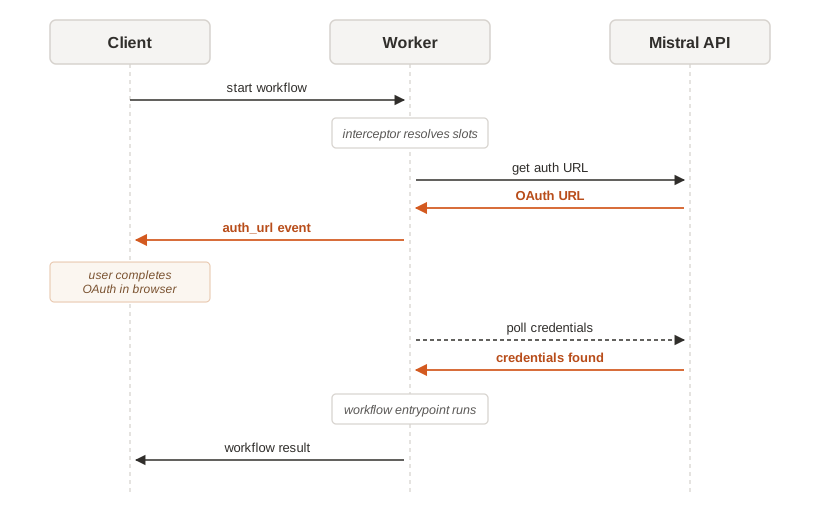
The polling activity heartbeats while it waits, so a slow user doesn't cause the worker to time out. The auth URL has a 10-minute window before ConnectorAuthTimeout fires.
Build a workflow with Connectors
A Connector workflow has three pieces: a slot declaration, an activity that calls the Connector, and a workflow class that ties them together.
Step 1: Declare Connector slots
Slots are declared at module level. Each slot holds the Connector name as registered in Studio:
from mistralai.workflows.plugins.mistralai.connectors import connector

github_connector = connector("github_app")
notion_connector = connector("Notion")connector(name) accepts these parameters:
| Parameter | Default | Description |
|---|---|---|
name | required | Connector name or ID as registered in Studio. |
auto_auth | True | Run the OAuth preflight before the workflow starts. |
credentials_name | None | Pin the slot to a specific named credential. Omit to use the caller's default credentials, or override per-execution with runtime bindings (see Pick a credential at execution time). |
allow_mcp_ui | False | Let app-visible MCP tools on this Connector show their ui:// app as a side app when called with ToolCallClient.call_tool() (see Show MCP apps from Connector tools). |
run_as | "auto" | Mistral identity used to access the Connector. "auto" follows the Workflow's on_behalf_of flag (triggering user under OBO, worker otherwise); "deployment" always uses the worker's service identity. See Choose the Connector identity. |
Step 2: Write an activity that calls the Connector
Activities receive a ToolCallClient via dependency injection. Depends(slot) resolves the slot to an authenticated client at runtime.
from typing import Any

import mistralai.workflows as workflows
from mistralai.workflows import Depends
from mistralai.workflows.plugins.mistralai.connectors import ToolCallClient, connector

github_connector = connector("github_app")


@workflows.activity(name="create-github-issue")
async def create_github_issue(
    owner: str,
    repo: str,
    title: str,
    body: str,
    github: ToolCallClient = Depends(github_connector),
) -> None:
    await github.call_tool(
        tool_name="issue_write",
        arguments={
            "method": "create",
            "owner": owner,
            "repo": repo,
            "title": title,
            "body": body,
        },
)call_tool(tool_name, arguments) dispatches the call to the MCP Connector and returns the raw tool response.
Step 3: Attach slots to the workflow class
Use @uses_connectors to register the slots. Add on_behalf_of=True to resolve credentials from the triggering user; omit it to use the worker's credentials:
import pydantic
import mistralai.workflows as workflows
from mistralai.workflows.plugins.mistralai.connectors import connector, uses_connectors

github_connector = connector("github_app")


class GitHubIssuePrompt(pydantic.BaseModel):
    owner: str
    repo: str
    title: str
    body: str


@workflows.workflow.define(name="github-issue-creator", on_behalf_of=True)
@uses_connectors(github_connector)
class GitHubIssueCreatorWorkflow:
    @workflows.workflow.entrypoint
    async def run(self, prompt: GitHubIssuePrompt) -> None:
        await create_github_issue(
            prompt.owner,
            prompt.repo,
            prompt.title,
            prompt.body,
)Notes:
on_behalf_of=Trueruns the workflow under the triggering user's identity, resolving that user's credentials. Omit it to run under the worker's identity and credentials.- Pass several slots in one call when the workflow needs more than one Connector:
@uses_connectors(github_connector, notion_connector). - Apply
@uses_connectorsafter@workflow.define. The order matters.
When the worker starts, the plugin auto-registers a ConnectorAuthInterceptor that handles the preflight and OAuth pause described in How the fallback OAuth flow works.
Choose the Connector identity (run_as)
The run_as= argument on connector() lets you select which Mistral identity is used to access a specific Connector. Depending on your use case, you may want to leverage the executor's data through their Connectors, or expose a pre-configured Connector independent of the executor.
Each Connector runs its credential preflight (resolve, list credentials, OAuth, tool validation) and its tool calls under one identity. run_as= sets it per Connector:
run_as | Runs as |
|---|---|
"auto" (default) | Follows the Workflow's on_behalf_of flag: the triggering user's credentials when the Workflow runs on behalf of a user, the worker's credentials otherwise. |
"deployment" | Always the worker's (deployment's) service identity, regardless of how the Workflow runs. |
from mistralai.workflows.plugins.mistralai.connectors import connector

# Follows the Workflow's on_behalf_of flag (the triggering user under OBO).
user_github = connector("github_app", run_as="auto")

# Acts as the worker's own service identity, regardless of how the Workflow runs.
shared_slack = connector("slack", run_as="deployment")Because run_as is set per Connector, a single Workflow can mix identities. For example, read the triggering user's GitHub with run_as="auto" while posting to a shared Slack with run_as="deployment". To have an auto Connector act as the triggering user, define the Workflow with on_behalf_of=True.
deploymentcannot run interactive OAuth. AdeploymentConnector runs as the worker's service identity, which has no interactive user. If it has no usable credentials and requires OAuth2, the preflight fails fast instead of emitting an auth URL, add the worker's credentials in Studio beforehand.- Durable Agents need a single
run_as. All Connectors attached to oneAgentmust share the samerun_as, because the agent's conversation runs as one identity; mixed values are rejected. UseToolCallClientfor per-Connector identity.
Execute a Connector Workflow
From Studio
Open Studio›Workflows ↗, pick your workflow, and click Start workflow.
- If you have multiple named credentials for a Connector, the launch dialog lets you pick which one to use for this execution.
- To add or update credentials per Connector before starting a workflow, go to Studio›Context›Connectors ↗ and open the
Credentialstab. - As a fallback, if you start a workflow with an OAuth2 Connector without any credentials, the execution panel shows an OAuth prompt (orange key icon). Complete the flow in a browser tab and the workflow resumes automatically.
From the SDK
Use execute_with_connector_auth_async to handle the OAuth flow programmatically. The helper polls the execution, detects auth requests, calls your on_auth_required callback with the URL, and waits for the user to complete the flow.
import asyncio
import webbrowser

from mistralai.client import Mistral
from mistralai.extra.workflows.connector_auth import (
    ConnectorAuthTaskState,
    execute_with_connector_auth_async,
)
from mistralai.extra.workflows.connector_slot import ConnectorSlot


async def on_auth_required(state: ConnectorAuthTaskState) -> None:
    if state.auth_url:
        webbrowser.open(state.auth_url)
    input("Press Enter after completing the OAuth flow...")


async def main() -> None:
    async with Mistral(api_key="<your-api-key>") as client:
        response = await execute_with_connector_auth_async(
            client=client,
            workflow_identifier="github-issue-creator",
            input_data={
                "owner": "my-org",
                "repo": "my-repo",
                "title": "Bug: something is broken",
                "body": "Steps to reproduce...",
            },
            on_auth_required=on_auth_required,
        )
        print(response)


asyncio.run(main())If the caller already has valid credentials for every required slot, the OAuth step is skipped and the workflow runs straight through.
Pick a credential at execution time (runtime binding)
If you have several named credentials for a Connector, pass a ConnectorSlot per slot to choose which one to use for that execution. Slot names must match the slots declared with @uses_connectors:
from mistralai.extra.workflows.connector_slot import ConnectorSlot

connector_slots = [
    ConnectorSlot(connector_name="github_app", credentials_name="github-pat-full"),
    ConnectorSlot(connector_name="Notion", credentials_name="work-notion"),
]

response = await execute_with_connector_auth_async(
    client=client,
    workflow_identifier="github-issue-creator",
    input_data={...},
    connectors=connector_slots,
    on_auth_required=on_auth_required,
)The same workflow code can be shared across a team while each user runs it with their own credentials. Omit credentials_name to fall back to the user's default credential for that Connector.
Surface MCP Apps from Connector tools
Some MCP Connectors expose tools with an interactive UI app. To let a workflow surface those apps, opt the Connector slot in with allow_mcp_ui=True, then call the tool directly through the injected ToolCallClient.
import mistralai.workflows as workflows
import mistralai.workflows.plugins.mistralai as workflows_mistralai
from mistralai.workflows import Depends
from mistralai.workflows.plugins.mistralai.connectors import (
    ToolCallClient,
    connector,
    uses_connectors,
)

connector_with_mcp_app = connector("my_mcp_connector", allow_mcp_ui=True)
MCP_APP_TOOL_NAME = "tool-name-tied-to-mcp-app"


@workflows.activity(name="open-mcp-app-tool")
async def open_mcp_app_tool(
    mcp_client: ToolCallClient = Depends(connector_with_mcp_app),
) -> None:
    await mcp_client.call_tool(
        tool_name=MCP_APP_TOOL_NAME,
        arguments={
            "arg1": "value1",
            "arg2": "value2",
        },
    )


@workflows.workflow.define(name="mcp-app-workflow", on_behalf_of=True)
@uses_connectors(connector_with_mcp_app)
class WorkflowUsingMCPApp:
    @workflows.workflow.entrypoint
    async def run(self) -> None:
        await workflows_mistralai.send_assistant_message(
            "Let's use a tool tied to an MCP App"
        )
        await open_mcp_app_tool()
        await workflows_mistralai.send_assistant_message(
            "The MCP App should be visible now"
)When the worker resolves a Connector slot with allow_mcp_ui=True, it discovers which tools declare an app-visible ui:// resource. Later, when ToolCallClient.call_tool() invokes one of those tools, the workflow emits an MCP app step: the side app starts before the tool call runs, completes when the tool call succeeds, and fails if the tool call raises or returns an MCP error. The Python call still returns the normal Connector tool response.
Limitations:
- MCP Apps are surfaced only for direct
ToolCallClient.call_tool()calls from workflow activities. Connector tools called indirectly by a model, agent, or sub-agent do not surface an app through this path. - The tool definition must declare a
ui://app resource in MCP metadata, such as_meta.ui.resourceUrior the legacy_meta["ui/resourceUri"]. If_meta.ui.visibilityis present, it must include"app". - The app is a side app: the workflow does not wait for the user to interact with it and cannot consume app interaction results deterministically. App interactions can still have side effects on the external resource the app controls, so avoid assuming later workflow steps and user interactions are ordered.
- Rendering depends on a client surface that supports workflow MCP apps. SDK-only callers still receive the regular
call_tool()result.
Use Connectors with Durable Agents
Pass a Connector slot directly to a Durable Agent to let the agent call Connector tools autonomously during its conversation loop. Keep @uses_connectors on the workflow so the auth interceptor still runs:
from mistralai.workflows.plugins.mistralai import Agent, Runner
from mistralai.workflows.plugins.mistralai.connectors import connector, uses_connectors
import mistralai.workflows as workflows

github_connector = connector("github_app")


@workflows.workflow.define(name="github-agent", on_behalf_of=True)
@uses_connectors(github_connector)
class GitHubAgentWorkflow:
    @workflows.workflow.entrypoint
    async def run(self, repo: str) -> str:
        agent = Agent(
            name="github-pr-lister",
            model="mistral-medium-latest",
            instructions=f"List recent pull requests on {repo}.",
            connectors=[github_connector],
        )
        result = await Runner.run(agent=agent, inputs=f"Summarize PRs on {repo}.")
return result.final_outputThe agent receives the Connector's tools in its tool belt and invokes them on each turn. OAuth and credential resolution still happen automatically via the workflow interceptor.
Common errors
| Error | Cause | Fix |
|---|---|---|
ConnectorError: Credential 'x' not found | Named credential doesn't exist for this Connector. | Create it from Studio › Connectors › Credentials, or drop credentials_name to use the default. |
ConnectorAuthTimeout | OAuth flow not completed within 10 minutes. | Re-run the workflow and complete the browser step promptly. |
ConnectorError: ... requires bearer authentication | Bearer-only Connector with no stored credential. | Add a bearer credential in Studio before running. Bearer auth on the fly is not supported. |
ConnectorError: Extension bindings reference unknown connectors | A runtime ConnectorSlot names a slot not declared in @uses_connectors. | Match connector_name to a slot on the workflow. |
No MCP app appears after call_tool() | The slot is missing allow_mcp_ui=True, the tool does not declare an app-visible ui:// resource, the tool was called indirectly by an agent/model, or the client surface does not support workflow MCP apps. | Opt the slot in, call the tool directly through ToolCallClient.call_tool(), and verify the tool metadata declares an app-visible ui:// resource. |
404 on workflow execute | Worker not running, or workflow name doesn't match. | Start the worker first and verify the exact workflow_identifier. |