[5' read]
RAG with Multiple Databases via Function Calling
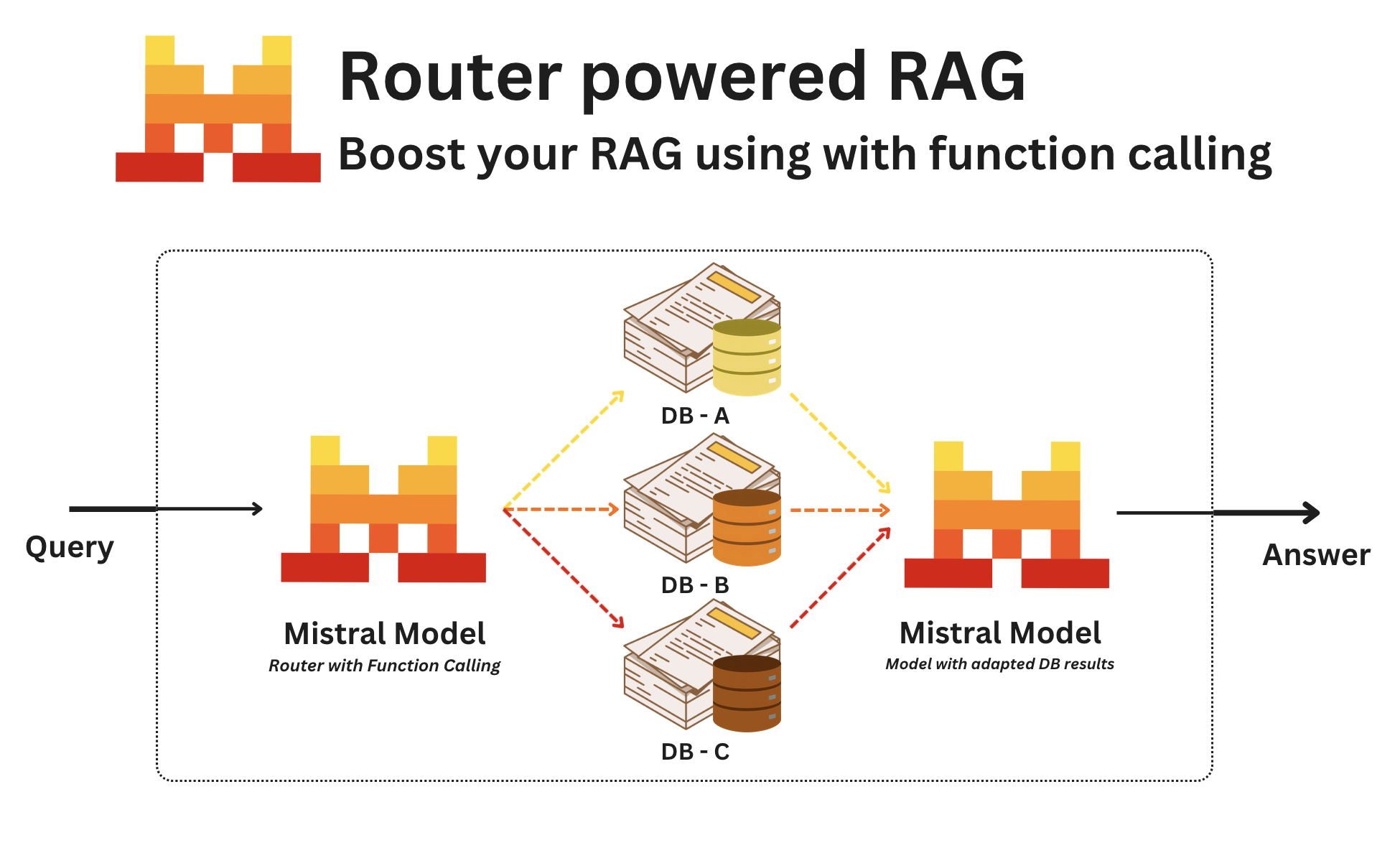
In this cookbook, we are coding a RAG agent that uses the function calling mechanism to determine which database to execute a RAG query on.
We are not coding the RAG logic itself here, but only the routing part of it !
Using such an architecture presents various advantages:
- It allows graceful scaling to multiple RAG databases
- It elegantly handles the switch between RAG phases and classic LLM instruct chat by activating the "auto" mode of function calling
- It is very easy to evaluate and finetune such a router
Imports and Mistral client#
First, let's install our SDK and set up our client.
!pip install mistralaifrom mistralai.client import Mistral
import jsonimport getpass
import os
if not os.environ.get("MISTRAL_API_KEY"):
os.environ["MISTRAL_API_KEY"] = getpass.getpass("Mistral API key: ")
client = Mistral(os.environ["MISTRAL_API_KEY"])Create an API key here.
Mock Questions#
A Lemonade company wants to create its own internal RAG. In this example we will mock a RAG search on three different types of databases :
- HR -> Database containing information about any human ressource topic e.g., holidays, pearks, salary, office, employees, etc...
- Product -> Database containing information about the specificities of the Lemonade product e.g., available tastes, price, packaging color, etc...
- Finance -> Database containing financial information e.g. revenue, costs of production, liabilities, etc...
- Other -> Any other question not related to the subjects above.
Create QA Pairs#
To demo this use case, we will generate a set of QnA pairs that will be used to test our router, we will be creating them with Mistral Medium and Structured Outputs.
from pydantic import BaseModel

class QAPair(BaseModel):
    id: int
    question: str
    database: str

class Pairs(BaseModel):
pairs: list[QAPair]GENERATOR_SYSTEM = """You are a QnA generator for a Lemonade company who wants to create its own internal RAG.
This RAG is based on three data sources :
- HR -> Database containing information about any human ressource topic e.g., holidays, pearks, salary, office, employees, etc...
- Product -> Database containing information about the specificities of the Lemonade product e.g., available tastes, price, packaging color, etc...
- Finance -> Database containing financial information e.g. revenue, costs of production, liabilities, etc...
- Other -> Any other question not related to the subjects above.
# Response Format
Your answer should take the form of a json contain a field "pairs" containg a list of lists of pairs with questions and database, database being one of the 4 choices: "HR", "Product", "Finance" or "Other".
Questions of type "Other" should be totally random about things that have no link with the context.
Here is an example :
{"pairs": [{"id": 1, "question": "How much money did the company made in 2024?", "answer": "Finance"}, {"id": 2, "question": "How many days of holidays do I have ?", "answer": "HR"}]}
"""
def generate_questions():
"""
Generate questions about HR, Prodcut, Finance or anything else.
"""
chat_response = client.chat.parse(
model="mistral-medium-latest",
messages=[
{
"role": "system",
"content": GENERATOR_SYSTEM
},
{
"role": "user",
"content": "Your role is too mock 40 questions related to either HR, Product, Finance or Other. These questions should reflect what new employee may ask."
}
],
response_format=Pairs,
temperature=0.7,
)
return chat_response.choices[0].message.parsed.pairs
pairs = generate_questions()We have 40 Questions ready ! We can now build our router and test it.
Build router Agent#
We will be using function calling with Mistral Small for our router. For this demonstration, we won't be configuring the full workflow. To learn how to set up function calling in more detail, see here. We also have multiple cookbooks on function calling and agents available!
import time

RESPONSE_SYSTEM = """You are an AI assistant for a Lemonade company.
Your job is to help employee retrieve relevant information.
Specifically, you generate calls to a tool function which will then be able to perform efficient retrieval of relevant information.

You dispose of a single tool function called "search_answer_in" which has two parameters "sources" and "question".
"question" is a copy paste of the user question.
"source" is a string whose values can exclusively be "HR", "Product", "Finance" or "Other"

The tool call will provide you some content to answer the user question.
Based on the the content from the tool call, answer the user's query.

You should be as helpful as possible while remaining factual, objective and keeping a professional tone.
You must answer in the same language as the user (or the one they ask you to).
"""

def get_response(question, model: str = "mistral-small-latest"):
    """
    Generate a router answer about HR, Prodcut, Finance or anything else.
    """

    tools = [
    {
        "type": "function",
        "function": {
            "name": "search_in_database",
            "description": "search_answer_in",
            "parameters": {
                "type": "object",
                "properties": {
                    "question": {
                        "type": "string",
                        "description": "The question asked by used.",
                    },
                    "source" : {
                        "type": "string",
                        "description": "Source to use to answer the question."
                    }
                },
                "required": ["source", "question"],
            },
        },
    }
]

    system_prompt = RESPONSE_SYSTEM

    chat_history = [
      {
          "role": "system",
          "content": system_prompt
      },
    {
          "role": "user",
          "content": question
      }
    ]

    for t in range(5):
        try:
            chat_response = client.chat.complete(
                model=model,
                messages=chat_history,
                tools=tools,
                temperature=0.3,
                tool_choice='any'
            )
            break
        except Exception as e:
            time.sleep(1)
    chat_history.append(chat_response.choices[0].message)
    db_to_search_in = json.loads(chat_response.choices[0].message.tool_calls[0].function.arguments)['source']
    return db_to_search_in

get_response('What are the different tastes of limonade ?')Test router Agent#
Let's test our Agent in our generated pairs !
from tabulate import tabulate

Q_WIDTH = max(len(p.question) for p in pairs) + 4
DB_WIDTH = max(len("DB Answer"), max(len(str(p.database)) for p in pairs)) + 2
A_WIDTH = max(len("Expected"), max(len(str(p.database)) for p in pairs)) + 2

score = 0
total = 0
results = []

for i, pair in enumerate(pairs):
    searched_db = get_response(pair.question, "ministral-8b-latest")
    total += 1
    correct = searched_db == pair.database
    if correct:
        score += 1
    status = "TRUE" if correct else "FALSE"
    results.append([
        f"{(i+1)} {pair.question}",
        str(searched_db),
        pair.database,
        status
    ])
    time.sleep(1)

# Display results in a table
headers = ["Question", "DB Answer", "Expected", "Status"]
print(tabulate(results, headers=headers, tablefmt="grid"))

print(f"\nAccuracy: {score} / {total} ({score / total:.1%})")We recommend testing multiple models and solutions with your test set or use case. For reference, let's test our smallest family, 'Ministral' and see how they perform.
models = ["ministral-14b-latest", "ministral-8b-latest", "ministral-3b-latest"]
results = []

for model in models:
    score = 0
    total = len(pairs)

    for pair in pairs:
        searched_db = get_response(pair.question, model)
        if searched_db == pair.database:
            score += 1

    accuracy = (score / total) * 100
    results.append([model, score, total, f"{accuracy:.1f}%"])

# Display results in a table
headers = ["Model", "Correct", "Total", "Accuracy"]
print(tabulate(results, headers=headers, tablefmt="grid"))