[5' read]
Web Search with References
Introduction#
The primary objective of this cookbook is to illustrate how to effectively use the lastest Mistral Models to conduct web searches and incorporate relevant sources into your responses. A common challenge with chatbots and Retrieval-Augmented Generation (RAG) systems is their tendency to hallucinate sources or improperly format URLs. Mistral's advanced capabilities address these issues, ensuring accurate and reliable information retrieval.
Mistral's Web Search Capabilities#
Our latest models integrates web search capabilities, allowing it to reference sources accurately in its responses. This feature enables you to retrieve the source content and present it correctly in your responses, enhancing the reliability and credibility of the information provided. By leveraging Mistral's advanced natural language processing and web search integration, you can build more robust and trustworthy applications.
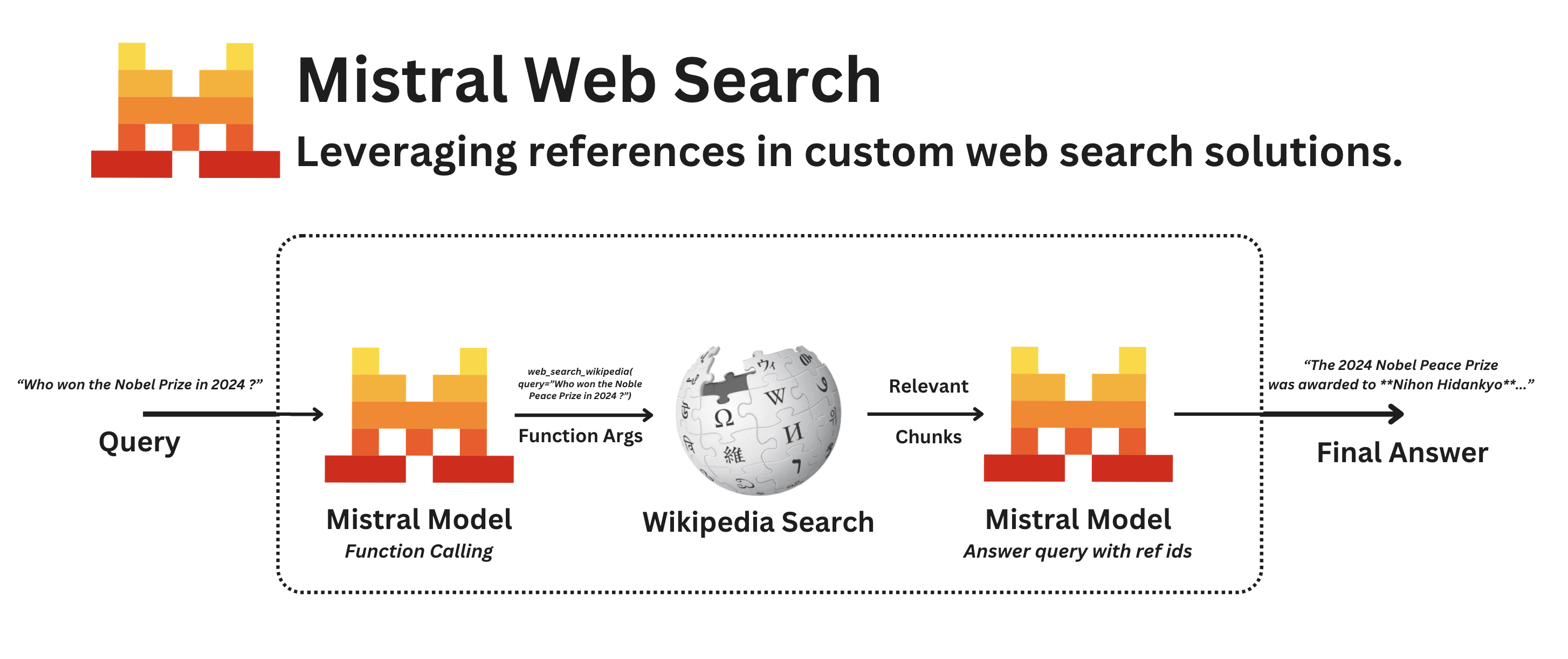
Here is a step-by-step description of the process depicted in the image above:
-
Query Initiation: The process begins with a user query.
-
Function Calling with Mistral: The query is processed by the Mistral model, which identifies that it needs to perform a function call to gather more information. This step involves determining the appropriate tool to use for the query.
-
Tool Identification: The Mistral model identifies the relevant tool for the query, which in this case is
web_search_wikipedia. The tool has the user query as an argument. -
Wikipedia Search: The tool is called and performs a search on Wikipedia using the query.
-
Extract Relevant Chunks: The results from the Wikipedia search are processed to extract relevant chunks of information. These chunks are then prepared to be used as references in the final answer.
-
Final Answer with References: The chat history is sent to the Mistral model which uses the extracted chunks to generate a final answer. The answer includes references to the Wikipedia articles, ensuring that the information provided is accurate and well-sourced.
Learn more#
You can read more on how to leverage our models for web search by visiting our Agents & Conversations API for a built-in web search feature, and our Search Toolkit SDK to build search and RAG systems.
!pip install mistralai wikipedia
Step 1 : Initialize the Mistral client#
In this step, we initialize the Mistral client with your API key. You can get or create your API key from the Mistral API dashboard. Warning: API Key can take up to 1 minute to be activated.
from mistralai.client import Mistral
from mistralai.client.models import  UserMessage, SystemMessage
import getpass
import os

if not os.environ.get("MISTRAL_API_KEY"):
    os.environ["MISTRAL_API_KEY"] = getpass.getpass("Mistral API key: ")

client = Mistral(os.environ["MISTRAL_API_KEY"])

query = "Who won the Nobel Peace Prize in 2024 ?"

#Add the user message to the chat_history
chat_history = [
    SystemMessage(content="You are a helpful assistant that can search the web for information. Use context to answer the question."),
    UserMessage(content=query),
]
print(chat_history)[SystemMessage(content='You are a helpful assistant that can search the web for information. Use context to answer the question.', role='system'), UserMessage(content='Who won the Nobel Peace Prize in 2024?', role='user')]
Step 2 : Define the function calling tool to search Wikipedia.#
Function calling allows Mistral models to connect to external tools. By integrating Mistral models with external tools such as user defined functions or APIs, users can easily build applications catering to specific use cases and practical problems.
First, we create a tool that will search the Wikipedia API and return the results in a specific format. Once we have the tool, we can use it in a chat completion request to Mistral. The result should contain:
- Name of the tool
- Tool call ID
- Arguments which contains the user query
web_search_tool = {
    "type": "function",
    "function": {
        "name": "web_search",
        "description": "Search the web for a query for which you do not know the answer",
        "parameters": {
            "type": "object",
            "properties": {
                "query": {
                    "type": "string",
                    "description": "Query to search the web in keyword form.",
                }
            },
            "required": ["query"],
        },
    },
}

chat_response = client.chat.complete(
    model="mistral-medium-latest",
    messages=chat_history,
    tools=[web_search_tool],
)

if hasattr(chat_response.choices[0].message, 'tool_calls'):
    tool_call = chat_response.choices[0].message.tool_calls[0]
    chat_history.append(chat_response.choices[0].message)
    print(tool_call)
else:
print("No tool call found in the response")function=FunctionCall(name='web_search', arguments='{"query": "Who won the Nobel Peace Prize in 2024?"}') id='3xdgHbIKY' type='function'
Step 3 : Define Method to Search Wikipedia Associated with the Tool#
In the previous step, we created a tool called web_search_wikipedia. We need to create a function that will take the tool call ID and the arguments and return the results in the specific format.
The format of the results should be:
{
    "url": str | None,        # Page URL
    "title": str | None,      # Page title
    "description": str | None, # Page description
    "snippets": List[str],    # Relevant text snippets in a list
    "date": str | None,       # date
    "source": str | None,      # Source/reference
    "metadata": Dict[str, Any] # Metadata
}import wikipedia
import json
from datetime import datetime
def get_wikipedia_search(query: str) -> str:
"""
Search Wikipedia for a query and return the results in a specific format.
"""
result = wikipedia.search(query, results = 5)
data={}
for i, res in enumerate(result):
pg= wikipedia.page(res, auto_suggest=False)
data[i]={
"url": pg.url,
"title": pg.title,
"snippets": [pg.summary.split('.')],
"description": None,
"date": datetime.now().isoformat(),
"source": "wikipedia"
}
return json.dumps(data, indent=2)Step 4 : Perform the Tool Call and Search Wikipedia#
Now that we have the tool call ID and the arguments, we can perform the tool call and search Wikipedia.
import json
from mistralai.client.models import ToolMessage

query = json.loads(tool_call.function.arguments)["query"]
wb_result = get_wikipedia_search(query)

tool_call_result = ToolMessage(
    content=wb_result,
    tool_call_id=tool_call.id,
    name=tool_call.function.name,
)

# Append the tool call message to the chat_history
chat_history.append(tool_call_result)

#See chunks in the response
print(json.dumps(json.loads(wb_result), indent=2)){
"0": {
"url": "https://en.wikipedia.org/wiki/2024_Nobel_Peace_Prize",
"title": "2024 Nobel Peace Prize",
"snippets": [
[
"The 2024 Nobel Peace Prize, an international peace prize established according to Alfred Nobel's will, was awarded to Nihon Hidankyo (the Japan Confederation of A- and H-Bomb Sufferers Organizations), for their activism against nuclear weapons, assisted by victim/survivors (known as Hibakusha) of the atomic bombings of Hiroshima and Nagasaki in 1945",
" They will receive the prize at a ceremony on 10 December 2024 at Oslo, Norway",
""
]
],
"description": null,
"date": "2024-11-26T17:39:55.057454",
"source": "wikipedia"
}
}Step 5 : Call Mistral with the Tool Call Result#
The chat history now contains:
- The
Systemmessage which contains the instructions for the assistant - The
Usermessage which contains the original question - The
Assistantmessage which contains a tool call to search Wikipedia - The
Tool callresult which contains the results of the Wikipedia search
See more information about types of messages here.
for msg in chat_history:
print(msg,end='\n')content='You are a helpful assistant that can search the web for information. Use context to answer the question.' role='system'
content='Who won the Nobel Peace Prize in 2024?' role='user'
content='' tool_calls=[ToolCall(function=FunctionCall(name='web_search', arguments='{"query": "Who won the Nobel Peace Prize in 2024?"}'), id='3xdgHbIKY', type='function')] prefix=False role='assistant'
content='{\n "0": {\n "url": "https://en.wikipedia.org/wiki/2024_Nobel_Peace_Prize",\n "title": "2024 Nobel Peace Prize",\n "snippets": [\n [\n "The 2024 Nobel Peace Prize, an international peace prize established according to Alfred Nobel\'s will, was awarded to Nihon Hidankyo (the Japan Confederation of A- and H-Bomb Sufferers Organizations), for their activism against nuclear weapons, assisted by victim/survivors (known as Hibakusha) of the atomic bombings of Hiroshima and Nagasaki in 1945",\n " They will receive the prize at a ceremony on 10 December 2024 at Oslo, Norway",\n ""\n ]\n ],\n "description": null,\n "date": "2024-11-26T17:39:55.057454",\n "source": "wikipedia"\n }', tool_call_id='3xdgHbIKY' name='web_search' role='tool'}'from mistralai.client.models import TextChunk, ReferenceChunk
def format_response(chat_response: list, wb_result:dict):
print("\n🤖 Answer:\n")
refs_used = []
# Print the main response
for chunk in chat_response.choices[0].message.content:
if isinstance(chunk, TextChunk):
print(chunk.text, end="")
elif isinstance(chunk, ReferenceChunk):
refs_used += chunk.reference_ids
# Print references
if refs_used:
print("\n\n📚 Sources:")
for i, ref in enumerate(set(refs_used), 1):
reference = json.loads(wb_result)[str(ref)]
print(f"\n{i}. {reference['title']}: {reference['url']}")
# Use the formatter
chat_response = client.chat.complete(
model="mistral-medium-latest",
messages=chat_history,
tools=[web_search_tool],
)
format_response(chat_response, wb_result)Step 6 : Streaming completion with references#
stream_response = client.chat.stream(
    model="mistral-medium-latest",
    messages=chat_history,
    tools=[web_search_tool],
)

last_reference_index = 0
if stream_response is not None:
    for event in stream_response:
        chunk = event.data.choices[0]
        if chunk.delta.content:
            if isinstance(chunk.delta.content, list):
                    # Check if TYPE of chunk is a reference
                    print(chunk.delta.content)
                    references_ids = [
                        ref_id
                        for chunk_elem in chunk.delta.content
                        if chunk_elem.type == "reference"
                        for ref_id in chunk_elem.reference_ids
                    ]
                    last_reference_index += len(references_ids)

                    # Map the references ids to the references data stored in the chat history
                    references_data = [json.loads(wb_result)[str(ref_id)] for ref_id in references_ids]
                    urls = " " + ", ".join(
                        [
                            f"[{i}]({reference['url']})"
                            for i, reference in enumerate(
                                references_data,
                                start=last_reference_index - len(references_ids) + 1,
                            )
                        ]
                    )
                    print(urls, end="")
            else:
print(chunk.delta.content, end="")Example of reply:
The 2024 Nobel Peace Prize was awarded to Nihon Hidankyo (the Japan Confederation of A- and H-Bomb Sufferers Organizations) for their activism against nuclear weapons, assisted by victim/survivors (known as Hibakusha) of the atomic bombings of Hiroshima and Nagasaki in 1945 1, 2.
Built In Websearch#
Using our Agents & Conversations service, we provide a built-in general purpose Websearch feature you can levarage.
Below we provide a simple snippet on how to get started.
# Start a conversation without creating an Agent
response = client.beta.conversations.start(
    model="mistral-medium-3.5",
    inputs=[{"role": "user", "content": "Who won the Nobel Peace Prize in 2024 ?"}],
    tools=[{"type": "web_search"}],
)

# Display raw outputs
for output in response.outputs:
    print(output.model_dump_json()[:256])